Azure Storage Accounts are fundamental services in Microsoft Azure that provide scalable, secure, and highly available cloud storage for various data types, including blobs (binary large objects), files, queues, and tables. They serve as containers that group these different storage services together under a single namespace for easy management.
Main configuration options:
Every storage account must have a uniq name across all Azure.
Every storage account is deployed in a region or in an Azure extended zone
It’s possible to select the premium version of the storage account for better performance
It’s possible to select among 4 types of redundancy to protect against rack, drive and datacenter failures.
Security configuration options:
Require secure transfer for REST API operations: Require TLS in any communication with the storage
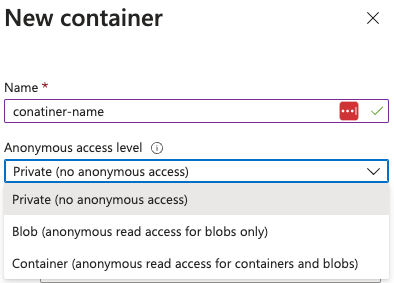
Allows enabling anonymous access on individual containers: If not, it won’t be possible to enable anonymous access in the future
Enable storage account key access: If not, access with Shared Keys will be forbidden
Minimum TLS version
Permitted scope for copy operations: Allow from any storage account, from any storage account from the same Entra tenant or from storage account with private endpoints in the same virtual network.
Blob Storage options:
Allow cross-tenant replication
Access tier: Hot (frequently access data), Cool and Cold (rarely accessed data)
Networking options:
Network access:
Allow from all networks
Allow from selected virtual networks and IP addresses
Disable public access and use private access
Private endpoints: It allows a private connection to the storage account from a virtual network
Data protection options:
Point-in-time restore for containers: Allows to restore containers to an earlier state
It requires versioning, change feed, and blob soft delete to be enabled.
Enable soft delete for blobs: It enables a retention period in days for deleted blobs (even overwritten)
Enable soft delete for containers: It enables a retention period in days for deleted containers
Enable soft delete for file shares: It enables a retention period in days for deleted file shared
Enable versioning for blobs: Maintain previous versions of your blobs
Enable blob change feed: Keep logs of create, modification, and delete changes to blobs
Enable version-level immutability support: Allows you to set time-based retention policy on the account-level that will apply to all blob versions.
Version-level immutability support and point-in-time restore for containers cannot be enabled simultaneously.
Encryption configuration options:
Encryption type: It’s possible to use Microsoft-managed keys (MMK) or Customer-managed keys (CMK)
Enable infrastructure encryption: Allows to double encrypt the data “for more security”
Static websites are served from the special $web container over a region-specific endpoint such as https://<account>.z13.web.core.windows.net/.
The $web container may report publicAccess: null via the blob API, but files are still reachable through the static site endpoint, so dropping config/IaC artifacts there can leak secrets.
Quick audit workflow:
# Identify storage accounts with static website hosting enabled
az storage blob service-properties show --account-name <acc-name> --auth-mode login
# Enumerate containers (including $web) and their public flags
az storage container list --account-name <acc-name> --auth-mode login
# List files served by the static site even when publicAccess is null
az storage blob list --container-name '$web' --account-name <acc-name> --auth-mode login
# Pull suspicious files directly (e.g., IaC tfvars containing secrets/SAS)
az storage blob download -c '$web' --name iac/terraform.tfvars --file /dev/stdout --account-name <acc-name> --auth-mode login
Locate storage accounts that can expose data: az storage account list | jq -r '.[] | select(.properties.allowBlobPublicAccess==true) | .name'. If allowBlobPublicAccess is false you cannot turn containers public.
Inspect risky accounts to confirm the flag and other weak settings: az storage account show --name <acc> --query '{allow:properties.allowBlobPublicAccess, minTls:properties.minimumTlsVersion}'.
Enumerate container-level exposure where the flag is enabled:
az storage container list --account-name <acc> \
--query '[].{name:name, access:properties.publicAccess}'
"Blob": anonymous reads allowed only when blob name is known (no listing).
"Container": anonymous list + read of every blob.
null: private; authentication required.
Prove access without credentials:
If publicAccess is Container, anonymous listing works: curl "https://<acc>.blob.core.windows.net/<container>?restype=container&comp=list".
For both Blob and Container, anonymous blob download works when the name is known:
az storage blob download -c <container> -n <blob> --account-name <acc> --file /dev/stdout
# or via raw HTTP
curl "https://<acc>.blob.core.windows.net/<container>/<blob>"
It’s possible to generate Shared Keys signed with the access keys to authorize access to certain resources via a signed URL.
Note
Note that the CanonicalizedResource part represents the storage services resource (URI). And if any part in the URL is encoded, it should also be encoded inside the CanonicalizedResource.
Note
This is used by default by az cli to authenticate requests. To make it use the Entra ID principal credentials indicate the param --auth-mode login.
It’s possible to generate a shared key for blob, queue and file services signing the following information:
Shared Access Signatures (SAS) are secure, time-limited URLs that grant specific permissions to access resources in an Azure Storage account without exposing the account’s access keys. While access keys provide full administrative access to all resources, SAS allows for granular control by specifying permissions (like read or write) and defining an expiration time.
User delegation SAS: This is created from an Entra ID principal which will sign the SAS and delegate the permissions from the user to the SAS. It can only be used with blob and data lake storage (docs). It’s possible to revoke all generated user delegated SAS.
Even if it’s possible to generate a delegation SAS with “more” permissions than the ones the user has. However, if the principal doesn’t have them, it won’t work (no privesc).
Service SAS: This is signed using one of the storage account access keys. It can be used to grant access to specific resources in a single storage service. If the key is renewed, the SAS will stop working.
Account SAS: It’s also signed with one of the storage account access keys. It grants access to resources across a storage account services (Blob, Queue, Table, File) and can include service-level operations.
A SAS URL signed by an access key looks like this:
When generating a SAS it’s needed to indicate the permissions that it should be granting. Depending on the objet the SAS is being generated over different permissions might be included. For example:
Azure Blob Storage now supports the SSH File Transfer Protocol (SFTP), enabling secure file transfer and management directly to Blob Storage without requiring custom solutions or third-party products.
Protocol Support: SFTP works with Blob Storage accounts configured with hierarchical namespace (HNS). This organizes blobs into directories and subdirectories for easier navigation.
Security: SFTP uses local user identities for authentication and does not integrate with RBAC or ABAC. Each local user can authenticate via:
Azure-generated passwords
Public-private SSH key pairs
Granular Permissions: Permissions such as Read, Write, Delete, and List can be assigned to local users for up to 100 containers.
Networking Considerations: SFTP connections are made through port 22. Azure supports network configurations like firewalls, private endpoints, or virtual networks to secure SFTP traffic.
# Get storage accounts
az storage account list #Get the account name from here
# BLOB STORAGE
## List containers
az storage container list --account-name <name>
## Check if public access is allowed
az storage container show-permission \
--account-name <acc-name> \
-n <container-name>
## Make a container public
az storage container set-permission \
--public-access container \
--account-name <acc-name> \
-n <container-name>
## List blobs in a container
az storage blob list \
--container-name <container name> \
--account-name <account name>
## Download blob
az storage blob download \
--account-name <account name> \
--container-name <container name> \
--name <blob name> \
--file </path/to/local/file>
## Create container policy
az storage container policy create \
--account-name mystorageaccount \
--container-name mycontainer \
--name fullaccesspolicy \
--permissions racwdl \
--start 2023-11-22T00:00Z \
--expiry 2024-11-22T00:00Z
# QUEUE
az storage queue list --account-name <name>
az storage message peek --account-name <name> --queue-name <queue-name>
# ACCESS KEYS
az storage account keys list --account-name <name>
## Check key policies (expiration time?)
az storage account show -n <name> --query "{KeyPolicy:keyPolicy}"
## Once having the key, it's possible to use it with the argument --account-key
## Enum blobs with account key
az storage blob list \
--container-name <container name> \
--account-name <account name> \
--account-key "ZrF40pkVKvWPUr[...]v7LZw=="
## Download a file using an account key
az storage blob download \
--account-name <account name> \
--account-key "ZrF40pkVKvWPUr[...]v7LZw==" \
--container-name <container name> \
--name <blob name> \
--file </path/to/local/file>
## Upload a file using an account key
az storage blob upload \
--account-name <account name> \
--account-key "ZrF40pkVKvWPUr[...]v7LZw==" \
--container-name <container name> \
--file </path/to/local/file>
# SAS
## List access policies
az storage <container|queue|share|table> policy list \
--account-name <acc name> \
--container-name <container name>
## Generate SAS with all permissions using an access key
az storage <container|queue|share|table|blob> generate-sas \
--permissions acdefilmrtwxy \
--expiry 2024-12-31T23:59:00Z \
--account-name <acc-name> \
-n <container-name>
## Generate SAS with all permissions using via user delegation
az storage <container|queue|share|table|blob> generate-sas \
--permissions acdefilmrtwxy \
--expiry 2024-12-31T23:59:00Z \
--account-name <acc-name> \
--as-user --auth-mode login \
-n <container-name>
## Generate account SAS
az storage account generate-sas \
--expiry 2024-12-31T23:59:00Z \
--account-name <acc-name> \
--services qt \
--resource-types sco \
--permissions acdfilrtuwxy
## Use the returned SAS key with the param --sas-token
## e.g.
az storage blob show \
--account-name <account name> \
--container-name <container name> \
--sas-token 'se=2024-12-31T23%3A59%3A00Z&sp=racwdxyltfmei&sv=2022-11-02&sr=c&sig=ym%2Bu%2BQp5qqrPotIK5/rrm7EMMxZRwF/hMWLfK1VWy6E%3D' \
--name 'asd.txt'
#Local-Users
## List users
az storage account local-user list \
--account-name <storage-account-name> \
--resource-group <resource-group-name>
## Get user
az storage account local-user show \
--account-name <storage-account-name> \
--resource-group <resource-group-name> \
--name <local-user-name>
## List keys
az storage account local-user list \
--account-name <storage-account-name> \
--resource-group <resource-group-name>
 HackTricks Cloud
HackTricks Training AWS Red Team Expert (ARTE)
HackTricks Training GCP Red Team Expert (GRTE)
HackTricks Training Azure Red Team Expert (AzRTE)
.png)