 HackTricks Cloud
GWS - Google Platforms Phishing
Tip
Apprenez & pratiquez AWS Hacking:
HackTricks Training AWS Red Team Expert (ARTE)
Apprenez & pratiquez GCP Hacking:HackTricks Training GCP Red Team Expert (GRTE)
Apprenez & pratiquez Az Hacking:HackTricks Training Azure Red Team Expert (AzRTE)
Soutenez HackTricks
- Consultez les subscription plans!
- Rejoignez le 💬 Discord group ou le telegram group ou suivez-nous sur Twitter 🐦 @hacktricks_live.
- Partagez des hacking tricks en soumettant des PRs aux HackTricks et HackTricks Cloud github repos.
Generic Phishing Methodology
Phishing Methodology - HackTricks
Google Groups Phishing
Apparemment, par défaut, dans workspace, les membres can create groups and invite people to them. Vous pouvez ensuite modifier l’e-mail qui sera envoyé à l’utilisateur en y ajoutant des liens. L’email proviendra d’une adresse Google, il paraîtra donc légitime et les gens pourraient cliquer sur le lien.
It’s also possible to set the FROM address as the Google group email to send more emails to the users inside the group, like in the following image where the group google--support@googlegroups.com was created and an email was sent to all the members of the group (that were added without any consent)
 (1).png)
Google Chat Phishing
Vous pouvez démarrer un chat avec une personne en ayant simplement son adresse e-mail ou envoyer une invitation à discuter. De plus, il est possible de créer un Space qui peut porter n’importe quel nom (p.ex. “Google Support”) et d’inviter des membres. S’ils acceptent, ils pourraient penser qu’ils parlent au support Google :
.png)
Tip
Dans mes tests, cependant, les membres invités n’ont même pas reçu d’invitation.
You can check how this worked in the past in: https://www.youtube.com/watch?v=KTVHLolz6cE&t=904s
Google Doc Phishing
Autrefois, il était possible de créer un document apparemment légitime puis, dans un commentaire, mentionner une adresse e-mail (par ex. @user@gmail.com). Google envoyait un e-mail à cette adresse pour notifier qu’elle avait été mentionnée dans le document.
De nos jours, cela ne fonctionne plus, mais si vous donnez à la victime l’accès par e-mail au document, Google enverra un e-mail l’indiquant. Voici le message qui apparaît lorsque vous mentionnez quelqu’un :
.png)
Tip
Les victimes peuvent avoir des mécanismes de protection qui empêchent que ces e-mails indiquant qu’un document externe leur a été partagé n’atteignent leur boîte.
Google Calendar Phishing
Vous pouvez create a calendar event et ajouter autant d’adresses e-mail de la société que vous attaquez que vous avez. Programmez cet événement dans 5 ou 15 minutes à partir de l’heure actuelle. Faites en sorte que l’événement paraisse légitime et ajoutez un commentaire et un titre indiquant qu’ils doivent lire quelque chose (avec le phishing link).
This is the alert that will appear in the browser with a meeting title “Firing People”, so you could set a more phishing like title (and even change the name associated with your email).
.png)
To make it look less suspicious:
- Configurez-le de façon à ce que les destinataires ne puissent pas voir les autres personnes invitées
- Ne PAS envoyer d’e-mails informant de l’événement. Ainsi, les personnes verront uniquement leur alerte concernant une réunion dans 5 minutes et qu’elles doivent consulter ce lien.
- Apparemment, en utilisant l’API vous pouvez définir à True que les personnes ont accepté l’événement et même créer des commentaires en leur nom.
App Scripts Redirect Phishing
Il est possible de créer un script sur https://script.google.com/ et de l’exposer comme une application web accessible par tous qui utilisera le domaine légitime script.google.com.
Avec un code comme le suivant, un attaquant pourrait faire charger du contenu arbitraire dans cette page tout en continuant d’accéder au domaine :
function doGet() {
return HtmlService.createHtmlOutput(
'<meta http-equiv="refresh" content="0;url=https://cloud.hacktricks.wiki/en/pentesting-cloud/workspace-security/gws-google-platforms-phishing/index.html#app-scripts-redirect-phishing">'
).setXFrameOptionsMode(HtmlService.XFrameOptionsMode.ALLOWALL)
}
Par exemple, en accédant à https://script.google.com/macros/s/AKfycbwuLlzo0PUaT63G33MtE6TbGUNmTKXCK12o59RKC7WLkgBTyltaS3gYuH_ZscKQTJDC/exec vous verrez :
 (1).png)
Tip
Notez qu’un avertissement apparaîtra car le contenu est chargé à l’intérieur d’un iframe.
App Scripts OAuth Phishing
It’s possible to create App Scripts attached to documents to try to get access over a victims OAuth token, for more information check:
OAuth Apps Phishing
Any of the previous techniques might be used to make the user access a Google OAuth application that will request the user some access. If the user trusts the source he might trust the application (even if it’s asking for high privileged permissions).
Note
Note that Google presents an ugly prompt asking warning that the application is untrusted in several cases and Workspace admins can even prevent people accepting OAuth applications.
Google allows to create applications that can interact on behalf users with several Google services: Gmail, Drive, GCP…
When creating an application to act on behalf other users, the developer needs to create an OAuth app inside GCP and indicate the scopes (permissions) the app needs to access the users data.
When a user wants to use that application, they will be prompted to accept that the application will have access to their data specified in the scopes.
This is a very juicy way to phish non-technical users into using applications that access sensitive information because they might not understand the consequences. However, in organizations accounts, there are ways to prevent this from happening.
Unverified App prompt
As it was mentioned, google will always present a prompt to the user to accept the permissions they are giving the application on their behalf. However, if the application is considered dangerous, google will show first a prompt indicating that it’s dangerous and making it more difficult for the user to grant the permissions to the app.
This prompt appears in apps that:
- Use any scope that can access private data (Gmail, Drive, GCP, BigQuery…)
- Apps with less than 100 users (apps > 100 a review process is also needed to stop showing the unverified prompt)
Interesting Scopes
Here you can find a list of all the Google OAuth scopes.
- cloud-platform: View and manage your data across Google Cloud Platform services. You can impersonate the user in GCP.
- admin.directory.user.readonly: See and download your organization’s GSuite directory. Get names, phones, calendar URLs of all the users.
Create an OAuth App
Start creating an OAuth Client ID
- Go to https://console.cloud.google.com/apis/credentials/oauthclient and click on configure the consent screen.
- Then, you will be asked if the user type is internal (only for people in your org) or external. Select the one that suits your needs
- Internal might be interesting you have already compromised a user of the organization and you are creating this App to phish another one.
- Give a name to the app, a support email (note that you can set a googlegroup email to try to anonymize yourself a bit more), a logo, authorized domains and another email for updates.
- Select the OAuth scopes.
- This page is divided in non sensitive permissions, sensitive permissions and restricted permissions. Eveytime you add a new permisison it’s added on its category. Depending on the requested permissions different prompt will appear to the user indicating how sensitive these permissions are.
- Both
admin.directory.user.readonlyandcloud-platformare sensitive permissions.
- Add the test users. As long as the status of the app is testing, only these users are going to be able to access the app so make sure to add the email you are going to be phishing.
Now let’s get credentials for a web application using the previously created OAuth Client ID:
- Go back to https://console.cloud.google.com/apis/credentials/oauthclient, a different option will appear this time.
- Select to create credentials for a Web application
- Set needed Javascript origins and redirect URIs
- You can set in both something like
http://localhost:8000/callbackfor testing
- Get your application credentials
Finally, lets run a web application that will use the OAuth application credentials. You can find an example in https://github.com/carlospolop/gcp_oauth_phishing_example.
git clone ttps://github.com/carlospolop/gcp_oauth_phishing_example
cd gcp_oauth_phishing_example
pip install flask requests google-auth-oauthlib
python3 app.py --client-id "<client_id>" --client-secret "<client_secret>"
Allez sur http://localhost:8000, cliquez sur le bouton Login with Google, vous serez invité·e par un message comme celui-ci :
.png)
L’application affichera les access and refresh token qui peuvent être facilement utilisés. Pour plus d’informations sur la façon d’utiliser ces tokens, consultez :
Using glcoud
Il est possible de faire la même chose en utilisant gcloud au lieu de la console web ; consultez :
GCP - ClientAuthConfig Privesc
Protections des apps OAuth
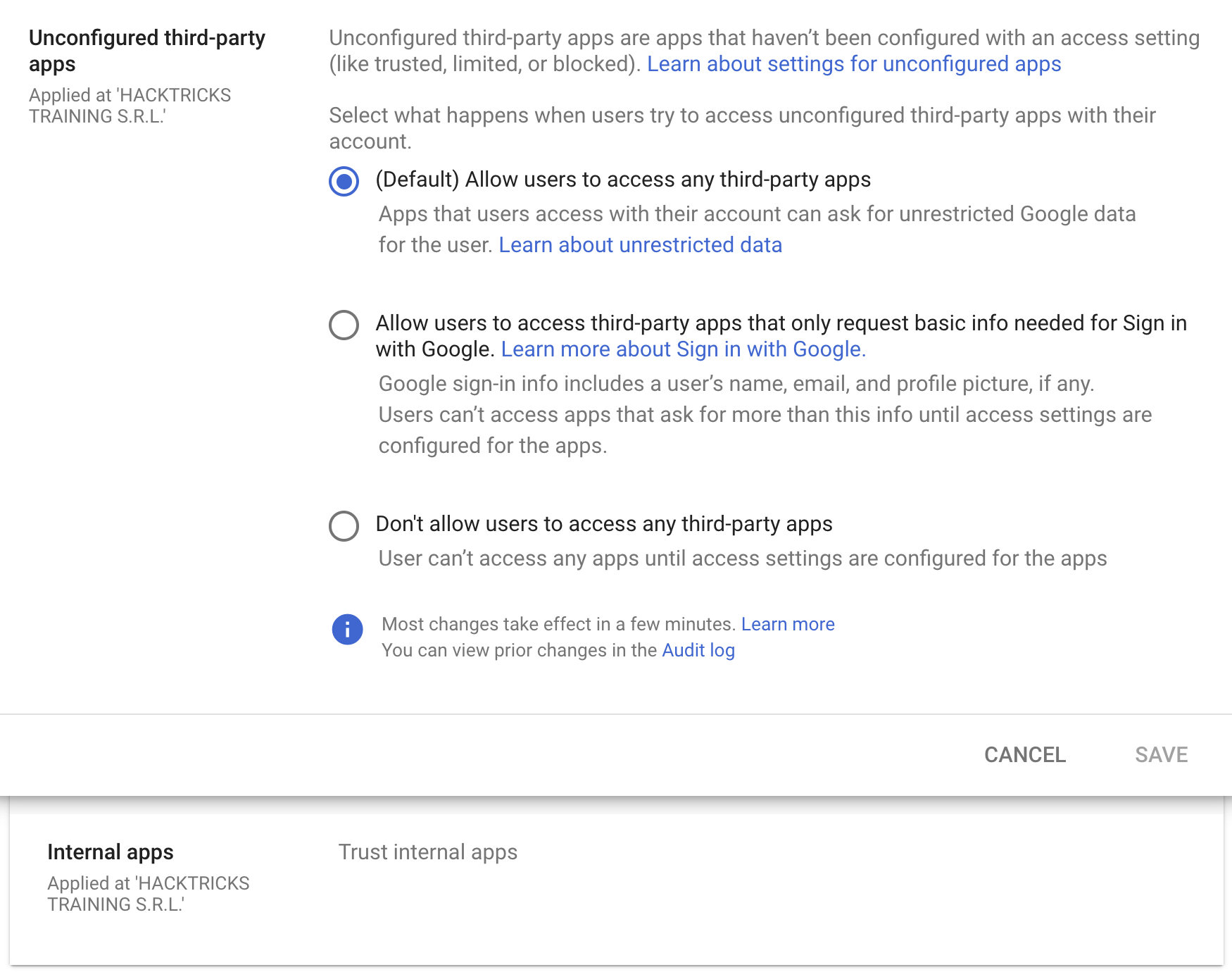
Par défaut, il est configuré que tout utilisateur d’une organisation Workspace peut accept any OAuth app with any permissions, mais il est possible de restreindre cela aux seules apps qui demandent uniquement les informations de base nécessaires pour Sign in with Google, ou de ne pas autoriser de third-party apps.
De plus, même en n’autorisant pas la confiance envers des third-party apps externes, il est possible d’autoriser la confiance envers n’importe quelle internal apps (apps créées au sein de l’organisation). Cette confiance est configurée par défaut.
OAuth Consent Grant Abuse: Detection & Response (Admin Reports)
Lorsqu’un utilisateur autorise une OAuth app, Google Workspace l’enregistre dans l’Admin Reports OAuth Token Audit Activity (application name token) avec events.name égal à authorize. Ces événements constituent la meilleure télémétrie pour détecter le consent phishing et suivre le client ID et les scopes qui ont été accordés.
Champs clés à extraire de l’événement d’audit :
id.time,id.customerIdactor.email,actor.profileIdipAddress,networkInfo.regionCode,networkInfo.subdivisionCodeevents[0]['parameters']values forclient_id,app_name,scope,scope_data
Commencez par une baseline (réduire le bruit) : constituez un inventaire des client IDs et des scopes existants, puis alertez sur les consents nouveaux/rares.
gam all users print tokens todrive
Idées de détection (new/rare app + risky scopes):
- Alerter si un
client_idn’est pas dans une allowlist approuvée et n’a pas été observé au cours des X derniers jours (par ex., 90). - Alerter si le
scopeaccordé inclut des scopes à haut risque ou rares, en particulier ceux qui permettent un accès en masse aux données ou un impact sur la chaîne d’approvisionnement, tels que: https://mail.google.com/https://www.googleapis.com/auth/gmail.readonlyhttps://www.googleapis.com/auth/drivehttps://www.googleapis.com/auth/drive.readonlyhttps://www.googleapis.com/auth/chat.messageshttps://www.googleapis.com/auth/chromewebstore
client_id NOT IN approved_client_ids
AND client_id NOT IN last_seen_90d
AND scope CONTAINS any(high_risk_scopes OR rare_scopes)
Réponse / confinement:
- Révoquer les tokens pour le OAuth client ID malveillant:
gam all users delete tokens clientId <client_id>
- Bloquer l’ID client OAuth dans l’Admin Console en révoquant l’accès de l’application aux données Google.
Pivots pour la chasse aux menaces :
- Lister les applications externes consenties par moins de N utilisateurs (adoption rare).
- Examiner le nom de l’application, l’éditeur, les permissions/scopes et l’ID d’application unique.
- Rechercher des applications dormantes qui utilisent soudainement des permissions risquées (actions secondaires possibles comme phishing interne ou vol de données).
Mesures d’atténuation :
- Restreindre tout accès aux applications tierces (approuvées uniquement par l’admin).
- Autoriser un accès limité afin que les utilisateurs ne puissent consentir qu’aux informations de profil basiques “Sign in with Google”.
Références
- https://www.youtube-nocookie.com/embed/6AsVUS79gLw - Matthew Bryant - Hacking G Suite: The Power of Dark Apps Script Magic
- https://www.youtube.com/watch?v=KTVHLolz6cE - Mike Felch and Beau Bullock - OK Google, How do I Red Team GSuite?
- https://redcanary.com/blog/threat-detection/google-workspace-oauth-attack/
- https://github.com/GAM-team/GAM
Tip
Apprenez & pratiquez AWS Hacking:
Apprenez & pratiquez GCP Hacking:
Apprenez & pratiquez Az Hacking:Soutenez HackTricks
- Consultez les subscription plans!
- Rejoignez le 💬 Discord group ou le telegram group ou suivez-nous sur Twitter 🐦 @hacktricks_live.
- Partagez des hacking tricks en soumettant des PRs aux HackTricks et HackTricks Cloud github repos.