 HackTricks Cloud
GWS - Google Platforms Phishing
Tip
सीखें और अभ्यास करें AWS Hacking:
HackTricks Training AWS Red Team Expert (ARTE)
सीखें और अभ्यास करें GCP Hacking:HackTricks Training GCP Red Team Expert (GRTE)
सीखें और अभ्यास करें Az Hacking:HackTricks Training Azure Red Team Expert (AzRTE)
HackTricks का समर्थन करें
- देखें subscription plans!
- शामिल हों 💬 Discord group या telegram group या हमें फ़ॉलो करें Twitter 🐦 @hacktricks_live.
- PRs सबमिट करके hacking tricks साझा करें HackTricks और HackTricks Cloud github repos.
Generic Phishing Methodology
Phishing Methodology - HackTricks
Google Groups Phishing
Apparently, by default, in workspace members can create groups and invite people to them. आप फिर उस ईमेल को संशोधित कर सकते हैं जो उपयोगकर्ता को भेजी जाएगी, कुछ links जोड़कर। वह ईमेल एक google address से आएगी, इसलिए यह legit लगेगी और लोग उस लिंक पर क्लिक कर सकते हैं।
यह भी संभव है कि FROM address को Google group email के रूप में सेट किया जाए ताकि समूह के अंदर के उपयोगकर्ताओं को और अधिक ईमेल भेजी जा सकें, जैसा कि नीचे की तस्वीर में जहाँ समूह google--support@googlegroups.com बनाया गया था और समूह के सभी सदस्यों को एक ईमेल भेजी गई थी (जो बिना किसी सहमति के जोड़े गए थे)
 (1).png)
Google Chat Phishing
You might be able to either start a chat with a person just having their email address or send an invitation to talk. Moreover, it’s possible to create a Space that can have any name (e.g. “Google Support”) and invite members to it. If they accept they might think that they are talking to Google Support:
.png)
Tip
मेरे परीक्षण में हालांकि आमंत्रित सदस्यों को invitation भी प्राप्त नहीं हुआ।
You can check how this worked in the past in: https://www.youtube.com/watch?v=KTVHLolz6cE&t=904s
Google Doc Phishing
In the past it was possible to create an apparently legitimate document and the in a comment mention some email (like @user@gmail.com). Google sent an email to that email address notifying that they were mentioned in the document.
Nowadays, this doesn’t work but if you give the victim email access to the document Google will send an email indicating so. This is the message that appears when you mention someone:
.png)
Tip
Victims के पास सुरक्षा तंत्र हो सकते हैं जो बाहरी दस्तावेज़ साझा किए जाने की सूचनाएँ उनके ईमेल तक नहीं पहुँचने देतीं।
Google Calendar Phishing
You can create a calendar event and add as many email address of the company you are attacking as you have. Schedule this calendar event in 5 or 15 min from the current time. Make the event look legit and put a comment and a title indicating that they need to read something (with the phishing link).
This is the alert that will appear in the browser with a meeting title “Firing People”, so you could set a more phishing like title (and even change the name associated with your email).
.png)
To make it look less suspicious:
- ऐसा सेट करें कि receivers अन्य आमंत्रित लोगों को नहीं देख सकें
- इवेंट के बारे में सूचित करने वाली ईमेल मत भेजें। फिर लोग केवल 5 मिनट में होने वाली मीटिंग की चेतावनी देखेंगे और यह कि उन्हें वह लिंक पढ़ना है।
- दिखाई देता है कि API का उपयोग करके आप सेट कर सकते हैं कि people ने इवेंट को True / accepted किया है और यहां तक कि उनकी ओर से comments भी बना सकते हैं।
App Scripts Redirect Phishing
It’s possible to create a script in https://script.google.com/ and expose it as a web application accessible by everyone that will use the legit domain script.google.com.
नीचे दिए गए जैसे कुछ code के साथ एक attacker उस script को इस पृष्ठ में arbitrary content लोड करने के लिए बना सकता है बिना domain तक पहुँचने को रोके:
function doGet() {
return HtmlService.createHtmlOutput(
'<meta http-equiv="refresh" content="0;url=https://cloud.hacktricks.wiki/en/pentesting-cloud/workspace-security/gws-google-platforms-phishing/index.html#app-scripts-redirect-phishing">'
).setXFrameOptionsMode(HtmlService.XFrameOptionsMode.ALLOWALL)
}
For example accessing https://script.google.com/macros/s/AKfycbwuLlzo0PUaT63G33MtE6TbGUNmTKXCK12o59RKC7WLkgBTyltaS3gYuH_ZscKQTJDC/exec you will see:
 (1).png)
Tip
ध्यान दें कि कंटेंट iframe के अंदर लोड होने पर एक चेतावनी दिखाई देगी।
App Scripts OAuth Phishing
यह संभव है कि दस्तावेज़ों से जुड़े App Scripts बनाकर पीड़ित के OAuth token तक पहुँच प्राप्त करने की कोशिश की जाए, अधिक जानकारी के लिए देखें:
OAuth Apps Phishing
Any of the previous techniques might be used to make the user access a Google OAuth application that will request the user some access. If the user trusts the source he might trust the application (even if it’s asking for high privileged permissions).
Note
ध्यान दें कि Google कई मामलों में एक खराब दिखने वाला prompt दिखाता है जो बताता है कि application untrusted है और Workspace admins यहाँ तक कि लोगों को OAuth applications स्वीकार करने से रोक भी सकते हैं।
Google ऐसे applications बनाने की अनुमति देता है जो कई Google services के साथ उपयोगकर्ताओं की ओर से इंटरैक्ट कर सकें: Gmail, Drive, GCP…
When creating an application to act on behalf other users, the developer needs to create an OAuth app inside GCP and indicate the scopes (permissions) the app needs to access the users data.
When a user wants to use that application, they will be prompted to accept that the application will have access to their data specified in the scopes.
This is a very juicy way to phish non-technical users into using applications that access sensitive information because they might not understand the consequences. However, in organizations accounts, there are ways to prevent this from happening.
Unverified App prompt
As it was mentioned, Google will always present a prompt to the user to accept the permissions they are giving the application on their behalf. However, if the application is considered dangerous, Google will show first a prompt indicating that it’s dangerous and making it more difficult for the user to grant the permissions to the app.
This prompt appears in apps that:
- कोई भी ऐसा scope उपयोग करते हैं जो private data (Gmail, Drive, GCP, BigQuery…) तक पहुँच सकता हो
- Apps with less than 100 users (apps > 100 a review process is also needed to stop showing the unverified prompt)
Interesting Scopes
Here पर आप सभी Google OAuth scopes की सूची पा सकते हैं।
- cloud-platform: अपने डेटा को Google Cloud Platform सेवाओं में देखें और प्रबंधित करें। आप GCP में उपयोगकर्ता की impersonate कर सकते हैं।
- admin.directory.user.readonly: अपने संगठन की GSuite directory देखें और डाउनलोड करें। सभी उपयोगकर्ताओं के नाम, फोन, calendar URLs प्राप्त करें।
Create an OAuth App
Start creating an OAuth Client ID
- Go to https://console.cloud.google.com/apis/credentials/oauthclient and click on configure the consent screen.
- Then, you will be asked if the user type is internal (only for people in your org) or external. Select the one that suits your needs
- Internal उपयोगी हो सकता है यदि आपने पहले से किसी organization के user को compromise कर लिया है और आप इस App को किसी और को phish करने के लिए बना रहे हैं।
- Give a name to the app, a support email (note that you can set a googlegroup email to try to anonymize yourself a bit more), a logo, authorized domains and another email for updates.
- Select the OAuth scopes.
- यह पृष्ठ non sensitive permissions, sensitive permissions और restricted permissions में विभाजित है। हर बार जब आप कोई नया permission जोड़ते हैं यह अपनी श्रेणी में जोड़ा जाता है। अनुरोधित permissions के आधार पर उपयोगकर्ता को अलग-अलग prompt दिखाई देंगे जो बताती हैं कि ये permissions कितनी संवेदनशील हैं।
- Both
admin.directory.user.readonlyandcloud-platformare sensitive permissions.
- Add the test users. As long as the status of the app is testing, only these users are going to be able to access the app so make sure to add the email you are going to be phishing.
Now let’s get credentials for a web application using the previously created OAuth Client ID:
- Go back to https://console.cloud.google.com/apis/credentials/oauthclient, a different option will appear this time.
- Select to create credentials for a Web application
- Set needed Javascript origins and redirect URIs
- You can set in both something like
http://localhost:8000/callbackfor testing
- Get your application credentials
Finally, lets run a web application that will use the OAuth application credentials. You can find an example in https://github.com/carlospolop/gcp_oauth_phishing_example.
git clone ttps://github.com/carlospolop/gcp_oauth_phishing_example
cd gcp_oauth_phishing_example
pip install flask requests google-auth-oauthlib
python3 app.py --client-id "<client_id>" --client-secret "<client_secret>"
http://localhost:8000 पर जाएँ, Login with Google बटन पर क्लिक करें, आपको इस जैसी एक संदेश दिखाई देगा:
.png)
Application दिखाएगा access and refresh token जिन्हें आसानी से इस्तेमाल किया जा सकता है। इन tokens को कैसे इस्तेमाल करना है, इसके बारे में अधिक जानकारी के लिए देखें:
Using glcoud
web console के बजाय glcoud का उपयोग करके कुछ किया जा सकता है, देखें:
GCP - ClientAuthConfig Privesc
OAuth app protections
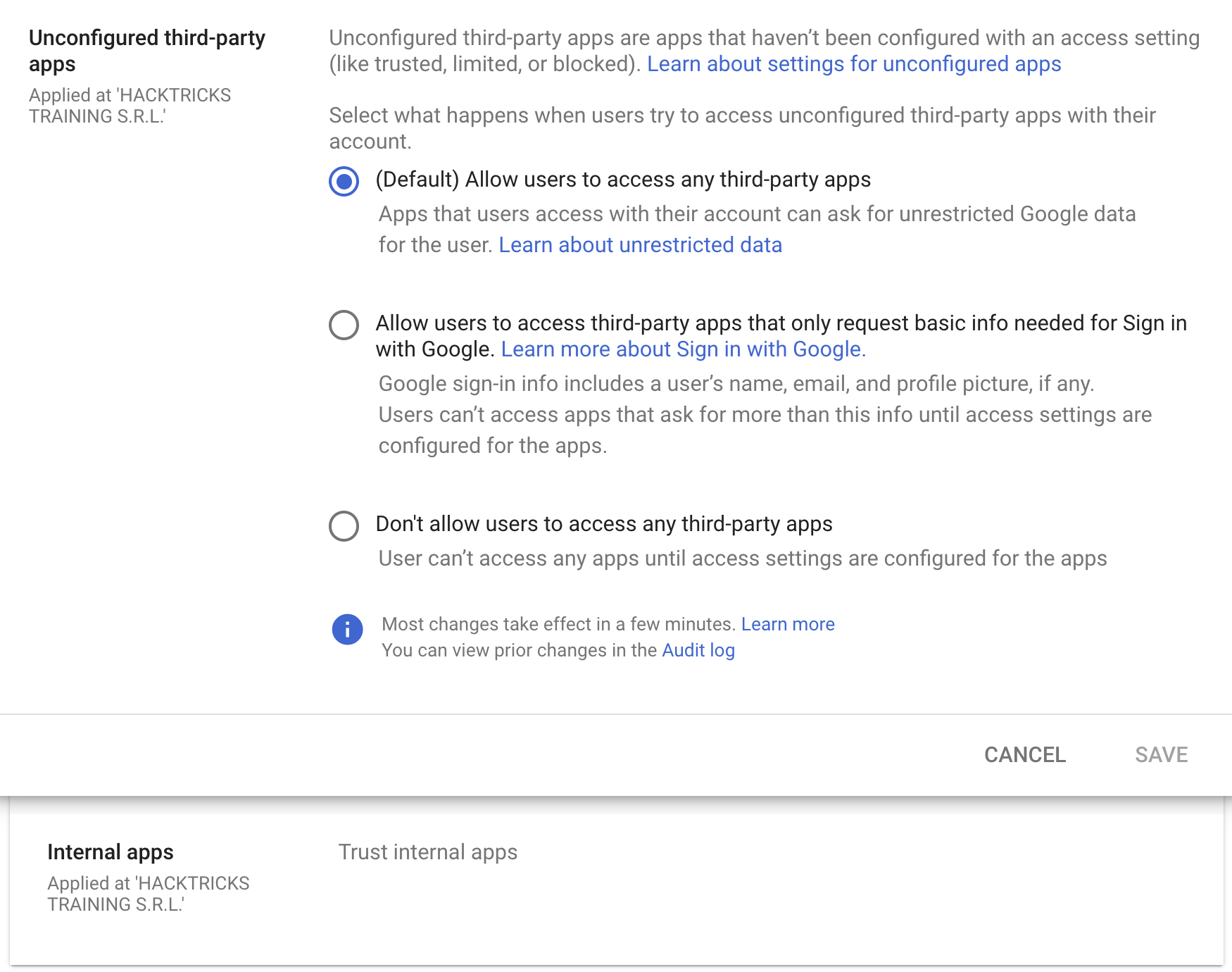
डिफ़ॉल्ट रूप से यह कॉन्फ़िगर किया गया है कि किसी भी Workspace संगठन के अंदर कोई भी user can accecpt any OAuth app with any permissions, पर इन्हें केवल उन apps तक सीमित करना संभव है जो Sign in with Google के लिए जरूरी basic info ही request करते हैं या किसी भी third-party apps को अनुमति न देना।
इसके अलावा, बाहरी third-party apps पर भरोसा न करने की अनुमति न देने के बावजूद, किसी भी internal apps (organization के अंदर बनाई गई apps) को trust any internal apps करने की अनुमति दी जा सकती है। यह trust default रूप से कॉन्फ़िगर होता है।
OAuth Consent Grant Abuse: Detection & Response (Admin Reports)
जब कोई user किसी OAuth app को authorize करता है, तो Google Workspace इसे Admin Reports OAuth Token Audit Activity (application name token) में रिकॉर्ड करता है, जहाँ events.name authorize पर सेट होता है। ये events consent phishing को detect करने और granted client ID और scopes को ट्रैक करने के लिए सबसे अच्छी telemetry हैं।
Audit event से extract करने वाले मुख्य fields:
id.time,id.customerIdactor.email,actor.profileIdipAddress,networkInfo.regionCode,networkInfo.subdivisionCodeevents[0]['parameters']values forclient_id,app_name,scope,scope_data
Baseline first (reduce noise): मौजूदा client IDs और scopes का inventory बनाएं, फिर नए/दुर्लभ consents पर alert करें।
gam all users print tokens todrive
डिटेक्शन विचार (new/rare app + risky scopes):
- अलर्ट अगर एक
client_idअनुमोदित allowlist में नहीं है और पिछले X दिनों में नहीं देखा गया है (उदा., 90). - अलर्ट अगर दिए गए
scopeमें उच्च-जोखिम या दुर्लभ scopes शामिल हैं, विशेषकर वे जो बड़े पैमाने पर डेटा एक्सेस या सप्लाई-चेन पर प्रभाव की अनुमति देते हैं, जैसे: https://mail.google.com/https://www.googleapis.com/auth/gmail.readonlyhttps://www.googleapis.com/auth/drivehttps://www.googleapis.com/auth/drive.readonlyhttps://www.googleapis.com/auth/chat.messageshttps://www.googleapis.com/auth/chromewebstore
client_id NOT IN approved_client_ids
AND client_id NOT IN last_seen_90d
AND scope CONTAINS any(high_risk_scopes OR rare_scopes)
प्रतिक्रिया / शमन:
- दुष्ट OAuth client ID के लिए tokens को रद्द करें:
gam all users delete tokens clientId <client_id>
- Admin Console में OAuth client ID को ब्लॉक करें — एप्लिकेशन की Google data तक पहुँच रद्द करके।
Threat hunting pivots:
- N से कम users द्वारा consent किए गए external apps की सूची बनाएं (दुर्लभ अपनाना)।
- app name, publisher, permissions/scopes, और unique application ID की समीक्षा करें।
- ऐसे dormant apps खोजें जो अचानक risky permissions का उपयोग करने लगे (संभावित follow-on actions जैसे internal phishing या data theft)।
Mitigations:
- सभी third-party app access को सीमित करें (केवल admin-approved)।
- सीमित access की अनुमति दें ताकि users केवल basic “Sign in with Google” profile info के लिए ही consent कर सकें।
संदर्भ
- https://www.youtube-nocookie.com/embed/6AsVUS79gLw - Matthew Bryant - Hacking G Suite: The Power of Dark Apps Script Magic
- https://www.youtube.com/watch?v=KTVHLolz6cE - Mike Felch and Beau Bullock - OK Google, How do I Red Team GSuite?
- https://redcanary.com/blog/threat-detection/google-workspace-oauth-attack/
- https://github.com/GAM-team/GAM
Tip
सीखें और अभ्यास करें AWS Hacking:
सीखें और अभ्यास करें GCP Hacking:
सीखें और अभ्यास करें Az Hacking:HackTricks का समर्थन करें
- देखें subscription plans!
- शामिल हों 💬 Discord group या telegram group या हमें फ़ॉलो करें Twitter 🐦 @hacktricks_live.
- PRs सबमिट करके hacking tricks साझा करें HackTricks और HackTricks Cloud github repos.