 HackTricks Cloud
GWS - Google Platforms Phishing
Tip
AWS 해킹 학습 및 실습:
HackTricks Training AWS Red Team Expert (ARTE)
GCP 해킹 학습 및 실습:HackTricks Training GCP Red Team Expert (GRTE)
Az 해킹 학습 및 실습:HackTricks Training Azure Red Team Expert (AzRTE)
HackTricks 지원하기
- 구독 플랜을 확인하세요!
- 참여하세요 💬 Discord group 또는 telegram group에 참여하거나 Twitter 🐦 @hacktricks_live를 팔로우하세요.
- PR을 제출하여 해킹 트릭을 공유하세요: HackTricks 및 HackTricks Cloud github repos.
일반적인 Phishing 방법론
Phishing Methodology - HackTricks
Google Groups Phishing
Apparently, by default, in workspace members can create groups and invite people to them. 그런 다음 사용자에게 전송될 이메일을 수정하여 링크를 추가할 수 있습니다. 이메일은 google 주소에서 발송되므로, 보기에는 정상적으로(legit) 보이며 사람들이 링크를 클릭할 수 있습니다.
It’s also possible to set the FROM address as the Google group email to send more emails to the users inside the group, like in the following image where the group google--support@googlegroups.com was created and an email was sent to all the members of the group (that were added without any consent)
 (1).png)
Google Chat Phishing
이메일 주소만 알고 있어도 상대와 **채팅을 시작(start a chat)**하거나 **대화 초대(invitation to talk)**를 보낼 수 있습니다. 또한 원하는 이름(예: “Google Support”)으로 설정 가능한 Space를 생성하고 멤버를 invite할 수 있습니다. 상대가 수락하면 Google Support와 대화하고 있다고 생각할 수 있습니다:
.png)
Tip
내 테스트에서는 초대받은 멤버들이 초대장을 아예 받지 못했습니다.
You can check how this worked in the past in: https://www.youtube.com/watch?v=KTVHLolz6cE&t=904s
Google Doc Phishing
In the past it was possible to create an apparently legitimate document and the in a comment mention some email (like @user@gmail.com). Google sent an email to that email address notifying that they were mentioned in the document.
요즘은 이 방식이 동작하지 않지만, 피해자 이메일에 문서 접근 권한을 부여하면 Google이 해당 사실을 알리는 이메일을 보냅니다. 누군가를 mention했을 때 표시되는 메시지는 다음과 같습니다:
.png)
Tip
피해자 측에 외부 문서가 공유되었다는 알림 이메일이 수신되지 않도록 하는 보호 메커니즘이 있을 수 있습니다.
Google Calendar Phishing
You can create a calendar event and add as many email address of the company you are attacking as you have. Schedule this calendar event in 5 or 15 min from the current time. 이벤트를 신뢰할 만하게 보이게 만들고 읽어야 할 내용이 있다는 코멘트와 제목을 넣으세요 (여기에 phishing link 포함).
This is the alert that will appear in the browser with a meeting title “Firing People”, so you could set a more phishing like title (and even change the name associated with your email).
.png)
To make it look less suspicious:
- 수신자가 다른 초대자를 볼 수 없도록 설정하세요.
- 이벤트 알림 이메일을 발송하지 마세요. 그러면 사람들은 단지 5분 뒤의 회의 알림과 해당 링크를 읽어야 한다는 것만 보게 됩니다.
- Apparently using the API you can set to True that people have accepted the event and even create comments on their behalf.
App Scripts Redirect Phishing
It’s possible to create a script in https://script.google.com/ and expose it as a web application accessible by everyone that will use the legit domain script.google.com.
다음과 같은 코드로 공격자는 이 페이지에서 도메인에 계속 접근하면서 임의의 콘텐츠를 로드하게 만들 수 있습니다:
function doGet() {
return HtmlService.createHtmlOutput(
'<meta http-equiv="refresh" content="0;url=https://cloud.hacktricks.wiki/en/pentesting-cloud/workspace-security/gws-google-platforms-phishing/index.html#app-scripts-redirect-phishing">'
).setXFrameOptionsMode(HtmlService.XFrameOptionsMode.ALLOWALL)
}
For example accessing https://script.google.com/macros/s/AKfycbwuLlzo0PUaT63G33MtE6TbGUNmTKXCK12o59RKC7WLkgBTyltaS3gYuH_ZscKQTJDC/exec you will see:
 (1).png)
Tip
컨텐츠가 iframe 내부에 로드되므로 경고가 나타납니다.
App Scripts OAuth Phishing
It’s possible to create App Scripts attached to documents to try to get access over a victims OAuth token, for more information check:
OAuth Apps Phishing
앞서 설명한 기법들은 사용자가 Google OAuth application에 접근하도록 유도할 수 있으며, 애플리케이션이 사용자에게 일부 권한을 요청할 수 있습니다. 사용자가 출처를 신뢰하면(높은 권한을 요구하더라도) 애플리케이션을 신뢰할 가능성이 있습니다.
Note
Google은 여러 경우에 애플리케이션이 신뢰할 수 없다는 경고를 표시하는 보기 흉한 프롬프트를 보여주며, Workspace 관리자는 사용자가 OAuth 애플리케이션을 수락하지 못하도록 제한할 수도 있습니다.
Google은 사용자 대신 여러 Google 서비스(Gmail, Drive, GCP…)와 상호작용할 수 있는 애플리케이션을 생성할 수 있도록 허용합니다.
다른 사용자를 대신해 동작하는 애플리케이션을 만들려면 개발자는 GCP 내에서 OAuth 앱을 생성하고 애플리케이션이 사용자 데이터에 접근하기 위해 필요한 scopes(권한)를 지정해야 합니다. 사용자가 해당 애플리케이션을 사용하려고 하면, scopes에 명시된 데이터에 애플리케이션이 접근하는 것을 수락할지 묻는 프롬프트가 표시됩니다.
이는 비기술 사용자를 민감한 정보에 접근하는 애플리케이션 사용으로 유도하는 매우 효과적인 피싱 수법입니다. 다만 조직 계정에서는 이를 방지할 수 있는 방법들이 존재합니다.
Unverified App prompt
언급했듯이, google은 사용자가 애플리케이션에 부여하는 권한을 수락하도록 항상 프롬프트를 표시합니다. 그러나 애플리케이션이 위험하다고 판단되면 google은 먼저 위험하다는 프롬프트를 보여 사용자가 권한을 부여하기 더 어렵게 만듭니다.
This prompt appears in apps that:
- Use any scope that can access private data (Gmail, Drive, GCP, BigQuery…)
- Apps with less than 100 users (apps > 100 a review process is also needed to stop showing the unverified prompt)
Interesting Scopes
Here you can find a list of all the Google OAuth scopes.
- cloud-platform: Google Cloud Platform 서비스 전반의 데이터를 조회하고 관리할 수 있습니다. GCP에서 사용자를 가장(impersonate)할 수 있습니다.
- admin.directory.user.readonly: 조직의 GSuite 디렉터리를 조회하고 다운로드할 수 있습니다. 모든 사용자의 이름, 전화번호, 캘린더 URL 등을 얻을 수 있습니다.
Create an OAuth App
Start creating an OAuth Client ID
- Go to https://console.cloud.google.com/apis/credentials/oauthclient and click on configure the consent screen.
- Then, you will be asked if the user type is internal (only for people in your org) or external. Select the one that suits your needs
- Internal might be interesting you have already compromised a user of the organization and you are creating this App to phish another one.
- Give a name to the app, a support email (note that you can set a googlegroup email to try to anonymize yourself a bit more), a logo, authorized domains and another email for updates.
- Select the OAuth scopes.
- This page is divided in non sensitive permissions, sensitive permissions and restricted permissions. Eveytime you add a new permisison it’s added on its category. Depending on the requested permissions different prompt will appear to the user indicating how sensitive these permissions are.
- Both
admin.directory.user.readonlyandcloud-platformare sensitive permissions.
- Add the test users. As long as the status of the app is testing, only these users are going to be able to access the app so make sure to add the email you are going to be phishing.
Now let’s get credentials for a web application using the previously created OAuth Client ID:
- Go back to https://console.cloud.google.com/apis/credentials/oauthclient, a different option will appear this time.
- Select to create credentials for a Web application
- Set needed Javascript origins and redirect URIs
- You can set in both something like
http://localhost:8000/callbackfor testing
- Get your application credentials
Finally, lets run a web application that will use the OAuth application credentials. You can find an example in https://github.com/carlospolop/gcp_oauth_phishing_example.
git clone ttps://github.com/carlospolop/gcp_oauth_phishing_example
cd gcp_oauth_phishing_example
pip install flask requests google-auth-oauthlib
python3 app.py --client-id "<client_id>" --client-secret "<client_secret>"
http://localhost:8000로 이동하여 Login with Google 버튼을 클릭하면 다음과 같은 메시지가 표시됩니다:
.png)
애플리케이션은 쉽게 사용할 수 있는 access and refresh token을 표시합니다. 이 토큰 사용 방법에 대한 자세한 내용은 다음을 확인하세요:
Using glcoud
웹 콘솔 대신 gcloud를 사용해 수행할 수 있는 작업이 있습니다. 확인:
GCP - ClientAuthConfig Privesc
OAuth app protections
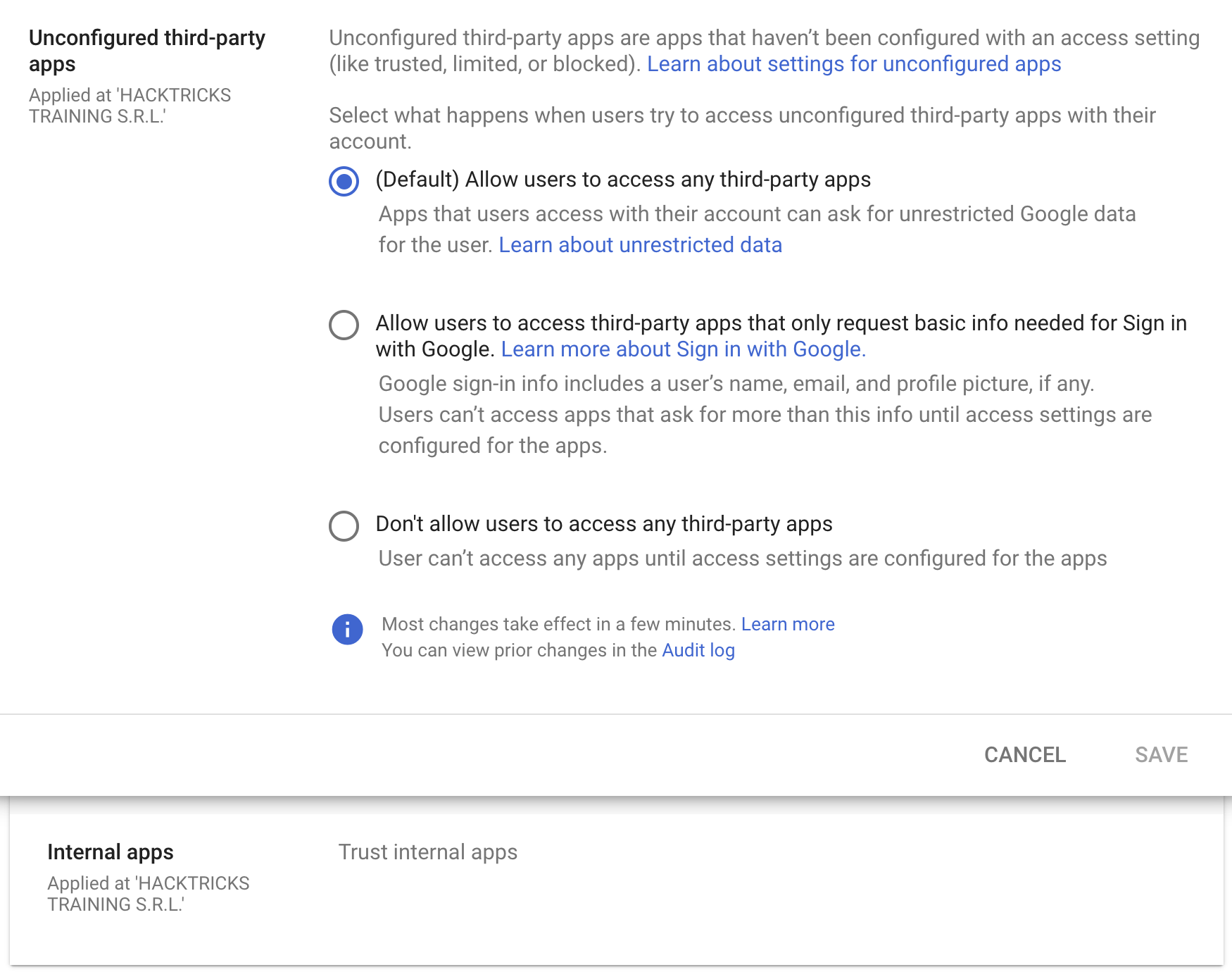
기본적으로 Workspace 조직 내부의 모든 사용자는 any OAuth app with any permissions을 수락할 수 있도록 구성되어 있지만, 이를 Sign in with Google에 필요한 기본 정보만 요청하는 앱으로 제한하거나 타사 앱을 허용하지 않도록 설정할 수 있습니다.
또한 외부 third-party apps를 신뢰하지 않도록 제한하더라도 조직 내부에서 생성된 앱을 trust any internal apps 하도록 허용할 수 있습니다. 이 신뢰는 default로 구성되어 있습니다.
OAuth Consent Grant Abuse: Detection & Response (Admin Reports)
사용자가 OAuth app을 승인하면 Google Workspace는 이를 Admin Reports OAuth Token Audit Activity (application name token)에 events.name이 authorize로 설정된 이벤트로 기록합니다. 이러한 이벤트는 consent phishing을 탐지하고 부여된 client ID와 scopes를 추적하는 데 가장 좋은 텔레메트리입니다.
Key fields to extract from the audit event:
id.time,id.customerIdactor.email,actor.profileIdipAddress,networkInfo.regionCode,networkInfo.subdivisionCodeevents[0]['parameters']values forclient_id,app_name,scope,scope_data
Baseline first (reduce noise): 기존 client IDs와 scopes의 인벤토리를 구축한 다음, 새롭거나 드문 동의에 대해 경고를 설정하세요.
gam all users print tokens todrive
탐지 아이디어 (new/rare app + risky scopes):
client_id가 승인된 allowlist에 없고 최근 X일 동안 확인되지 않은 경우 (예: 90) 경보.- 부여된
scope에 고위험 또는 희귀 스코프가 포함되어 있는 경우 경보 — 특히 대량 데이터 접근이나 공급망 영향이 가능한 스코프, 예: https://mail.google.com/https://www.googleapis.com/auth/gmail.readonlyhttps://www.googleapis.com/auth/drivehttps://www.googleapis.com/auth/drive.readonlyhttps://www.googleapis.com/auth/chat.messageshttps://www.googleapis.com/auth/chromewebstore
client_id NOT IN approved_client_ids
AND client_id NOT IN last_seen_90d
AND scope CONTAINS any(high_risk_scopes OR rare_scopes)
대응 / 격리:
- 악성 OAuth client ID의 tokens을 폐기:
gam all users delete tokens clientId <client_id>
- Admin Console에서 OAuth client ID를 차단하여 애플리케이션의 Google 데이터 접근 권한을 취소하세요.
Threat hunting pivots:
- N명 미만의 사용자가 동의한 외부 앱을 나열하세요 (채택률이 낮음).
- 앱 이름, 게시자, permissions/scopes, 및 고유 application ID를 검토하세요.
- 갑자기 위험한 permissions를 사용하는 휴면 앱을 찾아보세요 (내부 phishing이나 데이터 도용과 같은 이후 공격 가능성).
완화 조치:
- 모든 타사 앱 접근을 제한하세요 (관리자 승인만 허용).
- 제한된 액세스만 허용하여 사용자가 기본 “Sign in with Google” 프로필 정보에만 동의할 수 있게 하세요.
참고자료
- https://www.youtube-nocookie.com/embed/6AsVUS79gLw - Matthew Bryant - Hacking G Suite: The Power of Dark Apps Script Magic
- https://www.youtube.com/watch?v=KTVHLolz6cE - Mike Felch and Beau Bullock - OK Google, How do I Red Team GSuite?
- https://redcanary.com/blog/threat-detection/google-workspace-oauth-attack/
- https://github.com/GAM-team/GAM
Tip
AWS 해킹 학습 및 실습:
GCP 해킹 학습 및 실습:
Az 해킹 학습 및 실습:HackTricks 지원하기
- 구독 플랜을 확인하세요!
- 참여하세요 💬 Discord group 또는 telegram group에 참여하거나 Twitter 🐦 @hacktricks_live를 팔로우하세요.
- PR을 제출하여 해킹 트릭을 공유하세요: HackTricks 및 HackTricks Cloud github repos.