 HackTricks Cloud
Az Static Web Apps
Tip
学习并练习 AWS Hacking:
HackTricks Training AWS Red Team Expert (ARTE)
学习并练习 GCP Hacking:HackTricks Training GCP Red Team Expert (GRTE)
学习并练习 Az Hacking:HackTricks Training Azure Red Team Expert (AzRTE)
支持 HackTricks
- 查看 subscription plans!
- 加入 💬 Discord group 或者 telegram group 或 关注 我们的 Twitter 🐦 @hacktricks_live.
- 通过向 HackTricks 和 HackTricks Cloud github 仓库 提交 PRs 来分享 hacking tricks。
Static Web Apps 基本信息
Azure Static Web Apps 是一个云服务,用于托管 来自 GitHub 等代码库的静态 web 应用,并提供自动 CI/CD。它提供全球内容交付、无服务器后端和内置 HTTPS,使其安全且可扩展。然而,即使该服务被称为“静态”,也并不意味着它完全安全。风险包括配置错误的 CORS、不充分的身份验证和内容篡改,如果管理不当,可能会使应用面临 XSS 和数据泄露等攻击。
部署身份验证
Tip
创建静态应用时,可以在 部署授权策略 中选择 部署令牌 和 GitHub Actions 工作流。
- 部署令牌:生成一个令牌,用于验证部署过程。任何拥有 此令牌的人都足以部署应用的新版本。每当代码库更新时,Github Action 会自动在代码库中部署,并将令牌存储在一个秘密中以部署应用的新版本。
- GitHub Actions 工作流:在这种情况下,代码库中也会部署一个非常相似的 Github Action,令牌也存储在一个秘密中。然而,这个 Github Action 有一个不同之处,它使用
actions/github-script@v6动作来获取代码库的 IDToken 并用它来部署应用。 - 即使在这两种情况下,动作
Azure/static-web-apps-deploy@v1都是使用azure_static_web_apps_api_token参数中的令牌,但在第二种情况下,格式有效的随机令牌如12345cbb198a77a092ff885781a62a15d51ef5e3654ca11234509ab54547270704-4140ccee-e04f-424f-b4ca-3d4dd123459c00f0702071d12345就足以部署应用,因为授权是通过github_id_token参数中的 IDToken 完成的。
Web 应用基本身份验证
可以 配置密码 来访问 Web 应用。Web 控制台允许配置它以保护仅暂存环境或暂存和生产环境。
这就是在撰写时密码保护的 web 应用的样子:
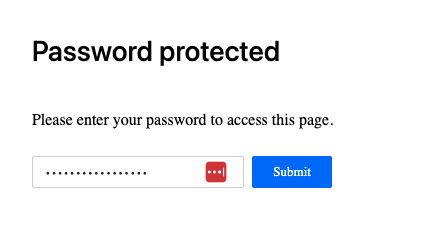
可以查看 是否使用了任何密码 以及哪些环境受到保护:
az rest --method GET \
--url "/subscriptions/<subscription-id>/resourceGroups/Resource_Group_1/providers/Microsoft.Web/staticSites/<app-name>/config/basicAuth?api-version=2024-04-01"
然而,这 不会以明文显示密码,而是类似于:"password": "**********************"。
路由和角色
路由定义了 如何处理传入的 HTTP 请求 在静态 web 应用程序中。配置在 staticwebapp.config.json 文件中,它们控制 URL 重写、重定向、访问限制和基于角色的授权,确保资源的正确处理和安全性。
一些示例:
{
"routes": [
{
"route": "/",
"rewrite": "/index.html"
},
{
"route": "/about",
"rewrite": "/about.html"
},
{
"route": "/api/*",
"allowedRoles": ["authenticated"]
},
{
"route": "/admin",
"redirect": "/login",
"statusCode": 302
},
{
"route": "/google",
"redirect": "https://google.com",
"statusCode": 307
}
],
"navigationFallback": {
"rewrite": "/index.html",
"exclude": ["/api/*", "/assets/*"]
}
}
注意如何可以通过角色保护路径,然后,用户需要对应用进行身份验证并被授予该角色才能访问该路径。还可以创建邀请,授予特定用户通过 EntraID、Facebook、GitHub、Google、Twitter 登录的特定角色,这可能对在应用内提升权限很有用。
Tip
请注意,可以配置应用,使得对
staticwebapp.config.json文件的更改不被接受。在这种情况下,仅仅从 Github 更改文件可能不够,还需要在应用中更改设置。
暂存 URL 的格式为:https://<app-subdomain>-<PR-num>.<region>.<res-of-app-domain>,例如:https://ambitious-plant-0f764e00f-2.eastus2.4.azurestaticapps.net
代码片段
可以在静态 Web 应用中存储 HTML 代码片段,这些片段将在应用内加载。这可以用于注入恶意代码到应用中,例如窃取凭据的 JS 代码、键盘记录器… 更多信息请参见权限提升部分。
托管身份
Azure 静态 Web 应用可以配置为使用托管身份,然而,如在this FAQ中提到的,它们仅支持从 Azure Key Vault 提取用于身份验证的机密,而不支持访问其他 Azure 资源。
有关更多信息,您可以在 https://learn.microsoft.com/en-us/azure/static-web-apps/key-vault-secrets 中找到 Azure 指南,了解如何在静态应用中使用保管库机密。
枚举
# List Static Webapps
az staticwebapp list --output table

# Get Static Webapp details
az staticwebapp show --name <name> --resource-group <res-group> --output table

# Get appsettings
az staticwebapp appsettings list --name <name>

# Get env information
az staticwebapp environment list --name <name>
az staticwebapp environment functions --name <name>

# Get API key
az staticwebapp secrets list --name <name>

# Get invited users
az staticwebapp users list --name <name>

# Get current snippets
az rest --method GET \
--url "https://management.azure.com/subscriptions/<subscription-id>/resourceGroups/<res-group>/providers/Microsoft.Web/staticSites/trainingdemo/snippets?api-version=2022-03-01"

# Get database connections
az rest --method GET \
--url "https://management.azure.com/subscriptions/<subscription-id>/resourceGroups/<res-group>/providers/Microsoft.Web/staticSites/<app-name>/databaseConnections?api-version=2021-03-01"

## Once you have the database connection name ("default" by default) you can get the connection string with the credentials
az rest --method POST \
--url "https://management.azure.com/subscriptions/<subscription-id>/resourceGroups/<res-group>/providers/Microsoft.Web/staticSites/<app-name>/databaseConnections/default/show?api-version=2021-03-01"

# Check connected backends
az staticwebapp backends show --name <name> --resource-group <res-group>
生成 Web 应用的示例
您可以在以下链接找到生成 Web 应用的一个不错示例:https://learn.microsoft.com/en-us/azure/static-web-apps/get-started-portal?tabs=react&pivots=github
- 将仓库 https://github.com/staticwebdev/react-basic/generate 叉接到您的 GitHub 账户,并命名为
my-first-static-web-app - 在 Azure 门户中创建一个静态 Web 应用,配置 GitHub 访问并选择之前叉接的新仓库
- 创建它,等待几分钟,然后检查您的新页面!
权限提升和后期利用
有关 Azure 静态 Web 应用中权限提升和后期利用的所有信息可以在以下链接找到:
参考
- https://learn.microsoft.com/en-in/azure/app-service/overview
- https://learn.microsoft.com/en-us/azure/app-service/overview-hosting-plans
Tip
学习并练习 AWS Hacking:
学习并练习 GCP Hacking:
学习并练习 Az Hacking:支持 HackTricks
- 查看 subscription plans!
- 加入 💬 Discord group 或者 telegram group 或 关注 我们的 Twitter 🐦 @hacktricks_live.
- 通过向 HackTricks 和 HackTricks Cloud github 仓库 提交 PRs 来分享 hacking tricks。