 HackTricks Cloud
GWS - Google Platforms Phishing
Tip
学习并练习 AWS Hacking:
HackTricks Training AWS Red Team Expert (ARTE)
学习并练习 GCP Hacking:HackTricks Training GCP Red Team Expert (GRTE)
学习并练习 Az Hacking:HackTricks Training Azure Red Team Expert (AzRTE)
支持 HackTricks
- 查看 subscription plans!
- 加入 💬 Discord group 或者 telegram group 或 关注 我们的 Twitter 🐦 @hacktricks_live.
- 通过向 HackTricks 和 HackTricks Cloud github 仓库 提交 PRs 来分享 hacking tricks。
Generic Phishing Methodology
Phishing Methodology - HackTricks
Google Groups Phishing
显然,默认情况下,在 workspace 中,成员可以创建 groups 并邀请他人加入。你可以修改将发送给用户的电子邮件,添加一些链接。该邮件会来自一个 google 地址,因此看起来可信(legit),人们可能会点击该链接。
还可以将 FROM 地址设置为 Google group email,以向组内的用户发送更多邮件。比如下面的图片中创建了组 google--support@googlegroups.com,并向组的所有成员发送了一封邮件(这些成员是在未经同意的情况下被添加的)。
 (1).png)
Google Chat Phishing
你可能只凭对方的邮箱地址就能start a chat 或发送一个invitation to talk。此外,还可以create a Space,该 Space 可以使用任何名称(例如 “Google Support”),并邀请成员加入。如果他们接受,可能会认为自己正在与 Google Support 对话:
.png)
Tip
不过在我的测试中,被邀请的成员甚至没有收到邀请。
你可以查看过去这是如何运作的: https://www.youtube.com/watch?v=KTVHLolz6cE&t=904s
Google Doc Phishing
过去可以创建一个看似合法的文档,然后在评论中提到某个邮箱(例如 @user@gmail.com)。Google 会向该邮箱发送邮件,通知他们在文档中被提及。
如今,这种方法已不起作用,但如果你授予受害者邮箱对该文档的访问权限,Google 会发送相应的邮件。下面是提及某人时显示的消息:
.png)
Tip
受害者可能有保护机制,阻止有关外部文档与他们共享的邮件送达其收件箱。
Google Calendar Phishing
你可以create a calendar event,并将你能获取到的目标公司尽可能多的邮箱地址加入其中。将该 calendar event 安排在距离当前时间 5 或 15 分钟 之后。让活动看起来可信,并在评论和标题中写明他们需要阅读某些内容(包含 phishing link)。
这是在浏览器中出现的提醒,会议标题为 “Firing People”,因此你可以设置一个更具钓鱼性质的标题(甚至更改与你的电子邮件关联的姓名)。
.png)
To make it look less suspicious:
- 设置为接收者无法看到其他受邀人员
- 不要发送有关活动的通知邮件。这样,人们只会看到距离 5 分钟的会议提醒以及需要阅读该链接的提示。
- 显然通过 API 可以将 people 的 accepted 状态设置为 True,甚至可以代表他们创建评论。
App Scripts Redirect Phishing
可以在 https://script.google.com/ 创建脚本,并将其公开为对所有人可访问的 web application,这样会使用合法域名 script.google.com。
使用类似下面的代码,攻击者可以让该脚本在不离开该域的情况下加载任意内容:
function doGet() {
return HtmlService.createHtmlOutput(
'<meta http-equiv="refresh" content="0;url=https://cloud.hacktricks.wiki/en/pentesting-cloud/workspace-security/gws-google-platforms-phishing/index.html#app-scripts-redirect-phishing">'
).setXFrameOptionsMode(HtmlService.XFrameOptionsMode.ALLOWALL)
}
For example accessing https://script.google.com/macros/s/AKfycbwuLlzo0PUaT63G33MtE6TbGUNmTKXCK12o59RKC7WLkgBTyltaS3gYuH_ZscKQTJDC/exec you will see:
 (1).png)
Tip
注意,在内容被加载到 iframe 内时会出现警告。
App Scripts OAuth Phishing
可以创建附加到文档的 App Scripts,尝试获取受害者的 OAuth 令牌,更多信息请参见:
OAuth Apps Phishing
前述任一技术都可能被用来让用户访问一个 Google OAuth application,该应用会请求用户的一些访问。如果用户信任该来源,他可能会信任该应用(即使它请求高权限)。
Note
注意,Google 在多种情况下会显示一个丑陋的提示,警告该应用不受信任,Workspace 管理员甚至可以阻止用户接受 OAuth 应用。
Google 允许创建可以代表用户与多个 Google 服务交互的应用:Gmail、Drive、GCP…
当为代表其他用户操作创建一个应用时,开发者需要在 GCP 中创建一个 OAuth app 并指明该应用访问用户数据所需的 scopes(权限)。当一个用户想要使用该应用时,会被提示去接受该应用将对 scopes 中指定的数据的访问。
这是一个非常有效的方式去phish非技术用户,使他们使用访问敏感信息的应用,因为他们可能不理解后果。不过,在组织账号中,有方法可以防止这种情况发生。
Unverified App prompt
如前所述,Google 会始终向用户显示一个提示,要求他们接受以代表他们授予应用的权限。但是,如果该应用被视为危险,Google 会先显示一个提示,说明它是危险的并使用户更难向该应用授予权限。
This prompt appears in apps that:
- Use any scope that can access private data (Gmail, Drive, GCP, BigQuery…)
- Apps with less than 100 users (apps > 100 a review process is also needed to stop showing the unverified prompt)
Interesting Scopes
Here you can find a list of all the Google OAuth scopes.
- cloud-platform: 查看和管理您在 Google Cloud Platform 服务中的数据。你可以在 GCP 中冒充该用户。
- admin.directory.user.readonly: 查看并下载你组织的 GSuite 目录。获取所有用户的姓名、电话、日历 URL。
Create an OAuth App
Start creating an OAuth Client ID
- Go to https://console.cloud.google.com/apis/credentials/oauthclient and click on configure the consent screen.
- Then, you will be asked if the user type is internal (only for people in your org) or external. Select the one that suits your needs
- Internal might be interesting you have already compromised a user of the organization and you are creating this App to phish another one.
- Give a name to the app, a support email (note that you can set a googlegroup email to try to anonymize yourself a bit more), a logo, authorized domains and another email for updates.
- Select the OAuth scopes.
- This page is divided in non sensitive permissions, sensitive permissions and restricted permissions. Eveytime you add a new permisison it’s added on its category. Depending on the requested permissions different prompt will appear to the user indicating how sensitive these permissions are.
- Both
admin.directory.user.readonlyandcloud-platformare sensitive permissions.
- Add the test users. As long as the status of the app is testing, only these users are going to be able to access the app so make sure to add the email you are going to be phishing.
Now let’s get credentials for a web application using the previously created OAuth Client ID:
- Go back to https://console.cloud.google.com/apis/credentials/oauthclient, a different option will appear this time.
- Select to create credentials for a Web application
- Set needed Javascript origins and redirect URIs
- You can set in both something like
http://localhost:8000/callbackfor testing
- Get your application credentials
Finally, lets run a web application that will use the OAuth application credentials. You can find an example in https://github.com/carlospolop/gcp_oauth_phishing_example.
git clone ttps://github.com/carlospolop/gcp_oauth_phishing_example
cd gcp_oauth_phishing_example
pip install flask requests google-auth-oauthlib
python3 app.py --client-id "<client_id>" --client-secret "<client_secret>"
前往 http://localhost:8000,点击 Login with Google 按钮,你会看到像这样的一条提示:
.png)
应用会显示可以被轻易使用的访问和刷新令牌。更多关于如何使用这些令牌的信息请查看:
使用 glcoud
也可以使用 gcloud 而不是 web 控制台来完成某些操作,参见:
GCP - ClientAuthConfig Privesc
OAuth app protections
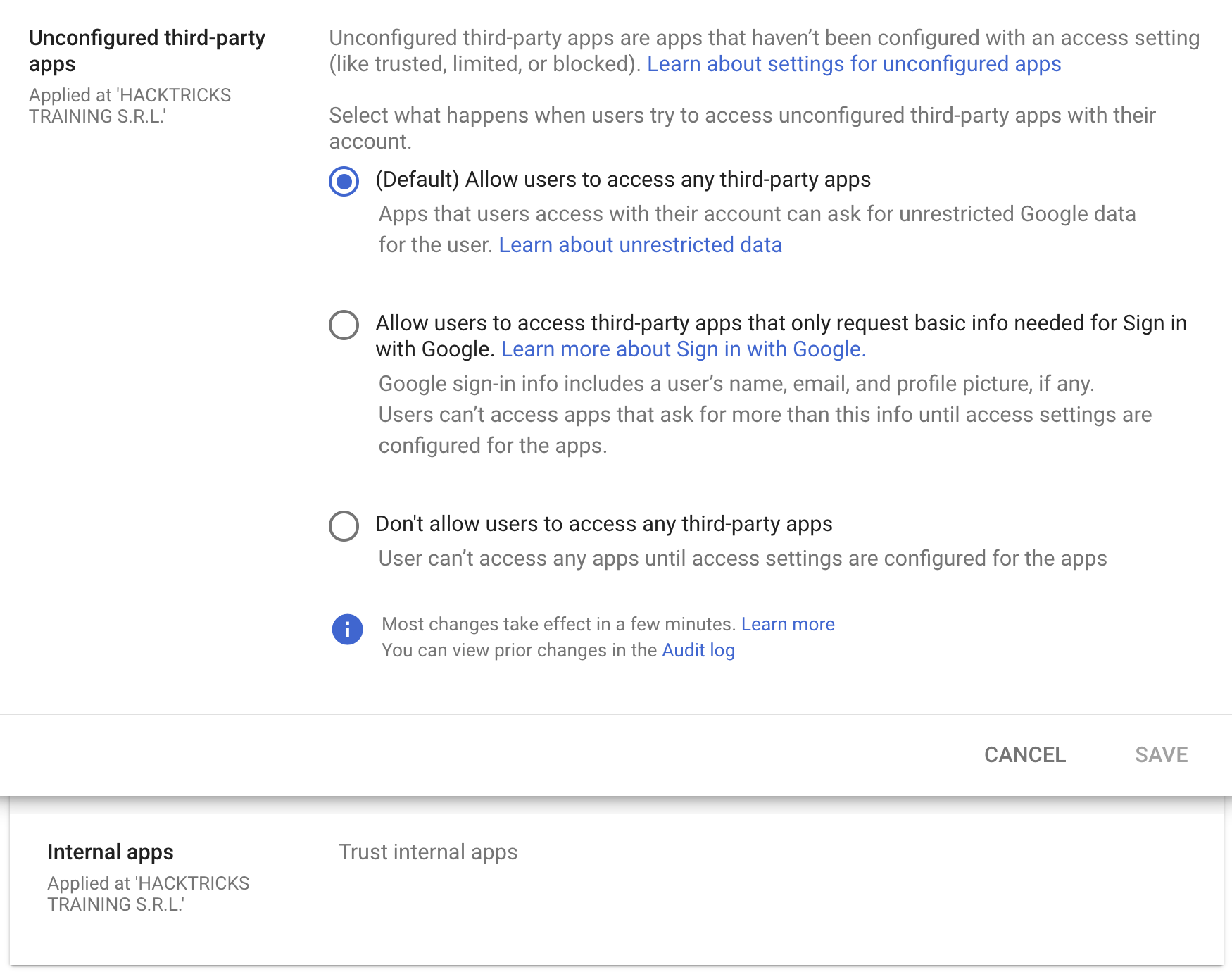
默认配置下,Workspace 组织内的任何用户可以接受任何具有任意权限的 OAuth 应用,但可以将这些限制为仅允许那些仅请求 Sign in with Google 所需基本信息的应用,或不允许任何第三方应用。
此外,即使不允许信任外部第三方应用,仍然可以允许信任任何内部应用(即在组织内部创建的应用)。这种信任是默认配置的。
OAuth Consent Grant Abuse: Detection & Response (Admin Reports)
当用户授权一个 OAuth 应用时,Google Workspace 会在 Admin Reports OAuth Token Audit Activity(application name token)中记录该操作,events.name 被设置为 authorize。这些事件是检测 consent phishing 并跟踪被授予的 client ID 和 scopes 的最佳遥测数据来源。
Key fields to extract from the audit event:
id.time,id.customerIdactor.email,actor.profileIdipAddress,networkInfo.regionCode,networkInfo.subdivisionCodeevents[0]['parameters']values forclient_id,app_name,scope,scope_data
先建立基线(减少噪音): 构建现有 client IDs 和 scopes 的清单,然后对新的/罕见的同意发出警报。
gam all users print tokens todrive
检测思路(新/罕见 应用 + 风险 作用域):
- 如果
client_id不在已批准的允许列表中 且 在过去 X 天内未见(例如 90),则发出警报。 - 如果授予的
scope包含 高风险或罕见 的作用域,尤其是那些允许批量数据访问或影响供应链的,例如: https://mail.google.com/https://www.googleapis.com/auth/gmail.readonlyhttps://www.googleapis.com/auth/drivehttps://www.googleapis.com/auth/drive.readonlyhttps://www.googleapis.com/auth/chat.messageshttps://www.googleapis.com/auth/chromewebstore
client_id NOT IN approved_client_ids
AND client_id NOT IN last_seen_90d
AND scope CONTAINS any(high_risk_scopes OR rare_scopes)
响应 / 隔离:
- 撤销恶意 OAuth client ID 的 tokens:
gam all users delete tokens clientId <client_id>
- 在 Admin Console 中阻止该 OAuth client ID,方法是撤销该应用对 Google 数据的访问。
威胁狩猎枢纽:
- 列出被少于 N 名用户授权的外部应用(采纳率低)。
- 审查应用名称、发布者、权限/范围、以及唯一的 application ID。
- 查找那些原本休眠但突然使用高风险权限的应用(可能的后续行动包括内部钓鱼或数据盗窃)。
缓解措施:
- 限制所有第三方应用访问(仅限管理员批准)。
- 允许有限访问,使用户只能同意获取基本的 “Sign in with Google” 个人资料信息。
References
- https://www.youtube-nocookie.com/embed/6AsVUS79gLw - Matthew Bryant - Hacking G Suite: The Power of Dark Apps Script Magic
- https://www.youtube.com/watch?v=KTVHLolz6cE - Mike Felch and Beau Bullock - OK Google, How do I Red Team GSuite?
- https://redcanary.com/blog/threat-detection/google-workspace-oauth-attack/
- https://github.com/GAM-team/GAM
Tip
学习并练习 AWS Hacking:
学习并练习 GCP Hacking:
学习并练习 Az Hacking:支持 HackTricks
- 查看 subscription plans!
- 加入 💬 Discord group 或者 telegram group 或 关注 我们的 Twitter 🐦 @hacktricks_live.
- 通过向 HackTricks 和 HackTricks Cloud github 仓库 提交 PRs 来分享 hacking tricks。